Sharing a Spotify playlist isn't just about passing along a link—it's about connecting with people through the powerful, universal language of music. The absolute best way to share a Spotify playlist is to embed it right where your audience lives, like on a Taap.bio page. This lets visitors press play and listen immediately, all without ever leaving your page. It transforms a simple link into a full-blown interactive experience.
Table of contents
Why Sharing Your Spotify Playlist Is a Superpower
Let's be honest. With trillions of songs being streamed, just making a great playlist isn't quite enough. You need to get it in front of people who will actually listen. This guide is about moving past the basic "share" button and turning your knack for curation into a serious tool for building your brand and your community.
Think about it this way: one perfectly placed share can set off a chain reaction. For creators, business owners, and passionate music lovers, a playlist is a piece of content. It says more about your vibe, your brand, and your personality than a long bio ever could.
Build Your Personal Brand Through Music
Every single track you add to a playlist tells a small part of your story. Are you the go-to person for chill lofi beats to study to? Or do you put together killer high-energy workout anthems? Sharing these collections carves out your identity and establishes you as a tastemaker in your corner of the internet. It’s one of the most authentic ways to connect with your audience on an emotional level.
Your playlists are a direct sonic reflection of your brand's personality. A well-curated and consistently shared playlist can become a signature part of your online identity, making you unforgettable to your followers.
Create a Thriving Community
Music has always brought people together. When you share a Spotify playlist, you're not just broadcasting—you're inviting people into a shared experience. This simple act builds a sense of belonging and can turn passive followers into a genuinely engaged community. People bond over music, and your playlists can be the spark that gets those conversations started.
- Spark Conversations: A new playlist drop is the perfect excuse for your followers to start chatting.
- Encourage Collaboration: Invite your audience to contribute to a collaborative playlist to give them a real sense of ownership.
- Gather Feedback: Ask your community what songs they’re loving right now and make them part of the creation process.
This kind of interaction is exactly what builds a loyal following. You can dive deeper into these strategies in our guide on how to increase social media engagement.
In this guide, we're going to treat your link-in-bio page as the main stage for your musical identity. We'll lay the groundwork for using powerful tools like Taap.bio, which lets you feature your playlists with interactive widgets, turning a boring link into an awesome listening party.
Getting Your Playlists Heard: A Guide to Spotify’s Sharing Tools
Before you can build a massive following around your playlists, you need to get comfortable with the tools Spotify gives you right inside the app. Think of these as your foundational moves. Mastering them means you can get your music in front of people quickly, no matter where they are.
The simplest way to share is by grabbing the playlist link. It’s a classic for a reason. On your phone or computer, just pop open your playlist, hit the three-dot menu (…), and find the "Share" option. From there, you can "Copy Link." This gives you a universal URL that you can drop anywhere—a text message, an email, or your social media bio. It’s the quickest way to say, "Here, listen to this."
Going Beyond the Basic Link with Social Sharing
But let's be honest, a plain link is pretty boring. When you share directly to your social media channels, Spotify creates a much more engaging experience for your audience.
Take Instagram Stories, for example. When you share a Spotify playlist there, it doesn't just post a link. It creates a slick, clickable sticker with your playlist's cover art and—this is the best part—a 15-second audio preview. People get an instant taste of the vibe you’ve curated, which is way more powerful than just reading a title.
This richer experience works across most major platforms:
- Facebook & Messenger: Sharing to your Feed or Story generates a nice visual card that also plays a preview and links straight back to the playlist.
- X (formerly Twitter): A player card gets embedded right in your tweet. Your followers can see the playlist details and cover art without ever leaving their timeline.
- WhatsApp Status: This is a great one for your inner circle. It posts a clean visual card to your status that your friends can tap to open directly in Spotify.
Think strategically about this. Dropping your "Morning Motivation" playlist on your Instagram Story at 7 AM just hits different. Sharing a deep-focus electronic playlist on X mid-afternoon might catch people looking to power through their workday. It’s all about context.
To help you decide which method to use and when, here’s a quick breakdown of the most common sharing options available directly within the Spotify app.
Spotify Sharing Methods at a Glance
| Sharing Method | Platform | Best For | User Experience |
|---|---|---|---|
| Copy Link | Any | Universal sharing in DMs, emails, bios | Basic; requires user to click a plain URL |
| Instagram Story | Maximum engagement, quick discovery | High; visual sticker with a 15-sec audio preview | |
| Facebook Post/Story | Reaching a broad audience, community groups | Good; visual card with an audio preview | |
| X (Twitter) | X | In-feed visibility, sparking conversation | Good; embedded player card in the timeline |
| Spotify Code | Physical world | Events, merch, print materials | Unique; bridges physical and digital spaces |
Each of these has its place. Your job is to match the tool to the goal, whether that's sparking a quick conversation or making a lasting brand impression.
Using Spotify Codes to Connect the Real World
Speaking of unique methods, don’t sleep on Spotify Codes. These are essentially custom QR codes made specifically for Spotify content, and they offer a really creative way to bridge the physical and digital worlds. You can generate one for any playlist right from the "Share" menu.
A Spotify Code can turn almost any physical object into a direct gateway to your music. Imagine a sticker on your laptop, a graphic on a concert flyer, or a design on a coffee cup—all leading people to your playlist with a simple scan.
A band could put a code for their "On the Road" playlist on their merch tags. A local coffee shop could print the code for their "Sunday Morning Chills" playlist on their menus. It's a fun and interactive invitation. You can find even more creative sharing ideas in our complete guide on how to share playlists.
Ultimately, your strategy will determine which method you choose. This chart can help visualize the path from content to community.
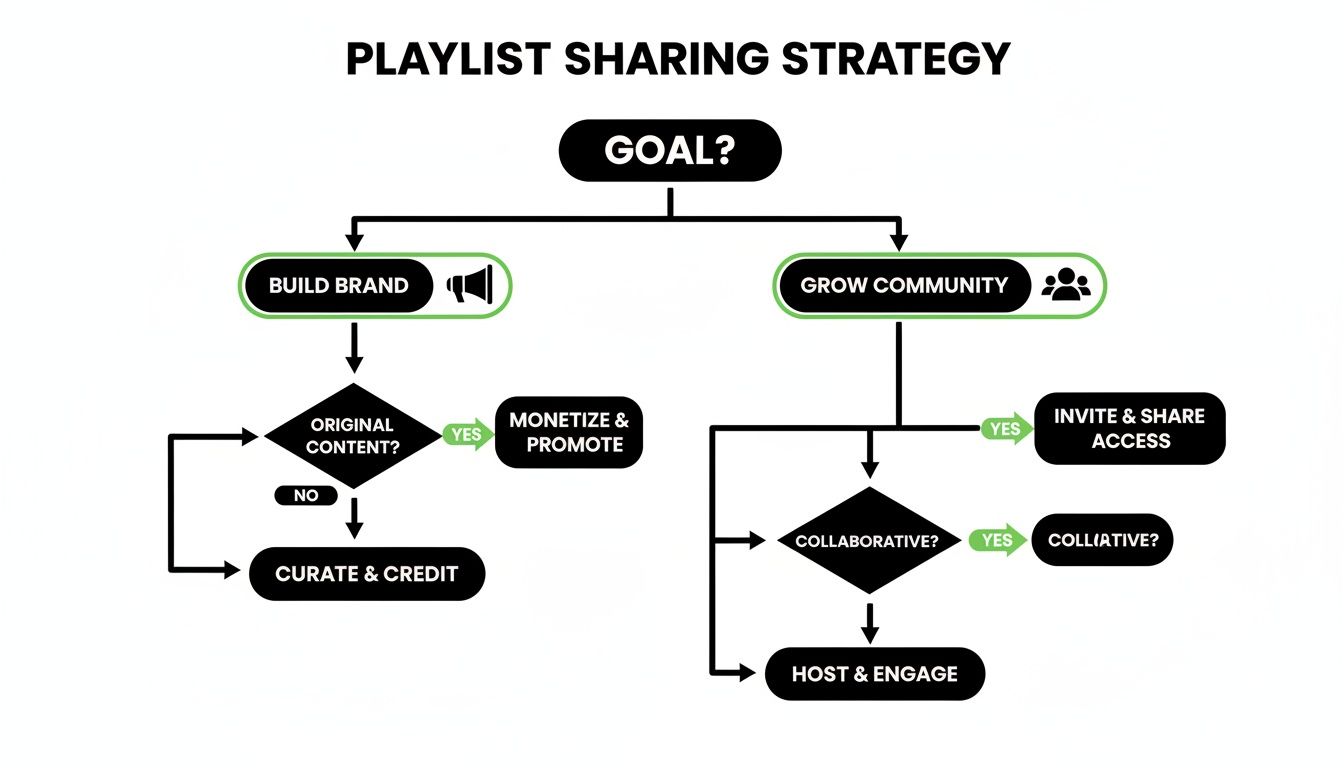
The real takeaway is to think beyond just sharing a link. By aligning your tactics with your goals—whether that's building a personal brand or growing a community—you make every share count. Getting these fundamentals down is the first step to making your playlists a core part of your online presence.
Your Link-in-Bio Is More Than Just a List
If your link-in-bio is just a list of links, you're leaving a lot on the table. It's easy to fall into the trap of thinking of it as a simple menu, but that's a huge missed opportunity. Instead, you should be treating it like your personal digital storefront—a dynamic, visual space that actually shows people who you are and what you care about.
This is where you stop just sharing links and start truly showcasing your taste. Your playlists aren't just URLs; they're curated content. When someone lands on your page, they shouldn't hit a dead-end directory that just sends them somewhere else. They should feel like they've arrived at a destination, a place that makes them want to stick around and explore your world.
A Canvas for Your Curation
This is exactly where modern link-in-bio tools like Taap.bio completely change the conversation. Forget the tired, single-file list of links. Taap.bio gives you a modular "bento box" grid, which is less like a list and more like a design canvas for your content. Every link, widget, or photo is a block you can place, move, and resize.
This design-led approach makes those old-school link pages look ancient. You can create a slick, asymmetrical layout that naturally guides your visitor's eye. It lets you make your most important content—like that brand-new Spotify playlist you just finished—the star of the show, not just another line of text.
Your link-in-bio is prime digital real estate. Transforming it from a simple directory into an engaging, interactive destination is key to capturing attention and turning casual visitors into dedicated followers.
This perspective shift is vital when you consider the sheer scale of music discovery today. By the end of 2026, Spotify is on track to hit a staggering 3.2 trillion total streams. What's more, 45% of those streams will come directly from personalized playlists. With over 4 billion user-made playlists already out there, just dropping a link isn't enough to get noticed. You can explore the full Spotify statistics from Orion Promotion to see just how big the numbers are.
From Passive Links to Active Listening
But here's the real game-changer: turning passive visitors into active listeners. A standard link creates friction. Your followers have to click away from your page, wait for the Spotify app to open, and completely interrupt their browsing. An interactive widget, on the other hand, eliminates that friction entirely.
When you share a Spotify playlist with a tool that allows for an embed, you aren’t just pointing people toward your music—you're bringing the music directly to them. An embedded player with inline playback lets visitors sample your curated tracks without ever leaving your Taap.bio page.
This one feature completely transforms the purpose of your page. It’s no longer just a list of places to go. It becomes a place to be, to listen, and to get a real feel for what you’re all about. Understanding the full potential here is the first step, a concept we dig into much deeper in our article on what link in bio means for creators.
Bring Your Playlist to Life: Embedding Spotify on Your Taap.bio Page
If you really want to share a Spotify playlist in a way that captures attention, forget just linking out. The real magic happens when you embed the playlist directly onto your Taap.bio page. This isn't just about sharing music; it's about creating an entire vibe.
Think about it. Instead of sending your followers on a detour to another app—where they can easily get distracted—you’re bringing the listening party right to them. They can hit play, explore your tracks, and stay locked into your world. This is how you turn a quick visit into a longer, more memorable experience.
How to Get Your Spotify Embed Code
First things first, you need to grab the right piece of code from Spotify. This is different from the simple "Copy Link" option; you're looking for the special <iframe> code that allows a player to live on another website.
You'll have to do this from the Spotify desktop app or web player, as the mobile app doesn't offer this feature.
- Find the playlist you’re ready to share.
- Click the three-dot icon (...) right next to the green play button.
- From the menu, hover your cursor over Share.
- In the next menu that appears, click on Embed playlist.
Spotify will then show you a pop-up with a preview of the player and the embed code you need. Just copy that entire block of code.
Adding the Player to Your Taap.bio Canvas
Alright, you've got the code. Now, let's put it to work. Head over to your Taap.bio editor. You don't need to know a single line of code to make this happen, thanks to the intuitive "bento box" grid.
All you have to do is add a new "Smart Widget" to your page and select the Spotify option. A box will appear, asking for your embed code. Simply paste the <iframe> code you just copied from Spotify, and voilà—Taap.bio instantly creates a fully interactive playlist widget right on your page.
It’s that simple. What was once an empty block on your grid is now a functioning music player.
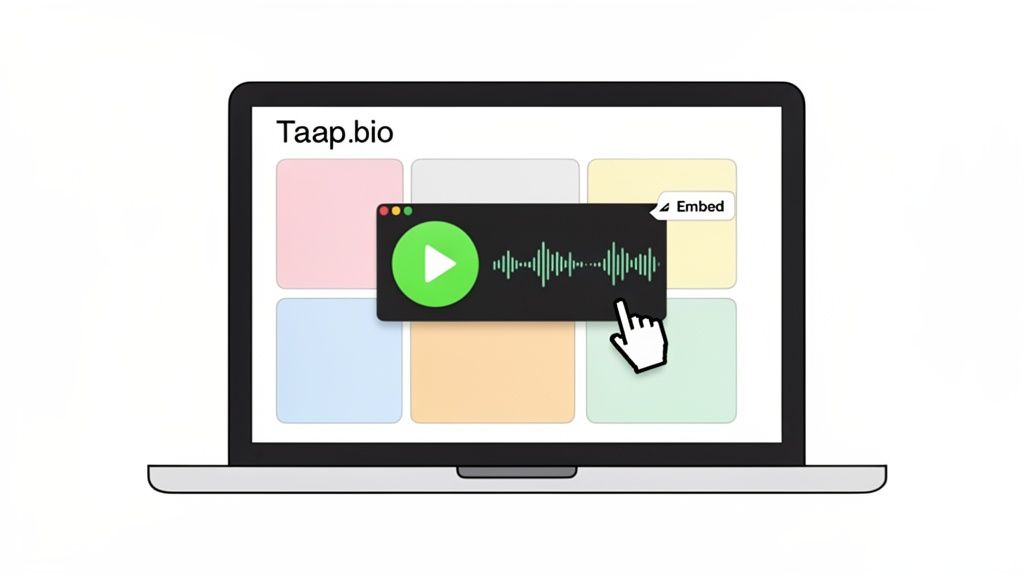
As you can see, the embedded player fits beautifully alongside your other content, turning a basic link page into a rich, engaging destination.
Customizing the Vibe for Maximum Impact
Now for the fun part—making it your own. The Spotify widget isn't just a static block; you can treat it like any other element on your Taap.bio page.
- Resize it: Want it to be the star of the show? Drag the corners to make it a large, unmissable centerpiece. Prefer a more subtle touch? Shrink it down. A larger widget is great because it shows more of your tracklist at a glance.
- Position it: Drag and drop the widget anywhere you want. Put it right at the top to set the mood instantly, or place it next to a related link, like a blog post about your favorite artists.
- Style it: The widget comes in both light and dark themes. Pick the one that best matches your page's background and colors to create a polished, professional look.
The best part? Inline playback. Your visitors can browse the tracklist, press play, and listen to any song without ever leaving your Taap.bio page. This is the definition of a frictionless experience, and it's key to keeping your audience hooked.
This opens up so many creative possibilities. Imagine pairing your workout playlist with links to your fitness programs. Or, you could embed a relaxing playlist right next to your latest Instagram photo gallery, creating a complete sensory experience. We even have a guide on how to embed an Instagram feed to get you started. By combining smart widgets like this, you're not just building a page—you're curating an experience.
Designing a High-Impact Playlist Showcase
Okay, you've embedded your playlist. Now for the fun part: making it impossible for your visitors to ignore. Dropping a widget on your page is one thing; turning it into a genuine centerpiece that captures your vibe is how you get people to actually press play.
Think of yourself as a designer, not just a content creator. Your goal is to build a cohesive experience where your playlist feels like a native, essential part of your brand. It shouldn't just be on the page—it should be the page.
Master Your Visual Hierarchy
Don't let your Spotify widget get lost in a sea of links. It needs to be a focal point, and the best way to do that is by mastering visual hierarchy. This is just a fancy design term for controlling where people look first.
On your Taap.bio page, you have total freedom to do this. Try making your main playlist widget the largest element on the screen. This immediately tells visitors, "Hey, this is important!" A bigger widget also shows more of the tracklist at a glance, tempting people to scroll through the songs right then and there.
Once your hero playlist is in place, frame it with smaller, supporting blocks. Maybe a compact link to your artist bio or a smaller widget for a secondary playlist. This creates a natural flow and guides the eye around the page exactly how you want it to.
Think about it: What's the #1 action you want someone to take? If the answer is "Listen to my music," then your design needs to make that the most obvious and appealing choice on the screen.
Create a Cohesive "Bento Box" Vibe
The "bento box" grid is a super popular and clean design trend for a reason: it's organized, satisfying, and makes everything look intentional. To pull this off, your Spotify embed needs to play nicely with everything else on your Taap.bio page.
Here’s how to nail that aesthetic:
Coordinate Your Colors: Your Taap.bio page has a theme, so make your Spotify widget match. Toggle between the light or dark embed theme to see which one best complements your background color and other blocks. A harmonious color scheme instantly makes your page look more buttoned-up and professional.
Bring in Movement and Media: A playlist is audio, but you can make it a visual magnet. Don't let it sit there alone! Add a media block right next to it—maybe a looping GIF that captures the playlist's mood or a striking piece of album art. Placing a vibrant visual beside your audio player makes the entire section pop.
When you thoughtfully arrange these pieces, you’re not just building a list of links. You're creating an interactive dashboard that truly shows off who you are. For some killer inspiration, check out our guide on grid layout design examples. The real magic happens when you blend smart functionality with great aesthetics, making it irresistible for visitors to dive into your world.
Got Questions About Sharing Your Spotify Playlists?
So, you've started sharing your playlists, but you're hitting a few snags. It happens to everyone. Let's walk through some of the most common questions I hear so you can get back to what matters: sharing great music with your audience.
One of the first things people notice is a delay. You've just added a few killer new tracks to your playlist, but the embedded version on your Taap.bio page doesn't show them. Don't panic! This isn't a bug. Most embedded players, including Spotify's, temporarily "cache" the playlist to make sure it loads quickly for visitors. Just give it a little while, and it will update on its own. You definitely don't need to re-embed the code every time you make a change.
A Simple Link vs. an Embedded Player
This brings up another great question: why bother with an embedded player when you can just drop a link? The difference is everything, and it all boils down to the user's experience.
A plain link is a dead end. It forces people to leave your page, open the Spotify app, and disrupt their flow. That's a lot of friction, and honestly, most people won't make the jump.
An embedded player with inline playback, like the one offered by Taap.bio, is a total game-changer. It keeps your audience right where you want them—on your page. They can press play and sample the vibe instantly, which is huge for keeping them engaged. You're not just telling them about the party; you're bringing the party to them.
Seeing a title is one thing, but hearing the music creates a genuine connection. It's an immediate, powerful way to share your taste and strengthen your brand.
How to Actually Get More People to Listen
Putting a playlist out into the world is only half the battle. You have to give people a compelling reason to press play. If your streams are lower than you'd like, try a few of these proven tactics.
- Create a Strong Identity. A playlist called "My Jams" is easy to ignore. Something like "Late Night Coding – Deep Focus Beats" immediately tells a specific person that you've curated something just for them. It solves a problem or sets a mood.
- Keep It Fresh. Treat your most important playlists as living, breathing collections. When you update them consistently, you give followers a reason to check back in and see what's new.
- Promote It Visually. Don't just post a boring link. When you share your Taap.bio, make sure the playlist widget is a focal point. Use a bold background color or an animated GIF next to it to draw the eye and encourage that first click.
Getting more listeners really comes down to presentation and purpose. When you frame your playlist as an experience rather than just a list of songs, people are far more likely to tune in and become genuine fans of your curation.
Ready to turn your playlist into your best marketing tool? With Taap.bio, you can build a stunning, interactive page that makes your musical taste unforgettable. Get started for free today.