
Let's get one thing straight: you can't just slap a YouTube link on Instagram and call it a day. It doesn't work like that. But what you can do is so much more powerful. The real magic happens when you repurpose your YouTube videos, pulling out the best bits and reformatting them for Instagram’s audience. Think of it as creating a killer movie trailer for your main feature.
Table of contents
Why Your YouTube Videos Belong on Instagram
If you’re trying to create completely different content for both YouTube and Instagram, you're on a fast track to burnout. The smarter move? Make your content work for you. Cross-promoting your YouTube videos on Instagram is more than just a trick to get a few extra views—it’s how you build a powerful brand ecosystem where each platform drives traffic and engagement to the other.
Instagram's quick, scroll-stopping format is the perfect place to drop a teaser for your more detailed YouTube content. A well-edited Reel can grab someone's attention, get them hooked on an idea, and send them straight to your YouTube channel to see the rest. This creates a brilliant feedback loop:
- Instagram for Discovery: The algorithm here is a discovery engine. It can push your content in front of a massive new audience that might have never stumbled upon your YouTube channel.
- YouTube for Depth: This is where you build loyalty. Your longer videos deliver the real value that turns a casual scroller into a dedicated subscriber.
Essentially, you're getting the most bang for your buck on every single video you create. Nailing your content repurposing strategies is the secret to expanding your reach without doubling your workload.
Building a Multi-Platform Audience
The numbers don't lie. Every single minute, users watch an incredible 138.9 million Instagram Reels. In that same 60 seconds, YouTube sees 3.4 million video views worldwide. By bridging these two worlds, you tap into Instagram’s impressive 61% marketer success rate for video content while also pulling from YouTube’s enormous user base of 2.7 billion people. You can dive deeper into these kinds of numbers in Hootsuite’s 2024 report.
This approach is a game-changer for reaching specific age groups. A huge 93% of US adults aged 18-49 are on YouTube every day, and it's the go-to platform for Gen Z when they want to connect with brands. A simple, well-placed Reel can be the hook that pulls them into your world.
The goal isn't just to rack up views on a single platform. It’s about building a brand that shows up wherever your audience is, guiding them from a quick clip on Instagram to the in-depth value you provide on YouTube.
When you treat these platforms as partners, you create more ways for your audience to connect with you. Someone might see a 30-second tip in a Reel, which leads them to the full tutorial on your YouTube channel. Later, they might jump into a Q&A you're hosting in your Instagram Stories. This is how you build a real community and establish yourself as the go-to expert in your field.
Picking the Right Way to Share Your Video
So, you've poured hours into a fantastic YouTube video. Now what? Just dropping a link on Instagram and calling it a day is a massive missed opportunity. The real question isn't if you should share it, but how.
There’s no single "best" way to post a YouTube video on Instagram. The right approach really hinges on what you want to achieve. Are you aiming for a viral hit that pulls in new followers? Or are you trying to get your existing audience to rush over to YouTube for a brand-new premiere? Maybe you just want to build a library of valuable, evergreen content on your profile.
Think of Instagram Reels, Stories, and Feed Posts as different tools for different jobs. Each one has a unique strength, and matching your goal to the right format is the secret to getting real results.
Here’s a simple way to visualize that decision-making process:
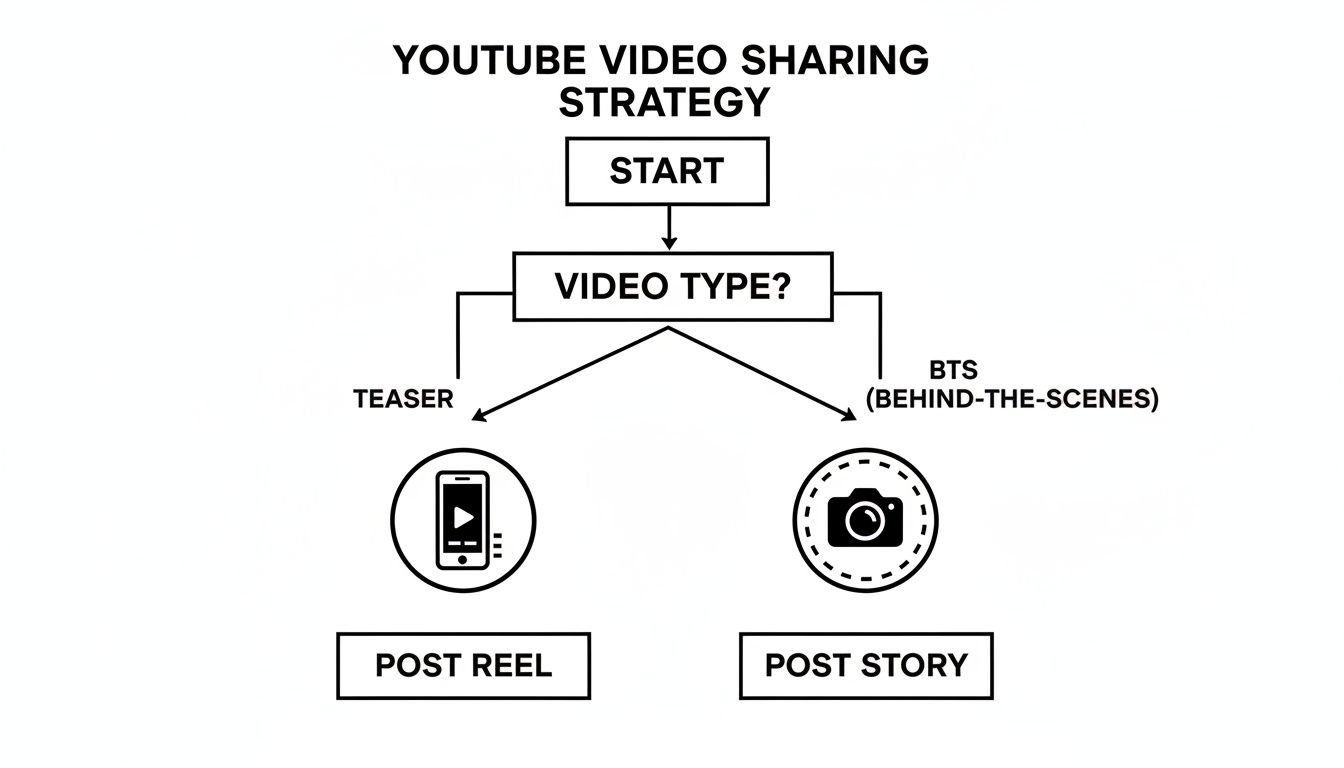
The big takeaway here is that your video’s purpose should drive your choice. A hard-hitting teaser needs a different home than a casual, behind-the-scenes moment.
To make this even clearer, let's break down which format works best for different types of YouTube content. This quick-reference table should help you decide where your video clips will have the most impact.
YouTube to Instagram Content Format Comparison
| Instagram Format | Best For | Video Length | Key Feature |
|---|---|---|---|
| Reels | Reaching new audiences, viral teasers, and showcasing highlights. | Up to 90 seconds | Algorithmic discovery and high shareability. |
| Stories | Urgent announcements, behind-the-scenes content, and direct linking. | 15-60 seconds per slide | 24-hour lifespan creates urgency; direct link sticker. |
| Feed Posts | Building a long-term content library and providing evergreen value. | Up to 60 seconds (video) or 10 slides (carousel) | Permanent placement on your profile grid. |
Each of these formats plays a distinct role in your content strategy. Reels are for discovery, Stories are for engagement, and Feed Posts are for building your brand's archive.
Instagram Reels for Maximum Reach
If you want to get new eyeballs on your content, Instagram Reels are your absolute best friend. The algorithm is built to push short, snappy vertical videos to people who don’t even follow you yet. It’s basically Instagram’s discovery engine.
This makes Reels the perfect place for high-impact teasers from your longer YouTube videos.
Don't try to cram the whole story in. Your job is to find the most exciting, controversial, or visually stunning 30 to 60-second snippet you can. Create a little bit of mystery or an "information gap" that leaves people dying to know what happens next. That’s what gets them to your YouTube channel.
- Best For: Pulling out your most compelling moments, creating clips with viral potential, and introducing your channel to a brand-new audience.
- Actionable Tip: Subtitles are non-negotiable. A huge chunk of users scroll with their sound off. If they can't understand your video without audio, you've already lost them.
Instagram Stories for Timely Engagement
For more immediate, in-the-moment updates, Instagram Stories are the way to go. They disappear after 24 hours, which creates a natural sense of urgency that’s perfect for announcing a new YouTube upload right now.
Use Stories to share a quick behind-the-scenes look from the video shoot, a personal message about why you're so excited for this one, or even a simple graphic hyping up the title.
But the real magic here is the link sticker. It's the most direct path you can create, sending viewers straight from your Story to your YouTube video with a single tap.
Stories are less about being discovered and more about connecting with the community you already have. Use them to give your loyal fans the first look and make it incredibly easy for them to watch.
Instagram Feed Posts for Evergreen Value
While Reels are for reach and Stories are for urgency, a video on your main Instagram Feed is built to last. These posts become a permanent part of your profile, creating a visual portfolio for your YouTube channel.
Feed posts are perfect for shorter clips (think under 60 seconds) or clever carousel posts that break a key idea from your video into bite-sized slides. For instance, you could post a 45-second clip demonstrating one crucial step from a longer tutorial, with a caption that guides people to the full guide on YouTube.
If you’re looking to streamline this process, some of the best repost apps for Instagram can help you manage your feed more efficiently.
This strategy effectively turns your Instagram grid into a library of valuable micro-content that works for you 24/7, constantly pointing people back to your best work.
How to Turn Your YouTube Videos into Traffic-Driving Instagram Reels
If you're serious about getting new eyes on your YouTube content, Instagram Reels are your secret weapon. The algorithm is built for discovery, pushing short, snappy clips to people who don't even follow you yet. This makes Reels the single best way to post a YouTube video on Instagram—or at least, the most exciting parts of it.
Your job isn't to cram your entire YouTube video into 90 seconds. Think of it as creating a killer movie trailer. You want to spark so much curiosity that people have to click the link in your bio to see the whole thing. Forget just clipping the first minute; you need to hunt for gold.
Comb through your long-form video and pull out the moments with the most impact.
- The Big Reveal: Find that one mind-blowing statistic or the surprising conclusion that changes everything.
- Peak Emotion: Isolate a genuine laugh, a moment of visible frustration, or any authentic, human reaction.
- The Cliffhanger: Cut the clip right before you solve the big problem or answer the critical question.
This approach creates what's called an "information gap." It’s a psychological itch that viewers can only scratch by heading straight to your YouTube channel.
Reformatting for a Vertical World
Let's be blunt: posting a horizontal YouTube clip directly to Reels looks terrible. You'll get those giant, ugly black bars and a tiny video that viewers will scroll past in a heartbeat. You absolutely have to reformat your video for the vertical 9:16 aspect ratio that dominates mobile.
This usually takes more work than a simple crop. You’ll probably need to reframe your shots to keep the action centered. For instance, if your original video has two people in a wide shot, you might need to create quick cuts, switching the focus between each speaker to make it work in a vertical frame.
Here's a pro tip: Always assume your Reel will be watched on mute. A huge number of users scroll with the sound off, so burned-in captions are non-negotiable. They're your best shot at grabbing and holding attention in those first crucial three seconds.
Luckily, you don't have to do this all by hand. There are some fantastic tools for content creators out there that make reformatting and captioning a breeze.
Make Your Reel Look Like It Belongs on Instagram
The final piece of the puzzle is to make your repurposed clip feel native to Instagram. It shouldn't scream "I'm an ad for a YouTube video!" It needs to blend in with the rest of the content on the Reels feed.
Start by adding trending audio. Find a popular song or sound and layer it underneath your original audio, even at a very low volume. This simple trick can give your Reel a surprising algorithmic boost.
Next, use Instagram's on-screen text overlays to highlight key points or ask a direct question. These visual cues keep viewers locked in and guide their attention. A simple text box saying, "The last tip is a game-changer..." can do wonders for your watch time.
The goal is to seamlessly weave your YouTube content into the fast-paced, dynamic world of Reels, turning casual scrollers into engaged followers who can't wait to see what's on your channel.
Turning Your Link-in-Bio Into a Content Hub
Okay, so you've hooked them with a killer Reel or Story. Now what? You tell everyone to hit the "link in bio," but what are they going to find there? A single, lonely link to your YouTube channel just doesn't cut it anymore. That one link is the most valuable real estate you have on Instagram, and you need to make it work harder.
This is exactly why a smart link-in-bio tool like Taap.bio is such a game-changer for creators. It lets you transform that static URL into a dynamic, interactive hub for all your content. Think of it less as a list of links and more as a mini-website that bridges the gap between your Instagram audience and your YouTube videos.
Instead of just telling people about your latest video, you can actually show them. By embedding your content directly on the page, you create a rich preview that makes it ridiculously easy for someone to click through and watch.
Building a Dynamic Bento Box Layout
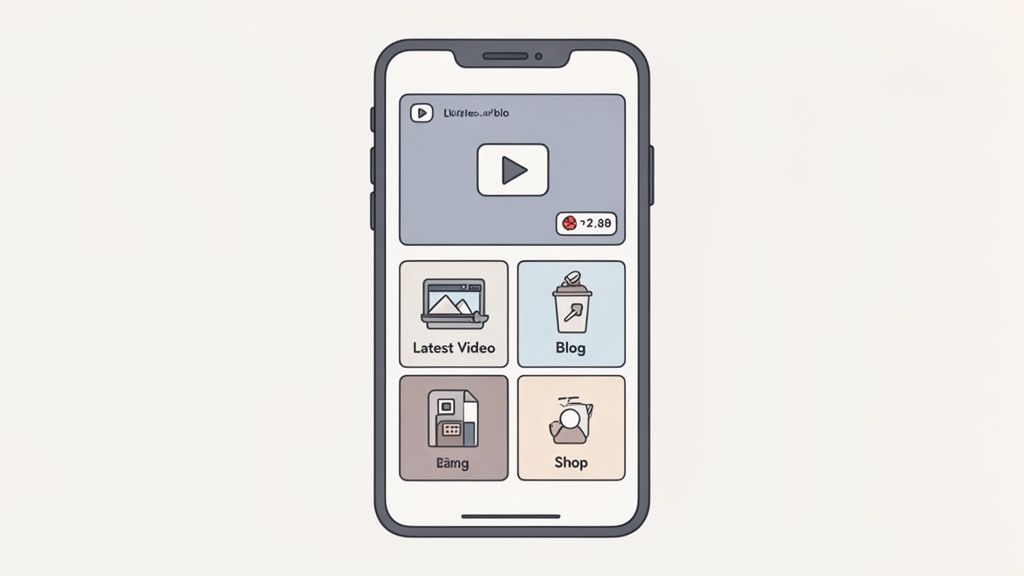
Let's be honest: those old-school, single-file lists of links are boring. The most engaging link-in-bio pages today use what's called a "bento box" grid. It’s a clean, modular layout that lets you arrange different content blocks—like a video embed, your latest blog post, and a link to your shop—in a visually interesting way.
With Taap.bio's physics-based, drag-and-drop editor, you have total creative control. You can arrange and resize blocks to highlight what's most important right now, crafting a page that truly reflects your brand's vibe instead of looking like everyone else's.
The goal is to make your link-in-bio a destination, not just a doorway. When you offer an interactive experience, you give people a real reason to stick around and explore, which naturally drives more clicks to your YouTube channel.
The Power of the YouTube Smart Widget
This is where the real magic happens for anyone wanting to effectively post a YouTube video on Instagram. A YouTube smart widget is so much more than a simple link; it's a live, automated window directly into your channel.
- Always Fresh Content: The widget automatically pulls in your four most recent video thumbnails. No more manually updating your page every time you publish.
- Live Subscriber Count: It shows off your current subscriber number, which is great social proof that encourages new visitors to join your community.
- Instant Previews: People can see your latest videos at a glance, making them way more likely to click on something that grabs their attention.
You can place this widget right at the top of your bento grid, maybe next to a link to your newsletter or a featured product. If you’re looking for more creative ways to feature your content, check out our guide on putting a full video link in your bio.
The stats don't lie. YouTube boasts 211 million daily active users who upload an insane 720,000 hours of video every single day. Meanwhile, Instagram’s 2+ billion users are driving massive engagement with short-form video. A tool that elegantly connects these two giants is your secret weapon. For more on this, take a look at these powerful video marketing statistics.
By bringing your most important platforms together in one place, you create a frictionless path for your followers, turning casual Instagram viewers into loyal YouTube subscribers.
Avoiding Common Copyright and Repurposing Mistakes
So, you're ready to get more mileage out of your YouTube content by sharing it on Instagram. It's a fantastic way to grow, but before you dive in, let's talk about a few common tripwires that can get your hard work flagged, muted, or even taken down.
The biggest headache for most creators? Music copyright.
It’s an easy mistake to make. You’ve already licensed that killer track for your full-length YouTube video, so it should be fine for a 60-second Reel, right? Unfortunately, that’s rarely the case. Most licenses are platform-specific. The safest bet is to strip the original audio and add a new track directly from Instagram’s own licensed music library when you're editing your clip. This is the simplest way to make sure your audio doesn't get instantly zapped.
Beyond the music, you've got to think about who owns the actual video footage. While people throw around the term "fair use," its legal definition is incredibly specific and doesn't cover most repurposing scenarios. As a golden rule, only repurpose content that you 100% own—meaning you shot the footage and have the rights to every visual element in it.
If you’re working with collaborators or using B-roll from another source, you absolutely need to get clear, written permission before posting it anywhere else. Getting a handle on how to avoid copyright strikes on YouTube in the first place is a great foundation, especially if you plan on cross-posting.
Honoring Platform Etiquette
Staying out of legal trouble is one part of the equation. The other is fitting in with the local culture. One of the most obvious rookie mistakes is just dumping a YouTube video onto Instagram with the exact same caption and hashtags. The audiences are different, the algorithms are different, and your approach needs to be, too.
To really post a YouTube video on Instagram effectively, you need to adapt your content, not just copy it.
- Write a fresh caption. Instagram is all about quick, punchy captions that grab attention and encourage a conversation right there in the feed.
- Find new hashtags. Don't just reuse your YouTube tags. Do a little research to see what's trending and relevant to your niche on Instagram.
- Jump into the comments. The community vibe on Instagram lives in the comments section. Be prepared to engage and chat in a way that feels more immediate and personal than on YouTube.
Think of it like being introduced to a new group of friends. You wouldn't just repeat the same story in the exact same way. You'd adapt your tone and focus to fit the new context. It’s the same logic behind learning how to properly repost an Instagram post; it’s all about context and giving proper credit.
The goal isn’t just to dump your content onto a new platform. It’s to introduce your work to a new audience in a way that respects their expectations and the platform’s culture.
When you get this right, the results can be massive. Cross-promoting your YouTube content can seriously boost engagement. For instance, YouTube Shorts boast an average engagement rate of 5.91%, which is way higher than the 1.23-1.48% often seen on Instagram Reels.
By sharing compelling clips on Instagram, you're giving people a taste of what they're missing, driving them back to your main channel. This is where a tool like Taap.bio becomes so powerful—by embedding a live YouTube widget right on your link-in-bio page, you can feature your latest videos and make it ridiculously easy for your Instagram followers to click through and watch more.
A Few Common Questions About Posting YouTube Videos to Instagram
When you start sharing your YouTube content on Instagram, a few questions always seem to pop up. It’s totally normal. Let's tackle some of the most common hurdles so you can keep your content flowing without a hitch.
A big one I hear all the time is about video length. People wonder, "Can I just upload my entire YouTube video?" Technically, Instagram lets you post feed videos up to 60 minutes long, but trust me on this one—it's almost never a good idea.
Think about how you use Instagram. You're scrolling, tapping, and looking for quick hits of entertainment. Trying to shoehorn a long-form video into that experience just doesn't work. It’s like trying to screen a feature film during a commercial break.
What’s the Magic Number for Clip Length?
So, if you can’t post the whole thing, how long should your repurposed clip be?
When you’re chopping up a longer video to create a Reel, aim for that sweet spot between 30 and 60 seconds. That gives you just enough runway to hook someone with a juicy preview, build some real intrigue, and make them want to see the rest. The goal isn't to just replay your YouTube video; it's to create a must-see trailer for it.
For Instagram Stories, you need to think even faster. Keep each Story slide to about 15 seconds. You can absolutely chain a few together to tell a mini-story, but each individual clip has to be a lightning-fast attention-grabber.
The best way to think about it is this: Your Instagram clips are the movie trailers. Your YouTube video is the main feature. Make the trailer so good they have to go see the movie.
Link Sticker vs. Link-in-Bio: Which One Wins?
This is a classic question, but it’s not an either/or battle. You should be using both. They work together, each playing a different but equally important role in your strategy.
The Story Link Sticker: This is your go-to for immediate, time-sensitive promotions. Dropped a new video? Slap a link sticker in your Story and point people directly to it. It’s perfect for capturing that initial wave of views from your most dedicated followers.
Your Link-in-Bio: This is your permanent content library. A truly effective bio link meaning it's more than a simple URL—it's a mini-website where followers can always find your most important stuff, including a direct link to your YouTube channel.
Using the link sticker for "hot off the press" announcements and your link-in-bio as your evergreen hub gives you a powerful, two-pronged system. You're maximizing every single opportunity to guide people from their Instagram scroll session straight over to your YouTube channel.
Turn that single link-in-bio into a dynamic content hub with Taap.bio. Embed your latest YouTube videos, showcase your portfolio, and create a visually stunning page that turns followers into subscribers. Start building your free Taap.bio page today.


