So, how do you actually link Instagram to TikTok? The most straightforward way is to drop your Instagram profile URL right into the website field on your TikTok bio. It’s a simple action that creates a clickable link, funneling your audience from one platform to the other and tying your whole social media presence together.
Table of contents
Why Connecting Instagram and TikTok Is a Power Move
Before we jump into the "how-to," let's talk about the "why." Connecting your Instagram and TikTok isn't just a box to check—it’s a genuine strategic play for building a stronger, more bulletproof brand.
This is about more than just adding another link. It's about creating your own digital ecosystem where your influence isn't at the mercy of a single platform's ever-changing algorithm.
The real magic happens when you merge two massive, hyper-engaged audiences. You start turning casual viewers on one app into loyal followers on both. This builds a unified brand identity that feels cohesive, whether someone finds you through a trending TikTok sound or a perfectly polished Instagram Reel.
Capitalize on Massive Audience Overlap
Here’s something many creators overlook: your audience on TikTok and Instagram aren't two separate groups. They’re often the same people, just using the apps differently. A huge chunk of your followers probably uses both apps every single day.
Let's look at a quick comparison to see where each platform really shines.
TikTok vs. Instagram At a Glance
| Metric | TikTok Advantage | Instagram Advantage |
|---|---|---|
| Primary Engagement | High-velocity, viral video consumption | Curated visual storytelling (Reels, Stories, Carousels) |
| Content Lifespan | Shorter; driven by trending audio/challenges | Longer; content is more discoverable over time |
| Audience Demographics | Dominates Gen Z; rapid growth in older demographics | Broad appeal across Millennials and Gen Z |
| Monetization | Creator Fund, in-app tipping, LIVE gifts | Mature ad platform, brand deals, direct shopping |
This overlap is your secret weapon. By Q3 2023, TikTok had even pulled ahead of Instagram in active users across North America, while Instagram still held the crown in places like Europe. This tells us a linked presence is no longer a "nice to have"—it’s a must-have if you want to maximize your reach.
This gives you a few powerful advantages:
- Create an Audience Funnel: You can steer TikTok viewers who love your short-form chaos over to your Instagram for more in-depth content like photo carousels, detailed Stories, or longer guides.
- Reinforce Your Brand: A consistent vibe and message across both platforms makes your brand instantly recognizable and memorable.
- Increase Your Touchpoints: The more places your audience bumps into you, the stronger their connection to your brand becomes. You're not just a random creator anymore; you're a fixture in their daily scroll.
By building a seamless bridge between your profiles, you’re not just sharing a link. You're crafting a multi-platform story that grabs and holds your audience's attention far more effectively.
Diversify Your Content Strategy
Putting all your eggs in one basket is a risky game, especially in social media. An algorithm change can tank your reach overnight. When you actively cross-promote, you're diversifying your content's reach and insulating your brand from those sudden shocks.
To really get a handle on the strategic side of this, it's worth exploring a bigger-picture view of your online presence by Harnessing AI for Social Media. This kind of thinking helps you build a more robust content plan that can weather any trend or platform shift.
The Easiest Way: Adding Instagram Directly to Your TikTok Bio
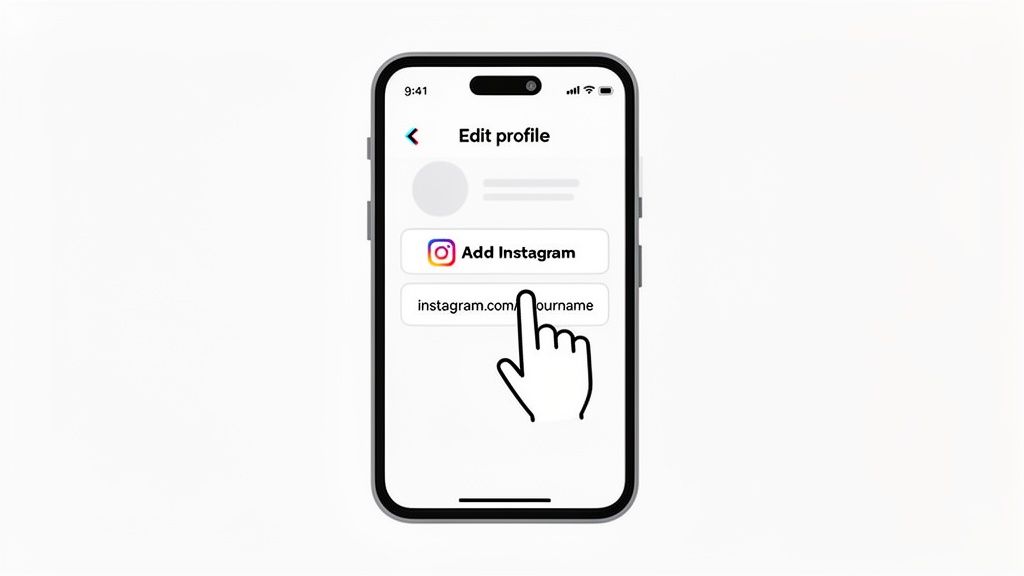
This is ground zero. The most straightforward way to link Instagram to TikTok is by using the platform’s own built-in feature. It adds a clean, clickable Instagram icon right on your profile, making it dead simple for followers to find you.
Think of it as the official digital handshake between your two profiles. This native integration is designed to be seamless, giving a new fan a frictionless way to explore your entire content world with a single tap.
Getting to Your Profile Settings
First things first, fire up the TikTok app. Tap the 'Profile' icon in the bottom-right corner to land on your main profile page. This is your command center.
From there, you'll see a big 'Edit profile' button right under your follower count. Tap that. This is where you can tweak your bio, update your profile picture, and, most importantly, connect your other social accounts.
Linking Your Instagram Account
Once you're in the 'Edit profile' menu, look for the 'Social' section. You should see an option that says 'Add Instagram'. That's the one you want.
Tapping it will open a new window asking you to log into your Instagram. No need to worry—this is a secure, standard authorization process handled by Instagram itself. Just pop in your credentials, authorize the connection, and TikTok will automatically add a slick little Instagram icon to your bio. It’s way better than just typing your @handle in the bio text because this one is actually clickable.
The Business Account Workaround
Ever go to add your Instagram and find the button is just... gone? This is a common snag for anyone with a TikTok Business Account. For whatever reason, TikTok often reserves this native feature for personal or creator accounts.
But don't sweat it. There’s an easy and equally effective workaround: the 'Website' field.
- Grab Your Instagram URL: Head over to your Instagram profile and copy the full URL from the address bar. It’ll be something like
https://www.instagram.com/yourusername. - Paste it in TikTok: Jump back to the 'Edit profile' screen in TikTok and paste that URL directly into the 'Website' field.
- Save and You're Set: Hit 'Save'. The link will now show up right under your bio, ready to be clicked.
Pro Tip: Honestly, even if you can use the dedicated Instagram button, using the website field for a more powerful link-in-bio tool is often the smarter play. It lets you send people to a landing page with multiple links instead of just one.
For a deeper dive into making the most of this precious real estate, check out our complete guide on how to add a link into your TikTok bio. This manual method ensures that no matter what kind of account you have, you can build that vital bridge for your audience.
Smart Strategies for Cross-Promoting Your Content
Alright, so you’ve got your Instagram link sitting in your TikTok bio. Job done, right? Not even close. That link is just a doorway, and now you have to convince people to walk through it.
The real magic happens when you build a bridge between the two platforms—one that your followers actually want to cross. It’s all about creating a journey that feels natural and gives them something valuable at the end. This is where you graduate from just linking accounts to strategically driving traffic that grows your brand.
Crafting Calls-to-Action That Actually Work
Your TikTok videos are your best tool for getting people over to your Instagram. It doesn’t have to be complicated. A simple verbal cue at the end of your video can work wonders. Something like, “I break down the full tutorial for this look in my latest Instagram post—link in bio!” is direct and effective.
On-screen text is another great way to do this. Imagine you're a food creator. You could post a super-fast recipe video on TikTok, but add a text bubble that says, “Full ingredient list and step-by-step photos on my Instagram!” It piques curiosity and gives them a solid reason to click over.
Here are a few ideas you can steal:
- Tease Exclusive Content: "I'm doing an Instagram-only Q&A this Friday," or "Check out the behind-the-scenes photo dump from my latest trip on my Insta right now."
- Run a Contest or Giveaway: Announce a giveaway on TikTok and make one of the entry rules following your Instagram account.
- Continue the Story: Post the hook of a great story or the beginning of a tutorial on TikTok, then tell everyone the conclusion is waiting for them on Instagram.
Why Reposting the Same Video Fails
So many creators make this mistake. They download their TikTok, watermark and all, and just upload it to Reels. This almost never works. Each platform has its own vibe, its own algorithm, and its own audience expectations. That trending audio on TikTok can feel completely out of place and dated on Reels.
In fact, just cross-posting the same video can hurt your reach. Some data shows that TikTok videos reposted to Instagram can perform up to 32% worse than content made specifically for Reels. It really drives home the point that you need to think natively.
While TikTok often crushes it with raw engagement, Instagram Reels can offer a higher median reach. And with 83% of users saying they discover new products on Instagram, that link in your bio becomes a seriously powerful funnel. You can discover more insights about these platform differences on sqmagazine.co.uk.
The takeaway is clear: don’t just repost, repurpose. Each platform deserves content tailored to its unique strengths. Your audience will thank you for it with higher engagement.
A huge part of a smart cross-promotion strategy is understanding how to properly start repurposing video content for Meta & TikTok. This lets you work efficiently without sacrificing the quality and native feel of your content. If you want more ideas on how to breathe new life into your existing posts, check out our guide on how to repost an Instagram post the right way.
Upgrade Your Bio with a Taap.bio Smart Link
Let’s be honest: that single, static URL in your bio is a huge missed opportunity. Sure, directly linking your accounts is a good first step, but it just sends people away from your carefully curated TikTok space. It's time to stop thinking of your bio link as a simple signpost and start treating it like a dynamic, interactive storefront for your entire brand.
This is where you level up from a basic link to a visually stunning landing page that lives right inside your TikTok profile. Using a tool like Taap.bio, you can build a modular page that acts as your personal digital headquarters, keeping your followers engaged and hungry for more.
More Than Just a List of Links
Picture this: a follower taps your bio link. Instead of being met with a boring button that just says "Instagram," they land on a vibrant, custom grid. On one side, they see a live feed of your latest Instagram photos and your real-time follower count. Right next to it, they can scroll through your most recent TikTok videos.
This kind of dynamic preview is infinitely more compelling than a standard URL. It grabs attention instantly and gives visitors a real taste of your content universe, encouraging them to explore without ever feeling like they've left your orbit. The goal is to stop being a directory and start being a destination.
Why a Smart Link Is a Game-Changer
A smart link-in-bio page transforms a passive click into an active, engaging experience. You're not just crossing your fingers and hoping they’ll follow you on another platform; you're showing them exactly why they should, with live content that puts your best work front and center.
This visual-first approach is everything. With Taap.bio, you can use a "bento box" style grid to arrange different content blocks, guiding your visitor's eye to what matters most. Whether that's your latest YouTube banger, a new blog post, or your gorgeous Instagram feed, you're in complete control of the narrative. To get some great ideas for these layouts, check out these strategies for designing a standout link-in-bio grid.
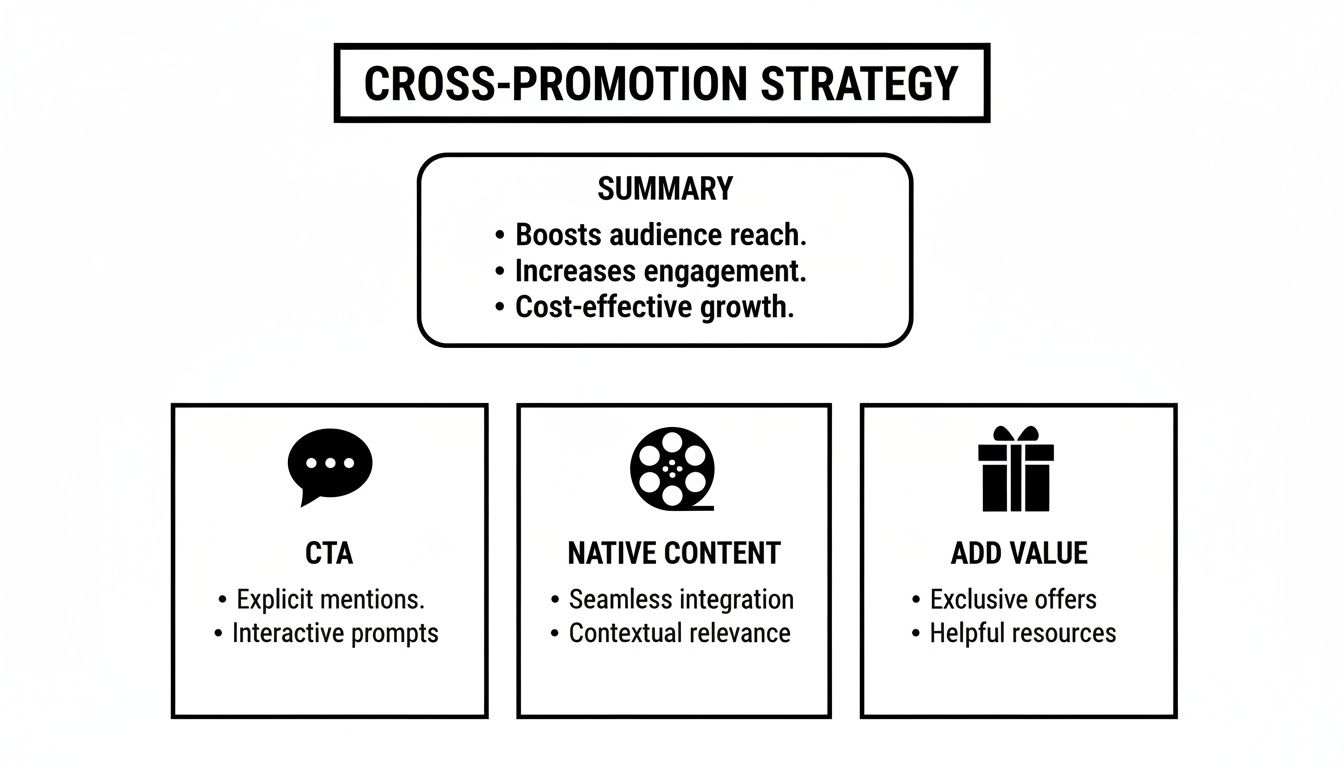
This visual breakdown really nails it: successful cross-promotion hinges on clear calls-to-action (CTAs), creating content that feels right for each platform, and consistently delivering value to your audience. A smart link helps you do all three.
To really see the difference, let's compare a standard link with what a Taap.bio smart widget offers.
Standard Link vs. Taap.bio Smart Widget
| Feature | Standard Instagram URL Link | Taap.bio Instagram Smart Widget |
|---|---|---|
| Visuals | None, just a plain text link. | Displays a live grid of your latest Instagram posts. |
| User Experience | Clicks out to the Instagram app, leaving TikTok. | Keeps users on your landing page while showing content. |
| Information | Provides no immediate context or value. | Shows your follower count and recent activity. |
| Engagement | Passive; requires user to leave and explore. | Interactive; encourages immediate follows and likes. |
| Conversion | Lower, due to the extra step and context switch. | Higher, as users see compelling content instantly. |
The table makes it pretty clear. One is a dead end, while the other is an engaging, multi-faceted invitation.
The Power of Interactive Widgets
The real magic behind this approach lies in smart widgets. These aren't just dressed-up links; they are live, interactive windows into your other creative worlds.
- Instagram Widget: Pulls in your latest posts, displays your follower count, and includes a direct follow button.
- TikTok Widget: Shows off a feed of your newest videos so visitors don’t miss a thing.
- YouTube Widget: Features thumbnails of your recent uploads alongside your subscriber count.
- Spotify Widget: Lets visitors play your newest podcast episode or song right from the page.
Instead of making your audience hunt down your content across a half-dozen different apps, you bring the best of it directly to them in one beautifully organized hub. This is how you truly link Instagram to TikTok and weave together everything you create.
This integrated setup makes your bio link incredibly "sticky." By cutting down the number of clicks it takes for someone to engage with your work, you dramatically boost the chances they'll follow you everywhere and become a true fan. It’s a complete evolution from a simple, one-way link.
Create Your Ultimate Social Hub with Taap.bio
It’s time to think bigger than just a simple link. Your bio shouldn't be a boring list of URLs; it should be an interactive destination—a digital headquarters that shows off your entire brand in one glance. Let's get hands-on and build a complete social hub with Taap.bio that truly reflects who you are.
This is about much more than just connecting your Instagram and TikTok. Imagine being a podcaster and embedding a Spotify widget that lets visitors play your latest episode right there on your page. Or maybe you're an artist who wants to pull in your portfolio from Behance, displaying your work in a stunning grid. That's the kind of experience we're talking about.
Designing Your Bento Box Layout
The real magic happens with the "bento box" design. You get to arrange different content blocks—widgets, links, videos—in various sizes to create a visually striking layout that naturally guides your audience's attention where you want it to go. This isn’t just about making things work; it's about crafting an aesthetic that feels like you.
For instance, you could place a tall, prominent Instagram profile widget right next to a more compact, punchy TikTok feed. This creates a dynamic, asymmetric look that’s way more engaging than a standard list of buttons. The goal is to make your link-in-bio a personalized, interactive experience that people actually enjoy exploring.
Here are a few layout ideas to get your creativity flowing:
- The Creator Showcase: Make your main platform, like YouTube or Instagram, the hero with a large block at the top. Surround it with smaller blocks for your TikTok, X (formerly Twitter), and a can't-miss newsletter signup.
- The Musician’s Stage: Feature a big Spotify widget with your latest single front and center, flanked by your Instagram feed and a link to upcoming tour dates.
- The Freelancer’s Portfolio: Combine a sleek Behance or Dribbble widget with text blocks highlighting glowing client testimonials and a direct link to your contact form.
Capitalizing on Your Audience Overlap
Building a central hub is more crucial than ever when you look at the massive user overlap between platforms. Did you know that over 80% of TikTok users are also active on Instagram every single month? A unified destination is the only way to capture their full attention.
While engagement styles can be different—comments on TikTok jumped an incredible 73.7% compared to a 33.3% rise on Instagram—Taap.bio helps you cater to both. You can literally drag and drop TikTok video blocks right next to your Instagram grid. Considering Reels average a 1.48% engagement rate and TikTok hits 2.5%, showing off both in one customizable layout turns these separate stats into a single, seamless conversion funnel. You can dig deeper into the latest social media demographics and statistics on tigerpistol.com.
By consolidating your presence, you’re not just making it easier for people to find you; you're creating a cohesive brand story that is stronger than the sum of its parts.
This strategy effectively turns your bio into a one-stop shop for everything you create. We cover this powerful approach in our guide explaining what is a content hub and how it can supercharge your brand. It’s how you transform the simple task of trying to link Instagram to TikTok into building a true digital home for your community.
Got Questions? We've Got Answers
Connecting your Instagram and TikTok accounts is a smart move, but it's not always a straight shot. Let's tackle some of the common questions and snags people run into so you can get everything working smoothly.
Can I Link a Business Instagram to My TikTok?
Absolutely. The process is just a little different than it is for a personal account.
You might have noticed that the dedicated "Add Instagram" button is often missing on TikTok business profiles. No worries—there’s an easy workaround. Just grab your full Instagram profile URL (it looks like https://www.instagram.com/yourusername) and pop it right into the Website field in your TikTok bio. It’s just as clickable and gets the job done perfectly.
If you need a quick refresher on finding that spot, our guide on where is the bio on TikTok breaks it down.
Will Linking My Accounts Hurt My Engagement?
Quite the opposite, actually. When you do it right, it can seriously amplify your reach.
The trick is to avoid a copy-and-paste content strategy. Don't just dump the same videos on both platforms. Instead, think of the link as a bridge. Use a TikTok to tease a bigger reveal waiting on your Instagram, like a detailed photo gallery or an exclusive behind-the-scenes Story. This gives your audience a genuine reason to follow you on both, doubling your chances to connect with them.
A direct link is a good start, but a smart link-in-bio tool creates a much richer experience. Instead of sending users away, it brings your content ecosystem to them.
What Should I Do If My Instagram Link Isn't Working?
It happens. First, do a quick sanity check. Go back and look at the URL you pasted. A tiny typo or a missing "https://" is usually the culprit.
If the link itself is perfect, try clearing your TikTok app cache. Sometimes old data just gums up the works. To do this, go to your TikTok settings, find "Clear Cache," and give it a tap.
Still no luck? It could just be a temporary glitch with the app. Take a break and try again in an hour or two. This is also where a solid link-in-bio service comes in handy—you manage one stable link that you know always works, sidestepping these platform-specific hiccups.
Ready to create a stunning, interactive hub for all your social profiles? With Taap.bio, you can build a dynamic "bento box" page that showcases your Instagram, TikTok, and more in one beautiful, shareable link. Start building your ultimate link-in-bio page for free today!