
It's time to stop just collecting followers and start building a real community. And one of the most underrated tools for doing that? A direct link to your Snapchat. Sharing a simple link—instead of just your username—is like handing someone a VIP pass straight into your unfiltered world.
Table of contents
Turn Your Snapchat Link Into a Growth Engine
Let's move past the basics of just getting friend requests and think more strategically. The real question isn't how to add a Snapchat link, but why it's so powerful. Top creators and savvy brands use Snapchat's raw, in-the-moment vibe to build connections that feel genuine. A direct link completely removes the friction, making it ridiculously easy for someone to go from a passive viewer to an active part of your community.
That simple URL becomes your secret weapon for community building. Instead of saying, "find me on Snapchat," you're extending a direct invitation. This subtle shift in your approach can make a massive difference in your add-back rate because it shows you value your audience's time.
From Simple Link to Strategic Asset
When you drop your Snapchat link onto a platform like Taap.bio, it's no longer just a random URL. It becomes a key part of your bigger brand story. Picture it: your Snapchat link sitting right next to your latest YouTube video or a post highlighting a new project. That context gives people a compelling reason to click and connect. They aren't just adding another account; they're choosing to join a world they've already gotten a peek into.
This is where your link truly starts working for you. It's not just another line of text buried in a bio; it becomes a central piece of your online identity. This is the core of what the link in bio meaning is all about—creating a curated hub that tells your whole story.
Your goal is to make tapping that Snapchat link feel like the most natural, irresistible next step. Frame it as exclusive access, a behind-the-scenes pass, or a direct line to your most authentic self.
Amplifying Your Reach
Once you've got your link looking great and placed strategically, it's time to think about scaling up. Organic shares are great, but if you're serious about explosive growth, you can't ignore paid strategies. To really turn that Snapchat link into a powerful growth machine, exploring dedicated Snapchat business advertising is a game-changer. It lets you target specific demographics and interests, making sure your invitation gets in front of the exact people who are most likely to love what you're doing.
Find and Share Your Snapchat Profile Link
Before you can get your Snapchat link working for you in your Taap.bio, you need to actually grab it. This is the crucial first step. Having that direct link ready to go is the difference between someone thinking, "I'll look them up later," and them tapping "Add Friend" right on the spot. It eliminates all the friction.
When it comes to sharing your Snapchat, you really have two main tools in your arsenal: the clickable URL and the scannable Snapcode. Each one shines in different situations. Your URL is king in digital spaces where people can tap, while the Snapcode is brilliant for anything in the real, physical world.
Locating Your Clickable Link
Getting your personal Snapchat URL is incredibly fast—it only takes a few seconds inside the app. This is the link you'll want for your Taap.bio, your Instagram bio, and even your email signature.
Here’s how to find it:
- First, open the Snapchat app and tap on your Bitmoji (or profile icon) in the top-left corner.
- On your profile screen, you'll see your big yellow Snapcode. Right below it is your username with a little share icon next to it. Go ahead and tap that.
- A menu will slide up from the bottom. Just choose "Share My Profile Link."
- From there, you can copy the link straight to your clipboard. It will look something like
snapchat.com/add/yourusername.
That copied link is your golden ticket. It's a direct, one-tap entry point to your profile, making it the most powerful tool for converting interest into a new follower online.
The process of snagging your Snapchat link is a lot like how you would copy your Instagram link—another must-have for your link-in-bio page. Both are designed to be grabbed and shared easily.
This visual breakdown really clarifies when a direct link is your best move versus just telling people your username.
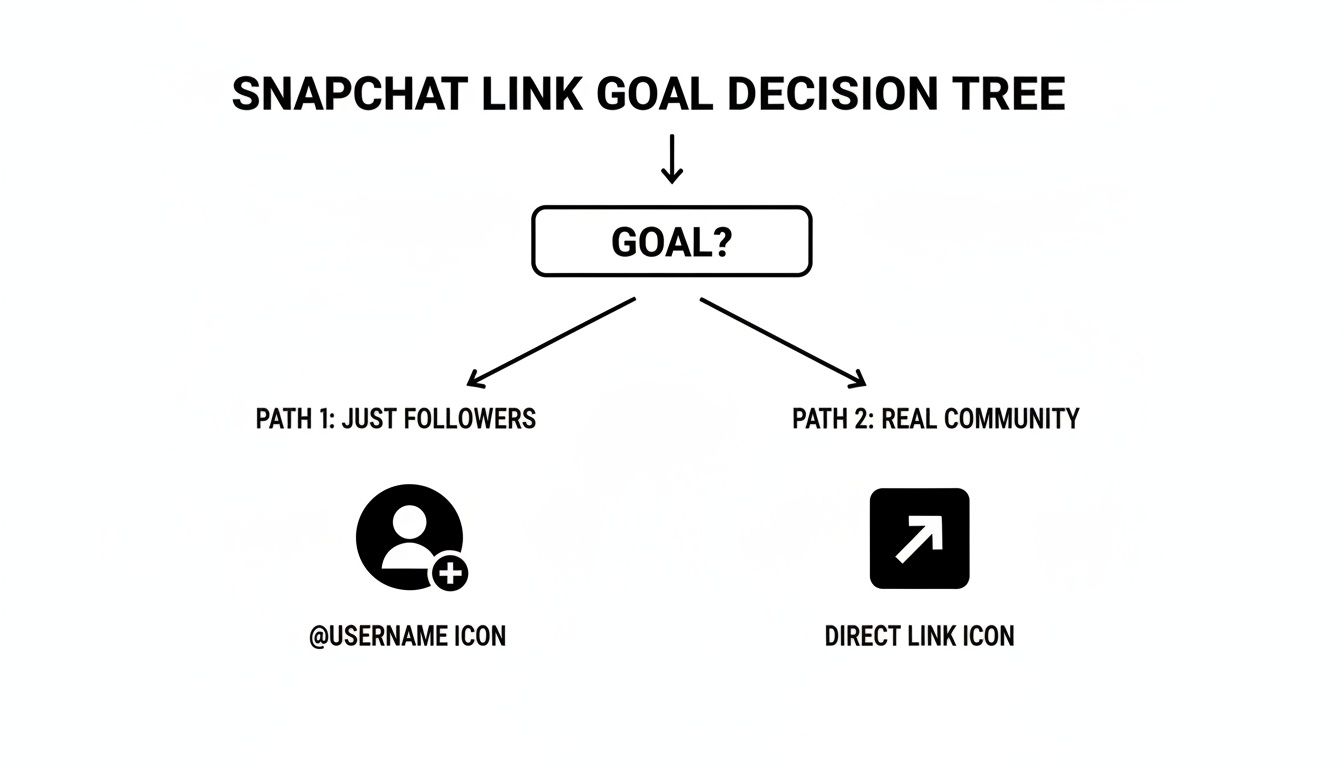
The bottom line? A direct link is for actively building an engaged community. Just sharing your username is a much more passive approach that almost always leads to slower growth.
When to Use Your Link vs Your Snapcode
So, when do you use the URL, and when is it Snapcode time? It all comes down to context. Just think about where your audience is and what they’re doing. Are they on their phone, ready to tap a link? Or are they looking at a flyer or a presentation slide?
Snapchat URL vs Snapcode Which One to Use
Here's a quick comparison to help you decide the best way to share your Snapchat profile across different marketing channels.
| Scenario | Best Choice | Why It Works Best |
|---|---|---|
| Link-in-Bio (Taap.bio, Instagram) | Snapchat URL | It’s a purely digital space. A clickable link is the most seamless, one-tap experience. No one wants to take a screenshot and switch apps. |
| Printed Materials (Business Cards, Flyers) | Snapcode | On physical items, a scannable code is way more practical than a long URL someone would have to manually type into their browser. |
| Email Signature | Snapchat URL | An email signature is a clickable environment. Hyperlinking text like "Join me on Snapchat" is clean, professional, and super effective. |
| Conference Presentations | Snapcode | Throwing a big Snapcode on a slide lets a room full of people scan and add you all at once. It's fast and interactive. |
Making the right choice here means you're always using the most efficient tool for the job. For any digital profile—from your Taap.bio to your website footer—the direct Snapchat URL is the undisputed champion.
Feature Your Snapchat Link on Taap.bio
Alright, you've got your Snapchat link. Now the real work begins—and it's actually fun. You're not just dropping another URL onto a page; you're crafting a direct, interactive invitation for your audience. Using a platform like Taap.bio is the key to turning that simple link into a powerful call to action. It transforms your link-in-bio from a boring old list into a dynamic hub for your brand.
The mission here is to build a page that’s impossible to ignore. It shouldn’t just be a signpost pointing elsewhere; it needs to tell your story and drive real engagement. This is your chance to shine a spotlight on your Snapchat and give people a very good reason to hit "Add Friend."
Building Your Interactive Hub
First things first, let's get that Snapchat link onto your Taap.bio page as a dedicated block. But please, don’t just paste it in and walk away. The secret sauce of Taap.bio is its visual, modular grid system. It lets you arrange and emphasize your content in a way that consciously guides your visitor's eyes right where you want them to go.
Here's how to get started:
- Add a Link Block: Kick things off by adding a new link block and pasting in your Snapchat URL. Simple enough.
- Write a Killer CTA: Ditch the default URL text. Instead of "snapchat.com/add/username," make it exciting. Try something like "👻 Get Daily BTS on Snap" or "Join My Snapchat Fam!"
- Make It Stand Out: Play with the block styles and sizes. A larger, more prominent block naturally gets more attention, so if Snapchat is a priority, make it look like one.
It’s surprisingly tough to find good, clear info on how to add a Snapchat link to link-in-bio tools. Most of what's out there just talks about Snapchat's own features like Stories or Lenses. This leaves a huge gap for creators who want to promote their Snapchat profile off the platform. Honestly, just mastering this simple step can put you way ahead of others who are still just telling people their username.
Make Your Snapchat Block a Focal Point
Your Snapchat block shouldn't have to fight for attention—it should be the star of the show. This is where you get to be a bit of a designer and use Taap.bio's flexible grid to create a visual hierarchy. Think of your page as a canvas, and you're the artist directing the viewer’s journey.
To get a feel for crafting a truly stunning layout, it's worth digging into how to build an effective link-in-bio grid. It’s the single biggest factor in making your profile pop.
The best Taap.bio pages aren't just lists of links. They're carefully curated visual experiences. Every block works together, telling a cohesive and compelling story about who you are.
For instance, try placing a big, bold block for your Snapchat link right next to a smaller one for your latest YouTube video. You're creating a narrative: "Watch my polished, long-form content here, then come get the raw, behind-the-scenes story over on Snapchat." That kind of strategic placement turns a basic link into an essential piece of your content ecosystem.
This screenshot shows how you can combine different elements—a Snapcode, a video, a clear call-to-action—to create a compelling layout.

See how everything works together? The visual synergy makes each piece stronger, encouraging people to explore everything you have to offer.
Amplify Your Link with Media
Want to make your Snapchat CTA truly irresistible? Pair it with media directly on your Taap.bio page. Stop telling people to add you and start showing them why they can't afford not to.
Here are a few combinations I've seen work incredibly well:
- Animate Your Snapcode: Pop an animated GIF of your Snapcode right next to your Snapchat link block. It’s a great scannable option for desktop visitors and adds a cool, dynamic touch.
- Embed a Quick Video: Use a video block for a short, personal invitation. A 15-second clip of you saying, "Hey, thanks for stopping by! For my daily updates and Q&As, you have to add me on Snapchat," is insanely effective.
- Use a Bold Image: A high-quality image with a text overlay like "Exclusive Content on Snapchat!" can act as a powerful visual CTA that points people straight to your link block.
When you surround your Snapchat link with rich, interactive media, you’re turning a simple ask into an exciting proposition. You're no longer just asking for a follow; you're offering them a key to a more exclusive, authentic side of your world. That’s what separates a generic link page from a high-conversion personal landing page.
Spread Your Taap.bio Link Far and Wide
You've done the work—your Taap.bio page is set up and your Snapchat link is front and center. But what good is a perfect hub if nobody knows where to find it? Now comes the fun part: getting your link out there.
Think of it this way: your Taap.bio is the destination, and every other platform you're on is a signpost pointing the way. The goal is to create a seamless network where your audience, no matter where they find you, can easily jump to your curated world. A blanket copy-and-paste approach won't work; each platform needs its own thoughtful strategy.
Make Your Social Bios Count
The link in your bio is the most valuable piece of digital real estate you own on any social platform. It’s your main call to action, the one place you can send followers anywhere you want. This is exactly where your Taap.bio link needs to be.
- Instagram Bio: This is a no-brainer. After you drop your Taap.bio link in your profile, go a step further. Create a permanent Story Highlight called something like "My Snapchat" or "BTS." Fill it with a few slides teasing the awesome content you share on Snap and end with a big, bold "Tap the link in my bio!"
- TikTok Profile: Just like on Instagram, your bio link is prime territory. If you need a refresher, we've got a great guide on how to add a link into your TikTok bio to get the most eyeballs on it. Don't forget to mention it in your videos, especially when you're talking about exclusive content they can only get by following you elsewhere.
- Twitter/X Bio: Your X profile is another perfect spot. Pin a tweet to the top of your profile that introduces your Taap.bio page and spells out what people will find there—especially your unfiltered Snapchat stories.
Your bio link isn't just a URL; it’s an invitation. Make it feel like a natural next step for anyone who’s curious to learn more about you.
Thinking Beyond the Bio
While your bio is the starting point, don't stop there. Weave your Taap.bio link into your everyday content. The more places people encounter it, the more clicks you'll get. A multi-channel strategy ensures you're catching people from every corner of your online world.
One of the most effective ways to do this is by bridging the gap between your digital and physical presence. To really expand your reach onto things like business cards, event flyers, or even other digital spaces, it's worth learning about using QR codes for social media. They are a surprisingly powerful tool for distribution.
Weave It Into Your Professional Communications
Your link has a place beyond your social profiles. Every professional interaction is a chance to subtly guide people to your Taap.bio page, and you'd be surprised how effective it can be.
A simple yet brilliant tactic is adding your link to your email signature. A clean line of text can do all the work for you. Instead of just pasting the URL, use a call-to-action that makes people want to click.
Here are a few ideas for your email signature:
- "See my latest projects and behind-the-scenes work: [Your Taap.bio Link]"
- "Connect with me across all my platforms: [Your Taap.bio Link]"
- "For my unfiltered thoughts (and daily snaps): [Your Taap.bio Link]"
This tiny change turns every email you send into a potential new follower. By strategically and consistently sharing your Taap.bio link, you're making sure that no matter where someone discovers you, they have a clear path to connect on a deeper level—all starting with a single tap.
Optimize Your Link for More Clicks and Adds
Alright, so you know how to add your Snapchat link. That's the easy part. The real magic happens when you make that link so compelling people can't help but click it. Your Taap.bio page isn't just a list of links; it’s a strategic dashboard designed to guide your audience where you want them to go. This is your chance to turn a simple URL into a follower-generating machine.
Let's start with your call-to-action (CTA). Simply labeling your link "My Snapchat" is a huge missed opportunity. You need to spark some curiosity. What's waiting for them on the other side? Think about what makes your Snapchat content unique and put that value right in the button text.
Use Visuals to Your Advantage
On a platform as visual as Taap.bio, the look of your links is just as critical as the words you use. You want to create a clear path for your visitor's eyes, leading them straight to your most important links. If growing your Snapchat audience is a top priority, that link needs to be a focal point.
Here are a few quick visual tweaks I've seen work wonders:
- Resize Your Block: Make the Snapchat link block noticeably larger than the others. This gives it more visual weight and draws immediate attention.
- Add a Pop of Color: Choose a background color for the Snapchat block that contrasts with the rest of your page. Make it stand out.
- Strategic Placement: Don't bury it at the bottom. Position your Snapchat link near the top or right next to another high-traffic element, like your newest YouTube video. Getting creative with a full video link in bio can create a powerful one-two punch for engagement.
Your job is to make it ridiculously easy for people to find and click your Snapchat link. Don't force them to search for it—guide them right to it with smart, intentional design.
Test for a Flawless Experience
This last step is crucial, yet so many people skip it. Never assume your page works perfectly everywhere. Something that looks incredible on your laptop could be a jumbled mess on a phone. And since most of your audience will find your Taap.bio from their smartphone, a killer mobile experience is non-negotiable.
Before you go live, be your own user. Open your Taap.bio page on your computer and your phone. Click every single link. Make sure everything loads fast and the layout is intuitive. This simple quality check can be the difference between gaining a new fan and losing them to a clunky, frustrating experience.
Answering Your Top Questions About Sharing Your Snapchat
Even after you've got a plan, a few common questions always seem to surface when you're figuring out the best way to share your Snapchat. Nailing these little details is the key to making sure your link works perfectly every time and that you're getting the most out of it. Let's clear up some of that confusion right now.
One of the biggest hang-ups I see is people mixing up their username and their share link. They are definitely not the same thing, and knowing the difference is crucial. Your username (something like your.name) is what someone has to manually type into the search bar to find you. Your link (snapchat.com/add/your.name), on the other hand, is a direct, clickable URL that takes them straight to your profile.
When you're sharing your profile anywhere online, that link is a hundred times more effective. It completely removes the friction, turning a curious visitor into a new friend with just a single tap.
Is My Snapchat Link Different From My Username?
Yes, absolutely—and it's a critical distinction. I like to think of it this way: your username is your home address, but your link is a free Uber that drops people off right at your front door. One requires them to do all the work, while the other provides instant, effortless access. For any link-in-bio tool like Taap.bio or even your Instagram profile, you always want to use the full, clickable link.
The whole point of using a link is to eliminate friction. The fewer hoops someone has to jump through to add you, the more likely they are to actually do it. It’s really that simple.
What Should I Do If My Snapchat Link Is Not Working?
A broken link is a complete dead end for a potential follower, so you'll want to fix it fast. The good news is, the culprit is usually something pretty simple.
First things first, double-check the URL you copied from the Snapchat app. It is surprisingly easy to accidentally miss a letter or add an extra space at the end. A great way to test it is to paste the link into a web browser on your phone. If it correctly redirects you to the Snapchat app, you know the link itself is good to go.
If the link is fine, check where you pasted it. In your Taap.bio or website editor, make sure there aren't any sneaky spaces before or after the URL. Finally, pop into your Snapchat privacy settings and make sure your account is discoverable by "Everyone." If it's set to "Friends Only," your link won't work for new people.
Can I See Who Clicks My Snapchat Link?
This is a fantastic question, and it gets right to the heart of measuring what’s working. Natively, Snapchat doesn't offer any analytics on who clicks your profile link. You can see when someone adds you as a friend, but you won't know where they came from.
This is exactly where a tool like Taap.bio becomes so powerful. When you put your Snapchat link into its own dedicated block on your Taap.bio page, you can actually track the clicks on that specific button. This gives you invaluable insight into how many people are engaging with your call-to-action, allowing you to experiment with different button text or placements to see what drives the most adds.
Ready to turn that simple link into a powerful hub for all your content? Taap.bio gives you the tools to build a stunning link-in-bio page that captures your brand and grows your following. Start building your free page today.


