Juggling multiple social media accounts can feel like a full-time job on its own. Between creating content, scheduling posts, engaging with your audience, and tracking performance, it's easy for a small business owner to feel completely overwhelmed. Without the right systems, you're just guessing, posting inconsistently, and likely missing out on real growth opportunities. This is where the right set of social media marketing tools for small business transforms your strategy from a chaotic time-sink into a streamlined, results-driven engine.
Think of it as building your own "social media stack." This isn't about finding one miracle tool, but about assembling a curated toolkit where each piece serves a specific, vital function. One tool handles your scheduling, another gives you deep analytics, and a third helps you create stunning visuals in minutes. By combining the right platforms, you automate repetitive tasks, gain actionable insights into what your audience loves, and free up your time to focus on what truly matters: running your business.
This guide cuts through the noise. We've compiled a comprehensive list of the best tools on the market, broken down by function: from scheduling and analytics to content creation and link-in-bio solutions like Taap.bio. For each tool, you'll find a clear breakdown of its best use case, key features, pricing, and honest pros and cons, complete with screenshots and direct links. Exploring various strategies, you might also consider what different social media management packages offer to enhance your efforts. Our goal is simple: to help you build the perfect, cost-effective social media stack that acts as your small business superpower, driving real engagement and growth without draining your resources.
Table of contents
1. taap.bio
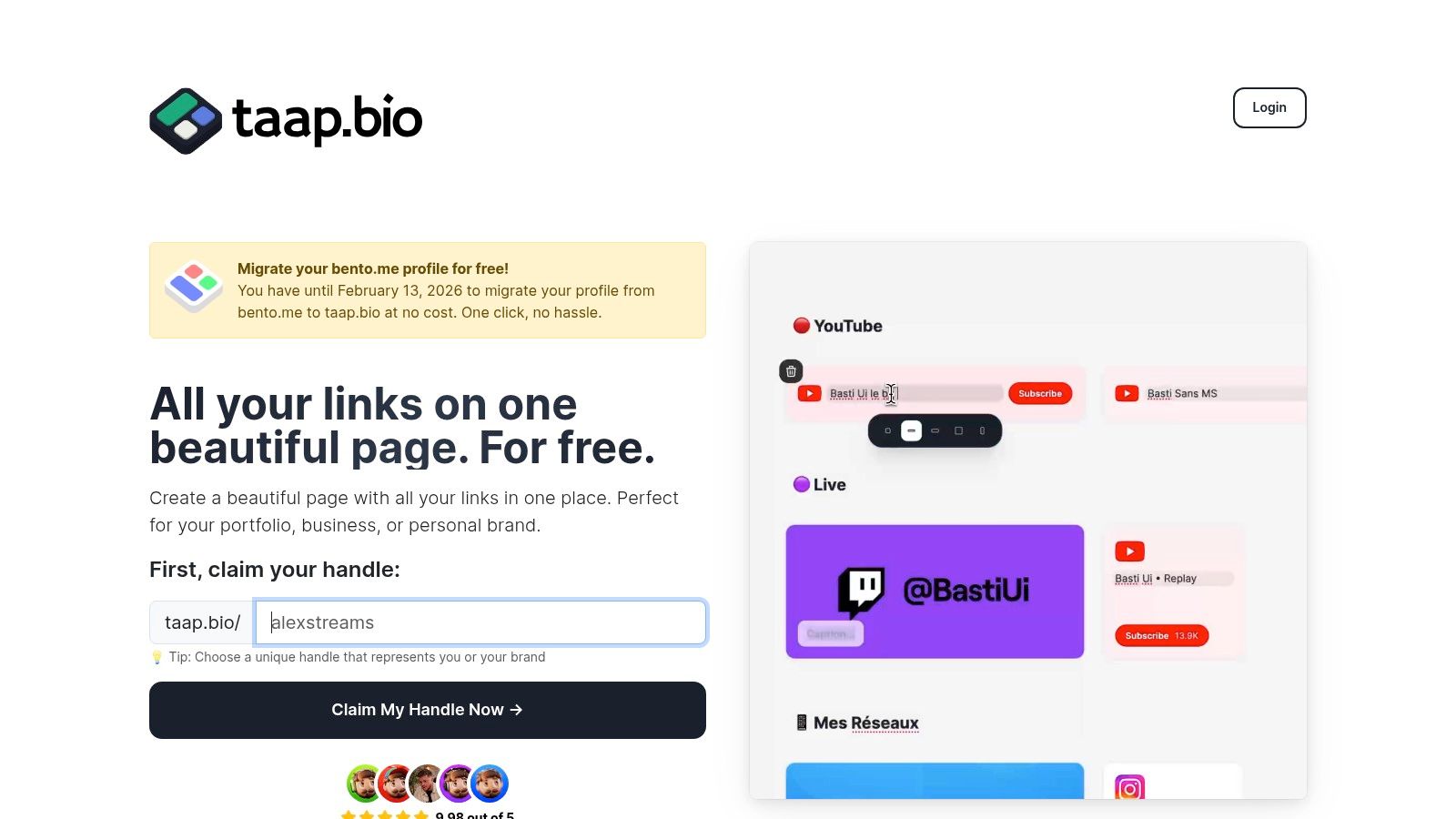
For small businesses aiming to make a powerful first impression, taap.bio transforms the standard "link in bio" page into a dynamic, brand-centric microsite. It breaks free from the typical vertical list of links, offering a sophisticated, bento-style modular grid. This design-first approach allows businesses to create a visually compelling and highly personalized landing page that functions more like a curated digital portfolio than a simple link directory. The platform's smooth, physics-based drag-and-drop editor makes arranging and resizing content blocks intuitive, providing unparalleled control over the final layout.
Why taap.bio Stands Out
What truly sets taap.bio apart among other social media marketing tools for small business are its "smart widgets." These are not static links but live, data-rich embeds that pull real-time information from other platforms. Imagine showcasing your latest YouTube video thumbnail, live Instagram follower count, or a GitHub contribution graph directly on your page. This capability turns your link-in-bio into an active dashboard of your brand's digital presence.
Key Features and Use Cases:
- Bento-Style Modular Grid: Move beyond linear lists. Arrange your services, testimonials, product photos, and social links in a custom, magazine-style layout that guides the visitor's eye.
- Real-Time Smart Widgets: Integrate live feeds from platforms like Instagram, YouTube, GitHub, Figma, and Dribbble to display current activity and social proof. Musicians can even embed Spotify tracks or albums with inline playback.
- Deep Visual Customization: Fine-tune every element, from colors and fonts to animated GIF avatars and custom backgrounds, ensuring your page is a perfect extension of your brand identity.
- Independent Mobile & Desktop Layouts: Optimize the user experience by creating distinct layouts for mobile and desktop visitors, a crucial feature for engaging audiences across devices.
Pricing and Onboarding
Currently, taap.bio offers a free plan and is running a special one-click migration for users of Bento.me until February 13, 2026, making the transition seamless. While detailed pricing for future premium tiers is not yet public, the robust free offering provides immense value. This makes it an excellent choice for businesses wanting to explore the potential of a more advanced link-in-bio without an initial investment. For those evaluating their options, exploring a comparison of the best link in bio tools can provide additional context.
Pros:
- Unmatched visual flexibility with its modular, non-linear grid.
- Dynamic "smart widgets" that display live data from key platforms.
- Extensive customization options for a deeply branded experience.
Cons:
- The wealth of design options can present a slight learning curve for users seeking a simple link list.
- Long-term pricing and feature tiers beyond the free plan are not yet transparent.
Website: https://taap.bio
2. Buffer
Buffer has long been a favorite among social media marketing tools for small business owners, and for good reason. It strips away the complexity of enterprise-level software, offering a clean, intuitive platform focused on scheduling content and engaging with your audience. Its straightforward, per-channel pricing model is a standout feature, allowing you to pay only for the social media accounts you actively manage without being forced into expensive, bundled tiers.
The platform excels at making scheduling feel effortless. You can load up your queue with posts, and Buffer will automatically publish them at optimal times. The unified inbox is another powerful feature, pulling comments and DMs from your connected accounts into one manageable stream, which is a massive time-saver for community management. For those struggling with content ideas, the built-in AI assistant can help you brainstorm and rephrase posts on the fly.
Key Details & Recommendations
- Best For: Solopreneurs and small teams who need a reliable, easy-to-learn scheduler and engagement tool without a steep learning curve or high costs.
- Standout Feature: The transparent, "pay-per-channel" pricing. You can start with a generous free plan (up to 3 channels) and scale affordably as your business grows. The Essentials plan starts at just $6 per month, per channel.
- Pros: Extremely user-friendly interface, predictable pricing, and a solid free tier perfect for getting started.
- Cons: Analytics and social listening features are basic compared to more advanced suites. Collaboration tools on lower-tier plans are limited.
For a deeper dive into how it stacks up against other platforms, our social media management tools comparison provides a detailed analysis. Buffer remains a top contender for small businesses prioritizing simplicity and affordability.
Website: https://buffer.com/pricing
3. Hootsuite
Hootsuite is one of the original and most established social media marketing tools for small business, evolving into a comprehensive, all-in-one suite. It’s designed for businesses that need more than just scheduling, offering robust tools for team collaboration, unified engagement, and basic social listening right out of the box. Its strength lies in providing a centralized command center to manage multiple networks, workflows, and team member assignments efficiently.
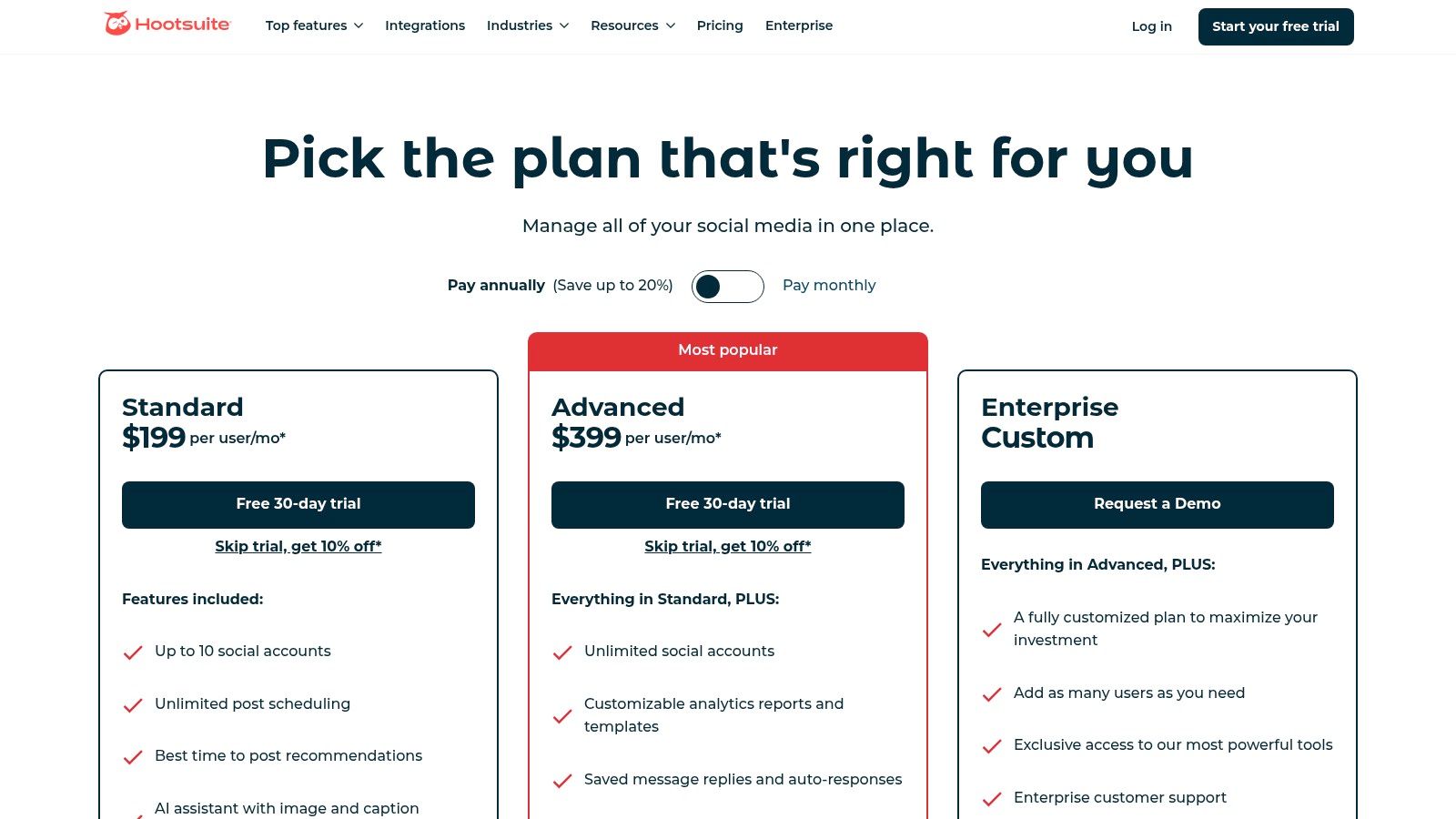
The platform is particularly powerful for managing audience interactions. Its unified inbox supports assigning conversations to specific team members, using automated rules, and even sending customer satisfaction (CSAT) surveys to measure service quality. For content creation, Hootsuite integrates Canva and Adobe Express templates directly and features its own AI assistant, OwlyGPT, for generating post ideas and captions. Its ability to bulk schedule hundreds of posts at once is a significant advantage for content-heavy strategies.
Key Details & Recommendations
- Best For: Growing teams and established small businesses that require strong workflow tools, cross-network management, and integrated customer engagement features.
- Standout Feature: The powerful, team-oriented unified inbox. The ability to assign conversations, track response times, and manage YouTube comments makes it ideal for businesses focused on customer service.
- Pros: Excellent team collaboration and workflow tools, extensive channel coverage, and rich integrations with business software like Salesforce and Zendesk.
- Cons: Pricing can be higher than competitors, and the most advanced features are often locked behind more expensive enterprise-level plans.
Hootsuite’s structured environment is perfect for teams that need to implement approval processes and maintain brand consistency across multiple accounts.
Website: https://www.hootsuite.com/plans/business
4. Sprout Social
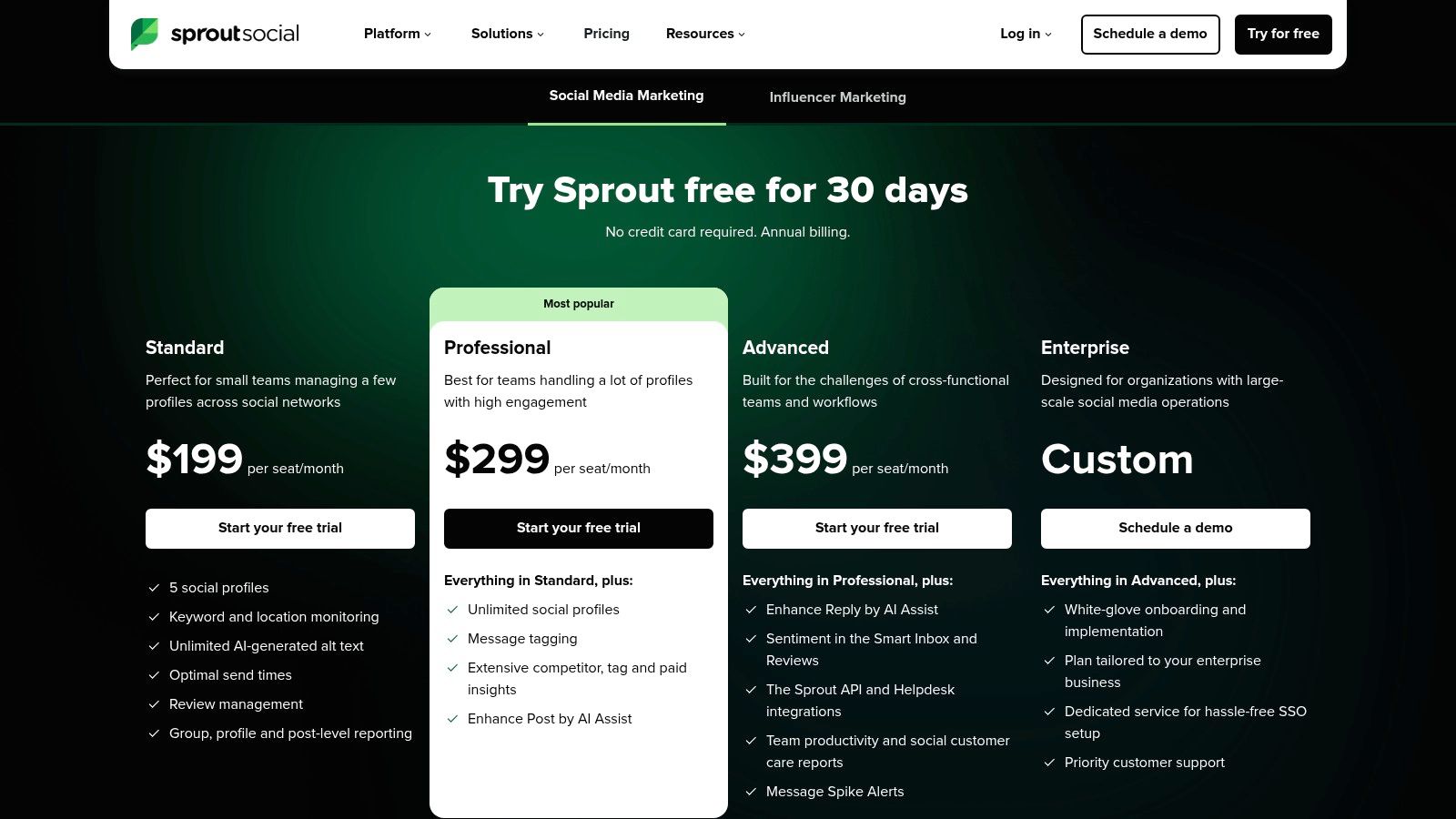
Sprout Social positions itself as a premium, all-in-one suite among social media marketing tools for small business, especially those with growth ambitions. It moves beyond basic scheduling to offer a powerful combination of publishing, engagement, and deep analytics, making it ideal for businesses that are ready to invest in a more robust, data-driven social strategy. The platform is designed to handle complexity with ease, from managing customer care workflows to generating stakeholder-ready reports.
Its unified Smart Inbox is a standout, consolidating messages, mentions, and even reviews into a single, actionable feed where team members can tag conversations and assign tasks. This feature alone can transform a chaotic customer service process into a streamlined operation. Sprout Social also excels in analytics, providing granular data on post performance, competitor activity, and paid campaign insights, allowing you to prove ROI and refine your approach with confidence.
Key Details & Recommendations
- Best For: Growing small to medium-sized businesses and agencies that need comprehensive reporting, advanced collaboration, and a scalable platform to manage multiple brands or team members.
- Standout Feature: The best-in-class analytics and reporting suite. It delivers beautiful, presentation-ready dashboards that clearly demonstrate social media performance and ROI to key stakeholders.
- Pros: Powerful and intuitive user interface, excellent collaboration tools, and industry-leading analytics. The 30-day free trial is generous and fully featured.
- Cons: The per-user pricing model can become expensive for larger teams, and some advanced features like premium analytics are sold as costly add-ons.
For teams looking to leverage these powerful tools, understanding the nuances of audience interaction is key. Exploring strategies for how to improve social media engagement can help you make the most of Sprout Social’s advanced capabilities.
Website: https://sproutsocial.com/pricing/
5. Later
Later began as an Instagram-first scheduler and has evolved into one of the most visually intuitive social media marketing tools for small business owners. It's built around a visual calendar, making it incredibly easy for brands that rely on strong aesthetics (like e-commerce, artists, and creators) to plan their content grid and maintain a cohesive look. The platform is heavily optimized for visual networks like Instagram, TikTok, and Pinterest.
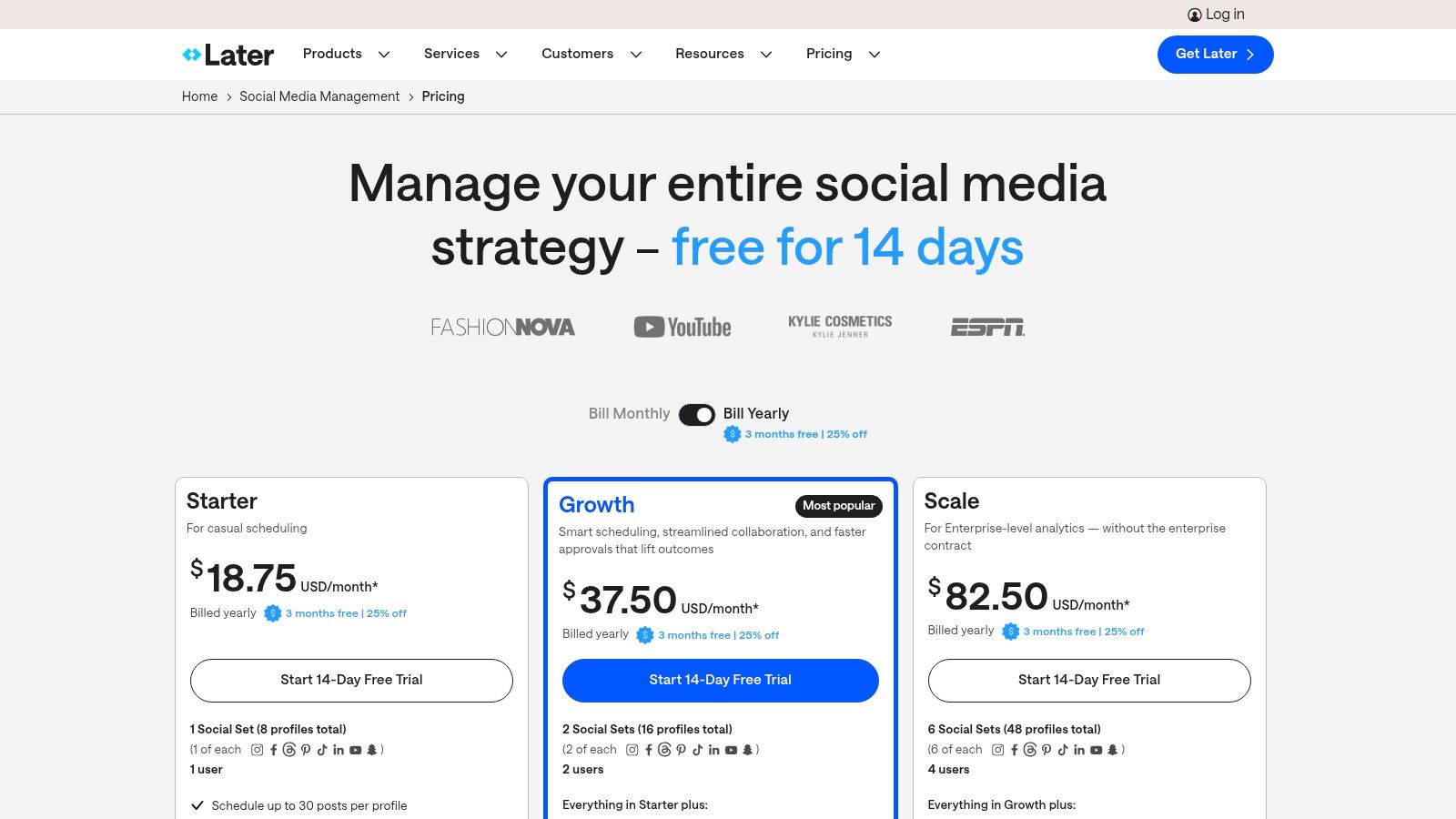
The drag-and-drop calendar combined with the Instagram grid preview is a game-changer for visual planning. Later also suggests the best times to post based on your audience's activity, taking the guesswork out of maximizing reach. While its roots are in scheduling, it has expanded to include a social inbox for managing comments and DMs, basic analytics, and a built-in Link in Bio tool, making it a well-rounded solution for visually-driven marketing efforts.
Key Details & Recommendations
- Best For: E-commerce brands, creators, and businesses where visual content on Instagram, TikTok, and Pinterest is the primary marketing driver.
- Standout Feature: The Visual Planner. Being able to see and arrange your Instagram grid before you post is an indispensable feature for maintaining a specific brand aesthetic.
- Pros: Superb for visual-first platforms, excellent user interface, and provides actionable "best time to post" suggestions. The included Link in Bio tool is a great value-add.
- Cons: Analytics and inbox features are less robust than dedicated tools. Add-ons for extra users or social sets can increase the final price on lower-tier plans.
For businesses that live and breathe by their visual feed, Later offers an unmatched planning experience. The free plan is limited but the paid Starter plan, beginning at $25/month, unlocks most of the key features a small business needs.
Website: https://later.com/pricing
6. Loomly
Loomly is a powerful yet accessible entry on our list of social media marketing tools for small business, especially for teams that value collaboration and a structured workflow. It's built around a "planning-first" philosophy, emphasizing a clean content calendar, post mockups, and approval processes before anything goes live. This makes it an ideal choice for businesses with multiple stakeholders or those managing client accounts who need clear, step-by-step sign-offs.
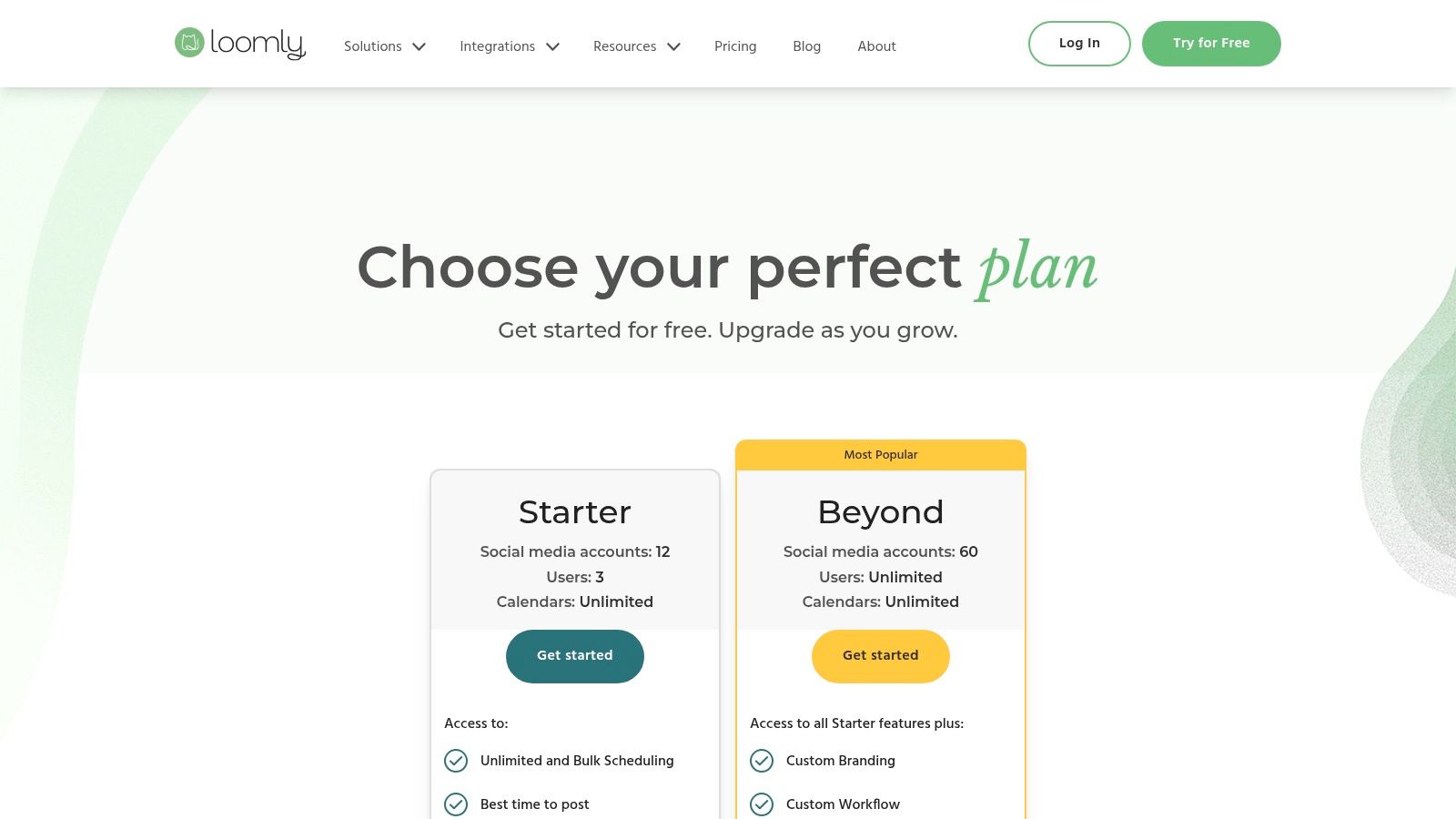
The platform offers a comprehensive experience beyond basic scheduling. Its content library, complete with a basic editor and integrations with Canva and Unsplash, helps teams organize assets efficiently. Loomly also provides post ideas and optimization tips based on social media best practices, guiding you toward more effective content. With broad support for channels like Google Business Profile and TikTok, it ensures your small business can maintain a consistent presence across all relevant platforms.
Key Details & Recommendations
- Best For: Small agencies, marketing teams, and businesses that require a structured approval workflow and a central content calendar to keep everyone aligned.
- Standout Feature: The collaborative calendar with built-in approval flows. Team members can create, comment on, and approve posts in a streamlined process, preventing errors and ensuring brand consistency.
- Pros: Excellent team-friendly collaboration and approval features, strong multi-network support including Google Business Profile, and helpful post ideas and tips.
- Cons: Pricing information can sometimes be hard to find on the website. Feature availability may be impacted by third-party API changes, and some users report occasional support delays.
Loomly’s structured approach brings order to the potential chaos of team-based social media management, making it a reliable choice for growing businesses.
Website: https://www.loomly.com/pricing
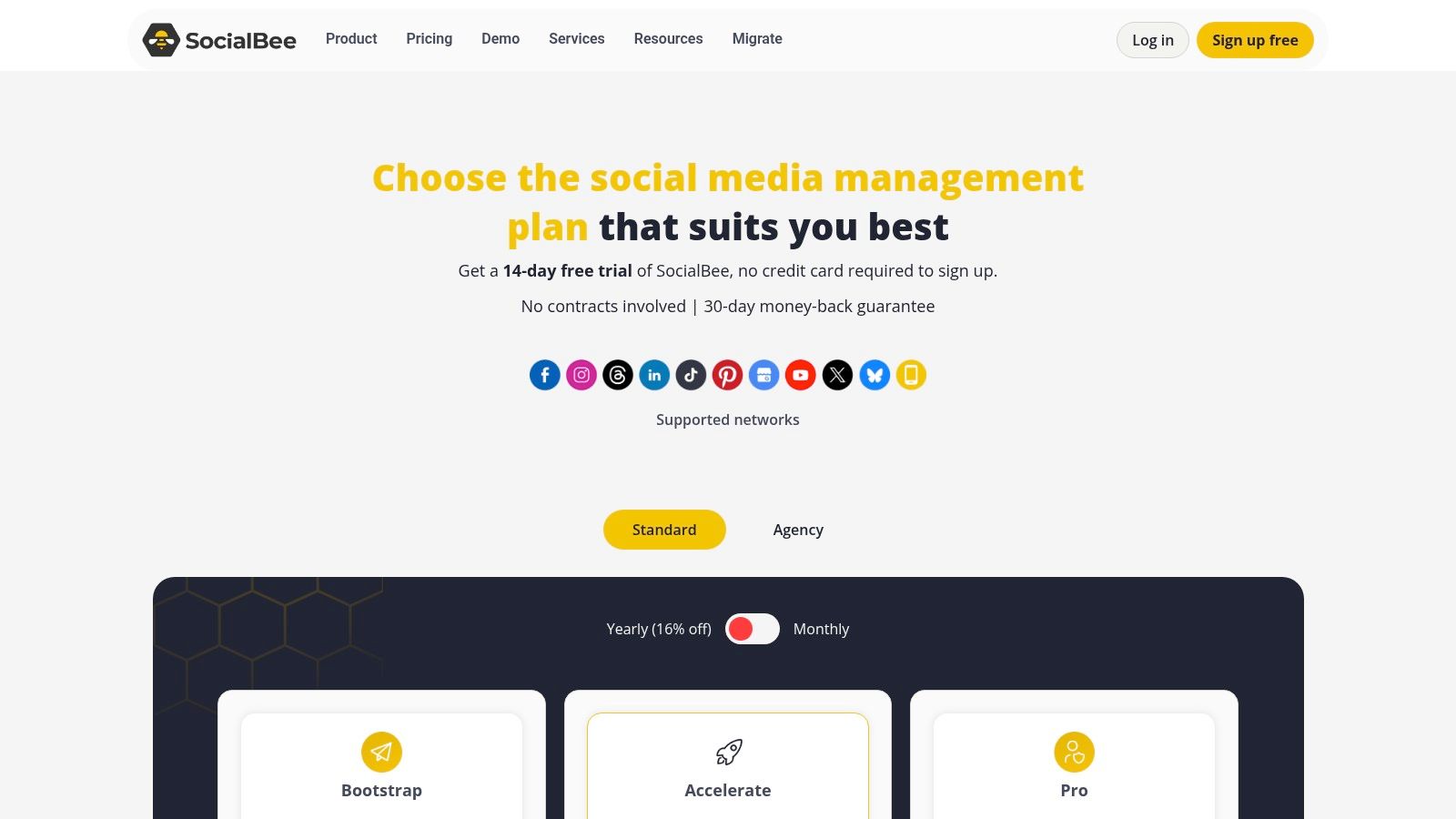
7. SocialBee
SocialBee is a powerful yet accessible choice among social media marketing tools for small business, especially for those who want to maximize their content output. Its core strength lies in its category-based evergreen content queues, which let you organize posts by topic and recycle your best-performing content automatically. This "set it and forget it" approach ensures your profiles remain consistently active, saving you countless hours of manual rescheduling.
The platform is designed with efficiency in mind, offering broad channel support that includes newer platforms like Threads and Bluesky alongside staples like Instagram and LinkedIn. For businesses that need more than just software, SocialBee stands out by offering optional concierge services to manage your social media for you. Its AI assistant is also a helpful addition, generating captions and content plans to overcome creative blocks.
Key Details & Recommendations
- Best For: Small businesses and agencies focused on content efficiency who want to automate posting schedules and recycle evergreen content without constant manual effort.
- Standout Feature: The category-based evergreen posting system. It allows you to create balanced content calendars that automatically pull from different topics, ensuring your feed never feels repetitive.
- Pros: Competitive pricing with clear plan limits, offers both DIY tools and optional done-for-you services, and supports a wide range of social media channels.
- Cons: The user interface is more functional and utilitarian compared to more design-led tools. Some advanced analytics are reserved for higher-tier plans.
SocialBee offers a 14-day free trial on its plans, which start at $29 per month for the Bootstrap plan, making it an affordable entry point for robust automation.
Website: https://socialbee.com/pricing/
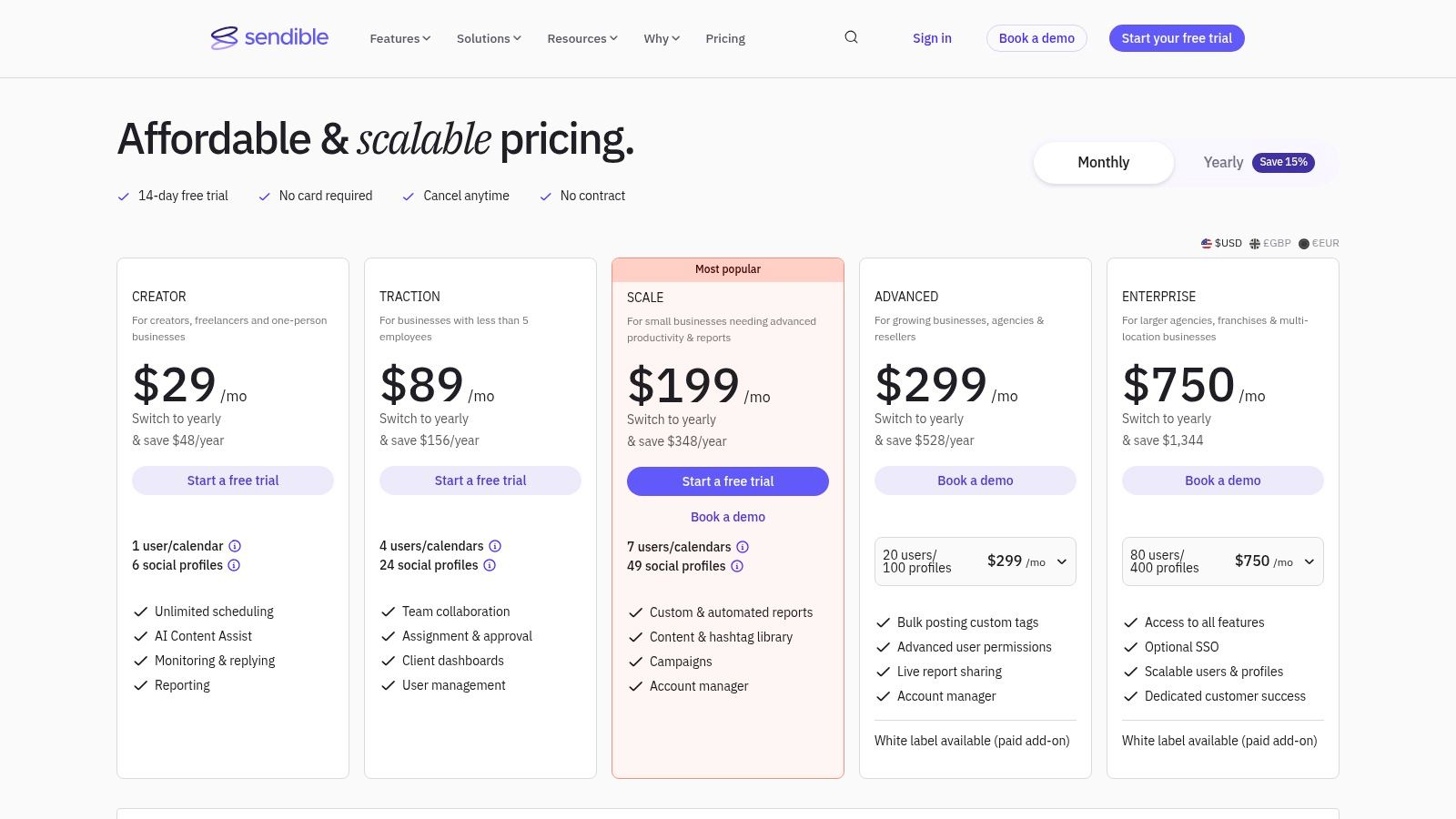
8. Sendible
Sendible is a powerful, agency-focused platform that scales down perfectly for small businesses managing multiple brands or client accounts. It positions itself as an all-in-one hub, combining scheduling, engagement, analytics, and client management into a cohesive dashboard. Unlike tools focused purely on simplicity, Sendible provides a deeper feature set, including dedicated client dashboards and robust reporting with Google Analytics integration, making it one of the most versatile social media marketing tools for small business teams.
The platform's strength lies in its structure, which is built for collaboration and brand separation. You can create distinct content libraries, queues, and approval workflows for each brand or client you manage. Its unified "Priority Inbox" intelligently gathers all critical mentions and messages, while direct integrations with Canva, Google Drive, and Dropbox streamline the content creation process significantly. For agencies or consultants, the optional white-labeling is a game-changer for presenting a professional, branded experience.
Key Details & Recommendations
- Best For: Small agencies, freelance social media managers, and businesses that manage social media for multiple distinct brands or locations.
- Standout Feature: The client and team management capabilities. Features like client dashboards, user permissions, and content approval workflows are built-in, not afterthoughts.
- Pros: Strong value for teams managing several brands, flexible user and profile bundles, and helpful post guidance to protect account integrity.
- Cons: The interface can feel more complex than single-brand tools. Advanced white-labeling features require a paid add-on or higher-tier plan.
Sendible offers a great balance of power and affordability, especially for those who have outgrown simpler schedulers and need more robust organizational tools.
Website: https://www.sendible.com/pricing
9. Semrush Social (Social Media Toolkit)
For businesses already leveraging Semrush for SEO and content marketing, its Social Media Toolkit is a powerful extension that consolidates your digital efforts. It stands out by integrating social media management with robust competitive analysis, making it one of the more strategic social media marketing tools for small business owners who are data-driven. This isn't just a scheduler; it's a tool for understanding what your competitors are doing right and applying those insights to your own content strategy.
The platform allows you to schedule posts across all major networks, including Google Business Profile, and offers practical features like bulk scheduling via CSV and a handy Chrome extension for sharing on the fly. Where it truly shines is in its analytics, letting you benchmark your performance against rivals and track content that resonates in your niche. The interface can feel a bit complex for newcomers, but for those invested in the Semrush ecosystem, the convenience of having SEO and social data in one place is a significant advantage.
Key Details & Recommendations
- Best For: Small to medium-sized businesses that are already using or considering Semrush for SEO and want an all-in-one marketing suite with strong competitive analysis features.
- Standout Feature: The deep integration with Semrush's competitive intelligence tools. You can analyze competitors' social strategies and use that data to inform your own scheduling and content creation.
- Pros: Combines scheduling with powerful competitive insights, useful for teams wanting a unified marketing platform, and offers a free plan and 7-day trials for paid tiers.
- Cons: The interface can feel heavy if you only need basic scheduling. Some of the most powerful features are tied to higher-tier plans or specific add-ons.
For those who prioritize understanding the competitive landscape as much as they do publishing content, Semrush Social offers a unique, data-rich perspective.
Website: https://www.semrush.com/features/social-media-poster/
10. Canva Content Planner (Canva Pro/Business)
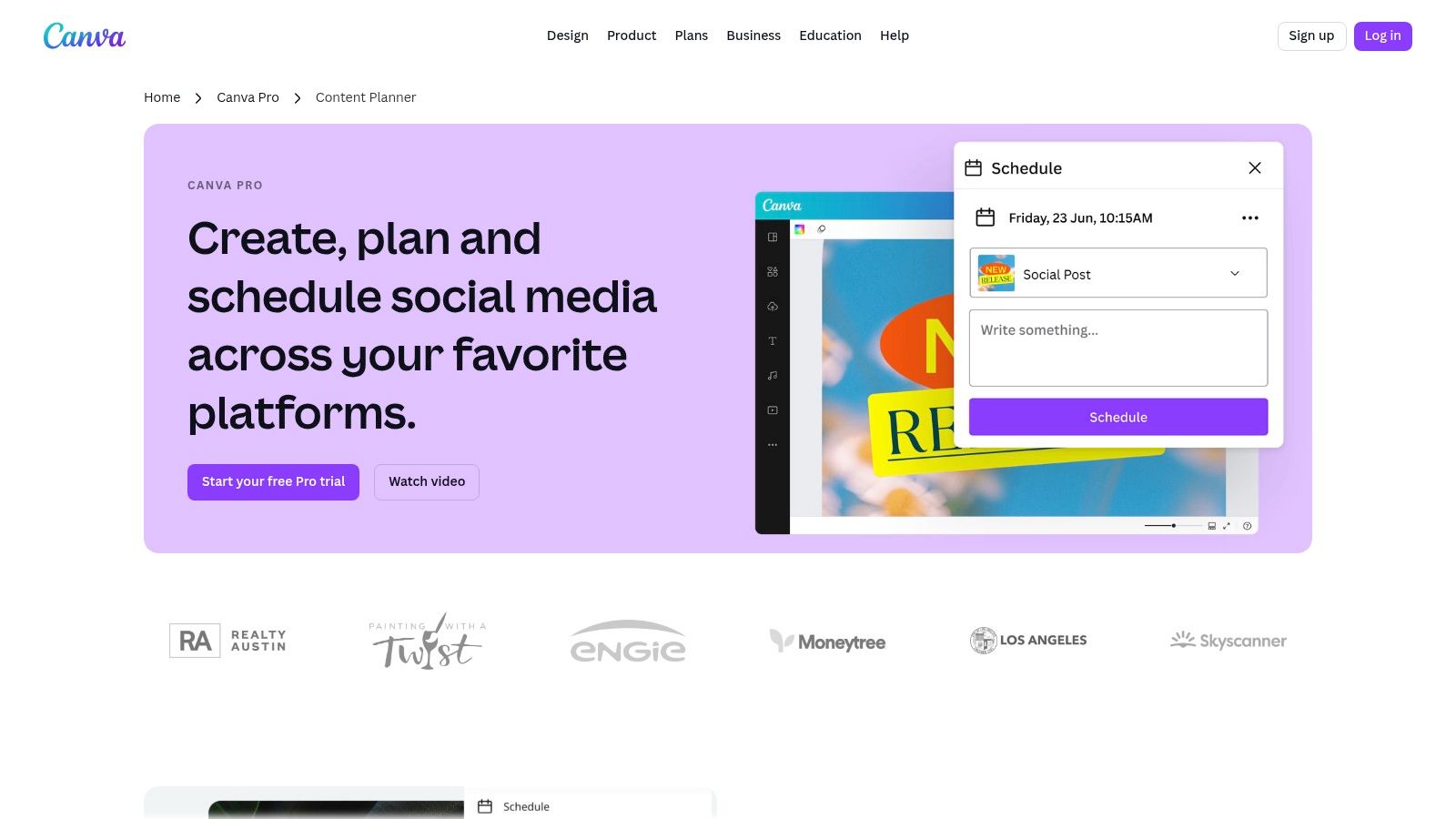
For many small businesses, the content creation process is completely separate from the scheduling process, creating an inefficient, multi-step workflow. Canva Content Planner, available with a Pro or Business subscription, solves this by integrating a powerful scheduler directly into the design suite millions already use. This makes it one of the most streamlined social media marketing tools for small business owners who want to design and publish from a single dashboard.
The magic is in the workflow integration. You can create a graphic using Canva’s massive template library, use the Magic Resize tool to adapt it for different platforms, and then add it directly to your content calendar for publication on Instagram, Facebook, Pinterest, and more. The built-in AI tools for writing captions and generating design ideas further accelerate the process, making it a true all-in-one solution for visual content.
Key Details & Recommendations
- Best For: Solo entrepreneurs and small teams who already use Canva for design and want to consolidate their creative and scheduling workflows into one platform.
- Standout Feature: The seamless integration of a content scheduler within a best-in-class design tool. Going from idea to design to scheduled post happens in one place, saving significant time.
- Pros: Eliminates the need to download and re-upload assets, access to a vast library of templates and stock media, and integrated AI tools. Canva Pro plans start with a 30-day free trial.
- Cons: The scheduler's features are less advanced than dedicated SMM suites, and some users report occasional publishing glitches or platform limitations.
For content creators looking to pair powerful design tools with their social strategy, our guide on the best tools for content creators offers additional resources. Canva remains a top choice for efficiency-focused businesses.
Website: https://www.canva.com/pro/content-planner/
11. Meta Business Suite
For small businesses heavily invested in the Facebook and Instagram ecosystem, Meta Business Suite is one of the most essential free social media marketing tools for small business. As a native platform, it eliminates the need for third-party connectors, providing a direct, unified hub for managing your presence across both networks. Its core strength lies in centralizing key activities like content creation, scheduling, and community management without any subscription fees.
The suite offers a surprisingly robust set of features for a free tool. You can plan and schedule posts, stories, and Reels from a single calendar view and get recommendations for optimal posting times based on your audience's activity. The unified inbox is a standout, combining Facebook and Instagram comments and DMs into one manageable feed. For those leveraging video, understanding how to create engaging Instagram Reels is key to maximizing your reach directly within the platform.
Key Details & Recommendations
- Best For: Small businesses and creators who focus exclusively on Facebook and Instagram and want a no-cost, official tool for basic scheduling and inbox management.
- Standout Feature: The native, unified inbox. Managing DMs and comments from both platforms in one place without paying for a third-party tool is a massive time-saver.
- Pros: Completely free to use, direct integration (no third-party apps needed), and includes useful features like a planner and basic analytics.
- Cons: Users frequently report reliability issues, such as scheduled posts failing to publish or syncing problems. The scheduling window is also limited, typically to just 29 days in advance.
To get the most out of the suite, ensure you’ve properly connected your accounts; our guide on how to link your Facebook Page to Instagram walks you through the process.
Website: https://business.facebook.com/
12. Planoly
Planoly carved out its niche as the go-to visual planner for Instagram, and while it has expanded, that visual-first approach remains its core strength. For businesses where aesthetics are paramount, like e-commerce brands, artists, and creators, this is one of the essential social media marketing tools for small business. It allows you to drag and drop images and videos to perfect your Instagram grid's look and feel before a single post goes live, ensuring brand consistency.
Beyond its powerful grid planning, Planoly offers a complete multi-channel workspace. You can schedule content not just for Instagram, but also for Pinterest, TikTok, Facebook, and more. Features like its hashtag manager, AI caption generator, and the ability to schedule the first comment (perfect for tucking away hashtags) streamline the entire content creation workflow. Its unified comment inbox and analytics provide the necessary tools to manage engagement and measure performance directly within the platform, making it a well-rounded solution for visually-driven brands.
Key Details & Recommendations
- Best For: E-commerce merchants, creators, and solopreneurs whose primary social channel is Instagram and who rely heavily on visual storytelling to market their business.
- Standout Feature: The drag-and-drop visual grid planner. It is incredibly intuitive and provides an unmatched preview of how your feed will look, which is critical for maintaining a curated brand image.
- Pros: Excellent and intuitive Instagram planning workflow, affordable entry-level pricing for individuals, and a clean, user-friendly interface.
- Cons: Features for other social networks like X and LinkedIn feel less robust than its core Instagram tools. Upload limits on the starter plan can be restrictive for high-volume posters.
Website: https://www.planoly.com/pricing
Top 12 Social Media Marketing Tools Comparison
| Product | Core features | UX / Quality ★ | Value / Price 💰 | Target audience 👥 | Unique selling points ✨ |
|---|---|---|---|---|---|
| taap.bio 🏆 | Bento-style modular grid, drag‑and‑drop, smart widgets (Spotify, IG, YouTube, GitHub, Figma) | ★★★★★ | 💰 Free + paid (tiers unclear) | 👥 Creators & designers who want a visual mini-site | ✨ Visual bento layout + real-time smart widgets; inline audio/playback |
| Buffer | Queue scheduling, unified inbox, AI copy, basic analytics | ★★★★ | 💰 Transparent, low entry | 👥 Solo owners & small teams | ✨ Simple, predictable pricing and easy onboarding |
| Hootsuite | Cross-network publishing, bulk uploads, unified inbox, integrations | ★★★★ | 💰 Mid–High (variable) | 👥 Teams & agencies | ✨ Broad integrations & team workflow features |
| Sprout Social | Scheduling, smart inbox, deep analytics & reporting, review mgmt | ★★★★★ | 💰 Premium, per-seat | 👥 Growing SMBs & multi-brand teams | ✨ Best-in-class reporting and stakeholder dashboards |
| Later | Visual calendar, auto-publish (IG/TikTok), link-in-bio bundle | ★★★★ | 💰 Clear plans; 14‑day trial | 👥 Visual brands & creators | ✨ Strong IG/TikTok visual workflows and grid preview |
| Loomly | Content calendar, approval workflows, role permissions, media library | ★★★ | 💰 Mid (team-focused) | 👥 Teams needing approvals & process | ✨ Planning-first UX with built-in approvals |
| SocialBee | Evergreen queues, AI captions, engagement inbox, client reports | ★★★★ | 💰 Competitive, clear limits | 👥 SMBs & agencies (DIY or managed) | ✨ Evergreen recycling + optional white‑glove services |
| Sendible | Scheduling, client dashboards, reporting, optional white‑label | ★★★★ | 💰 Good value for multi-brand teams | 👥 Agencies & SMBs with multiple clients | ✨ Client-friendly dashboards & white‑label options |
| Semrush Social | Cross-network posting, competitor benchmarking, CSV bulk | ★★★★ | 💰 Add-on dependent | 👥 SEO/marketing teams | ✨ Competitive insights combined with social posting |
| Canva Content Planner | Design-to-post scheduling, templates, brand kits, Magic Resize | ★★★★ | 💰 Included with Pro/Business (trial) | 👥 Small teams who design & publish | ✨ One workflow from design to publish with huge template library |
| Meta Business Suite | Native FB/IG scheduler, unified inbox, ad integration | ★★★ | 💰 Free | 👥 Facebook & Instagram managers | ✨ Native tool (no third-party connector); free entry |
| Planoly | Visual grid planning, auto-post, hashtag manager, analytics | ★★★★ | 💰 Affordable entry | 👥 Instagram creators & merchants | ✨ Instagram-first visual planner with commerce tools |
Building Your Perfect Stack: How to Choose and Get Started
You've navigated the expansive landscape of social media marketing tools for small business, from comprehensive management suites like Sprout Social to visually-focused schedulers like Later and Planoly. We've explored everything from analytics powerhouses to content creation hubs, but the most crucial takeaway isn't just knowing what these platforms do. It's understanding that there is no single "best" tool, only the best tool for you.
The goal is not to adopt every shiny new app. The goal is to strategically assemble a "stack" of tools that streamlines your workflow, amplifies your message, and ultimately drives tangible growth without overwhelming your budget or your schedule. You are the architect of your own marketing efficiency.
Synthesizing Your Strategy: From List to Action
Before you start signing up for free trials, take a moment to reflect on the core challenges identified in your current social media process. Is your biggest bottleneck creating engaging visuals? Is it finding the time to post consistently? Or is it proving the ROI of your efforts to stakeholders (or even just to yourself)? Your primary pain point is your starting point.
Remember the key categories we covered: scheduling, analytics, content creation, ad management, link-in-bio, and social listening. A balanced tool stack addresses your most critical needs across these functions. A solopreneur might thrive with a combination of Canva for creation, Buffer for scheduling, and Taap.bio for conversion. A growing team, however, might need the collaborative features of Loomly or the deep analytics of Sprout Social to manage a more complex operation.
A Practical Framework for Choosing Your Tools
Don't let analysis paralysis stall your progress. Use this simple, three-step framework to make a confident decision and start implementing your new social media marketing tools for small business.
Define Your Non-Negotiables: Based on your business goals, what is the one feature you absolutely cannot live without? Is it an intuitive mobile app for on-the-go posting? Is it a unified inbox to manage all your DMs? Is it a visual grid planner for Instagram? Start here. This single requirement will immediately narrow your options from a dozen to just a few.
Set a Realistic Budget: Determine what you can comfortably invest per month. Many powerful tools offer free or low-cost starter plans perfectly suited for small businesses. Be honest about your budget from the outset. This prevents you from falling in love with a platform like Sprout Social if your budget is better aligned with a tool like Buffer or SocialBee.
Run a Pilot Test: Almost every tool on our list offers a free trial. Choose your top two contenders and commit to using them exclusively for a week or two. Don't just explore the dashboard; use them for your real-world tasks. Schedule actual posts, analyze real data, and see which one feels more intuitive and less like a chore. The one that simplifies your life the most is your winner.
Building your marketing stack is an iterative process. The tools you start with today may not be the ones you use a year from now as your business scales and your needs evolve. The key is to begin with a thoughtful, strategic foundation that saves you time, enhances your creativity, and transforms your social media presence from a daily task into a powerful engine for growth.
Ready to unify your online presence and turn your social media traffic into action? Your link-in-bio is the crucial bridge between your content and your business goals, and taap.bio provides the most visually stunning and effective way to build it. Start creating your beautiful, conversion-focused landing page for free today at taap.bio.