You're probably in the same spot most creators hit eventually. Your bio link started as a tidy list of links, then turned into a checkout page, a lead form, a booking flow, a digital product shelf, and one more dashboard you forgot to cancel.
That's why the Linktree vs Beacons decision gets misframed so often. People compare templates, button styles, and surface features. The question is simpler. Which tool costs you less and creates less operational drag once money starts moving through it?
If you only need a recognizable page that sends people elsewhere, Linktree is still the easy default. If you want built-in monetization features and can tolerate a busier setup, Beacons is usually the stronger fit. But if you're already tired of stacking a link page with separate checkout, scheduling, and email tools, you should stop treating this like a link-in-bio choice and start treating it like a store decision.
Table of contents
Why Linktree vs Beacons Is Really a Revenue Stack Decision
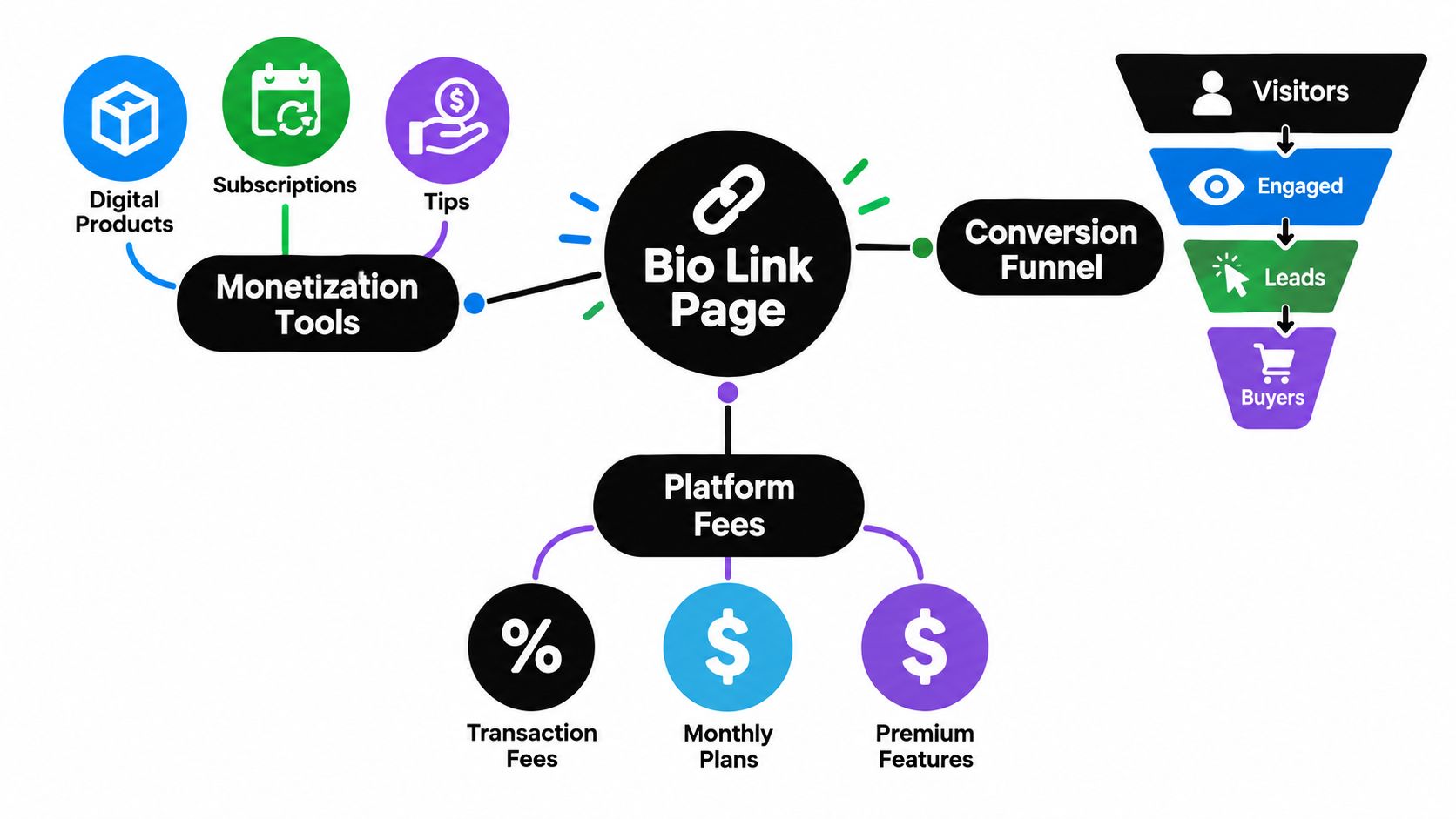
Most creators don't lose money on the monthly subscription first. They lose it in the stack around the bio page. One tool handles links. Another handles email. Another handles bookings. Another hosts digital downloads. Then transaction fees start shaving off every sale.
That's why Linktree vs Beacons is really a revenue stack decision. Your bio page isn't a profile accessory anymore. It's the front door to your funnel.
What your bio page is actually doing
When I set these pages up for clients, I don't start with design. I start with what happens after the tap.
- If you sell digital products, the page needs to reduce friction between visitor and checkout.
- If you sell services, it needs to collect intent, qualify leads, and take payment before your calendar gets abused.
- If you're building an audience, it needs to capture email, not just spray people across five platforms.
- If you're doing all three, the wrong setup creates tool sprawl fast.
Linktree leans simpler. It's cleaner, more familiar, and easier to keep lightweight. Beacons pushes harder toward an all-in-one creator business setup with storefront, email, media kit, and automation. That sounds better on paper, and often is better in practice, but only if you'll use those pieces.
Practical rule: If your bio page sends people to three different tools before they can buy, book, or subscribe, your setup is already too fragmented.
Fees matter more than feature lists
Both platforms can help you monetize. Both can also become expensive in a quiet way because the cost isn't only the monthly plan. It's the combination of subscription fees, transaction fees, and the extra apps you keep bolting on.
That's why I'd rather point creators toward consolidation logic than feature tourism. If you're already asking whether one page can replace checkout, email capture, scheduling, and analytics, you're asking the right question. A good breakdown of that broader consolidation mindset sits in this all-in-one business platform guide.
The blunt version is this. If your page exists to earn money, don't choose based on which one has prettier blocks. Choose based on how much revenue will pass through it and how many extra subscriptions you'll still need after setup.
Platform Scale and Background at a Glance
Linktree and Beacons compete in the same category, but they're not the same kind of company. One is the category giant. The other is the smaller creator-tools challenger trying to win on built-in monetization.
Linktree vs Beacons at a glance
| Metric | Linktree | Beacons |
|---|---|---|
| Founding background | Founded in Melbourne in 2016 | Younger creator tools competitor |
| Reported user scale | Surpassed 50 million users in May 2024, according to TechCrunch's Linktree coverage | Third-party summaries described around 2 million creators worldwide, referenced in Beacons' seed round announcement context |
| Funding disclosed in cited data | Raised more than $165 million, per TechCrunch | Raised a $6 million seed round led by Andreessen Horowitz, per Beacons |
| Commerce signal | Industry profile cited in the TechCrunch piece said creator base reached 70M+ by April 2025 and drove about $300 million in monthly commerce sales from 240 million commerce clicks in the prior month | Subscription-led model with paid tiers at $10, $30, and $50 per month, plus transaction fees on some sales features, as described in Beacons company context |
| Positioning | Mainstream, familiar, broadly adopted | Smaller, more feature-bundled creator business platform |
What that scale actually means
Linktree has brute-force market presence. It started as a simple fix for the one-link problem and turned into a category leader. The size matters because audiences recognize it, brands recognize it, and plenty of creators stick with it because it feels safe and familiar.
Beacons is a different bet. It's smaller in disclosed scale and more opinionated about creator monetization. That usually attracts creators who want the bio page to do more than route traffic.
If you need a simple explainer on Linktree's core role before comparing it to anything else, this quick breakdown of what Linktree does is useful.
Linktree wins on familiarity and distribution. Beacons wins by trying to replace more of the creator stack from the start.
My read as an advisor
If you care about brand trust and ease of explanation, Linktree has the advantage. If you care about built-in business features and don't mind a more involved setup, Beacons is trying to solve a bigger problem.
That doesn't make Beacons the automatic winner. It just means the two tools should be judged differently. Linktree is trying to be obvious. Beacons is trying to be useful.
Side-by-Side Feature Comparison
The easiest way to compare Linktree and Beacons is to stop looking at homepage copy and look at the jobs creators need done.
Feature comparison for Linktree vs Beacons
| Feature | Linktree | Beacons | Winner |
|---|---|---|---|
| Core link-in-bio setup | Simple, fast, familiar | More configurable, more moving parts | Linktree |
| Storefront and direct selling | Available, but commerce feels more layered into the product | Built around direct creator monetization from the start | Beacons |
| Email capture | Simpler approach, often supplemented with outside tools | Built-in email tooling is part of the pitch | Beacons |
| Bookings and services | Supported, but not the product's strongest identity | Better aligned with creators selling offers from the same page | Beacons |
| Media kit and creator business tools | Lighter business stack | Stronger all-in-one creator toolkit | Beacons |
| Analytics experience | Cleaner and easier to read | Broader business reporting, but busier | Depends |
| Customization | Polished but more constrained | More flexible, but easier to overbuild | Depends |
| Ease of use | Lower learning curve | More complex, more feature-dense | Linktree |
Where Linktree is better
Linktree's strength is restraint. The editor is easier to understand, the public page is recognizable, and most creators can publish something acceptable very quickly. If your goal is traffic routing, not operating a mini business stack from one page, that simplicity is useful.
The problem is that you eventually start asking Linktree to behave like a storefront, scheduler, and CRM front end. It can help, but that's not the product identity it is still associated with.
Where Beacons is better
Beacons ships with more business logic. Storefront functions, email tools, media kit positioning, and monetization-first blocks make more sense for creators who want one page to sell, collect leads, and support partnerships.
That said, more features don't automatically mean better outcomes. They mean more things to configure, maintain, and explain. Some independent reviews note that Beacons can feel slower and more complex, which tracks with my experience on client setups. If the page is supposed to be a fast conversion surface, complexity is not free. That broader trade-off is captured well in this independent Linktree vs Beacons review.
The trade-off most comparisons miss
A lot of comparison posts flatten this into “Linktree is simple, Beacons has more features.” That's true, but incomplete. The sharper question is whether the extra built-in functionality replaces other subscriptions you'd otherwise keep paying for.
For broader perspective on how different tools frame these trade-offs, I'd also skim the FLYP LTD comparison hub insights. It's a good way to sanity-check your shortlist against how adjacent creator tools position themselves.
If you want a wider shortlist beyond these two, this roundup of best link-in-bio tools helps put them in context.
A simple page that converts is more valuable than a “creator hub” that takes too long to maintain.
Pricing, Fees, and Real All-In Cost
Most Linktree vs Beacons articles get soft. They talk about plans, then ignore transaction fees. That's bad advice.
The fee structure that actually matters
One comparison shows Linktree Free charges 12% on sales and reaches 0% only on Premium at $35 per month, while Beacons Free charges 9% and reaches 0% on Creator Plus at $30 per month, according to this Beacons vs Linktree pricing comparison.
That's not a small detail. It changes the economics of selling through your bio page.
Another pricing breakdown makes the bigger point clearly. The question isn't which tool has more boxes checked. It's what your all-in cost looks like once monetization starts, because both platforms mix subscriptions and transaction fees, and the break-even point changes quickly depending on what you sell and how often you sell it. That framing is covered well in this all-in-cost comparison of Beacons and Linktree.
All-in monthly cost at three sales volumes
| Monthly Sales | Linktree | Beacons | taap.bio |
|---|---|---|---|
| Lower sales volume | Lower upfront cost can look attractive, but percentage fees can take a painful share of each sale on lower tiers | Usually friendlier than Linktree on free-tier commission, but still takes a cut until higher plans | Flat monthly pricing can be easier to justify only if you're actively selling |
| Mid sales volume | Subscription plus commission starts to feel inefficient fast | Often reaches its upgrade logic earlier for active sellers | Flat pricing becomes easier to compare against stacked fees |
| Higher sales volume | Paying a platform cut on meaningful sales volume gets expensive unless you move to the zero-fee tier | Better than Linktree earlier, but still pushes you toward a higher paid plan to protect margin | Flat-fee structure is easier to forecast if sales are consistent |
I'm keeping that table qualitative for one reason. If you calculate “real cost,” you can't stop at platform pricing. You also need to include the outside tools you're still paying for because your link page doesn't replace them.
My blunt recommendation on fees
Use this logic instead:
- If you barely sell anything yet, free plans are fine. Don't overbuy.
- If you sell regularly, percentage fees stop being harmless. They become margin drag.
- If you sell lower-priced items, every cut hurts more because there's less room to absorb platform tolls.
- If you need email, bookings, and product delivery too, the platform with the “cheaper” monthly sticker price may still be the more expensive setup.
For readers comparing pricing models across creator tools, this overview of link-in-bio pricing is worth checking.
The mistake creators make is treating commissions like background noise. They aren't. If your page is a revenue surface, recurring percentage fees are a tax on growth.
Best Fit by Creator Type
The right answer changes by business model. Not by aesthetics.
The musician who mostly needs a clean hub
A mid-list musician usually cares more about discovery, streaming links, social proof, and one obvious page to share everywhere. Merch and tips matter, but the bio page often still functions as a traffic router first.
Pick Linktree if that sounds like you. It's recognizable, fast to set up, and easy for fans to understand. Beacons almost fits because it offers more monetization layers, but many musicians won't use enough of them to justify the extra complexity.
The outgrowth point is simple. Once the artist starts pushing direct products, fan-club access, or paid bookings from the same page, Linktree starts feeling thin.
The coach who sells access and outcomes
A fitness coach, consultant, or educator usually needs bookings, lead capture, simple offers, and a page that can collect money without bouncing people through a maze.
Pick Beacons here. This is the profile where bundled creator-business features make more sense. Coaches benefit when the page does more than list destinations. They need a working business surface.
Linktree almost fits if the coach already has a separate scheduler, checkout, and email platform they trust. If not, it turns into connector glue.
Don't choose a “simple” tool if it forces your customers to complete the real action somewhere else.
The digital product seller with thin margins
This is the most fee-sensitive profile. Think templates, presets, downloads, mini-products, or small-ticket offers sold repeatedly. Percentage fees are brutal here because margin is the whole game.
Neither platform is ideal once volume is consistent if you're still paying commission on top of subscriptions. Beacons fits better than Linktree earlier because its fee structure is lighter on the lower end and reaches a zero-fee tier sooner. But the trigger to move beyond both comes fast if direct sales are now a core revenue stream.
For these sellers, the issue isn't “which bio page looks better?” It's “why am I still giving up a cut on every sale when the page is now my storefront?”
Migrating From Linktree or Beacons Without Losing Conversions
Most migrations fail for boring reasons. People rebuild the page, forget the business plumbing, and flip the link too early.
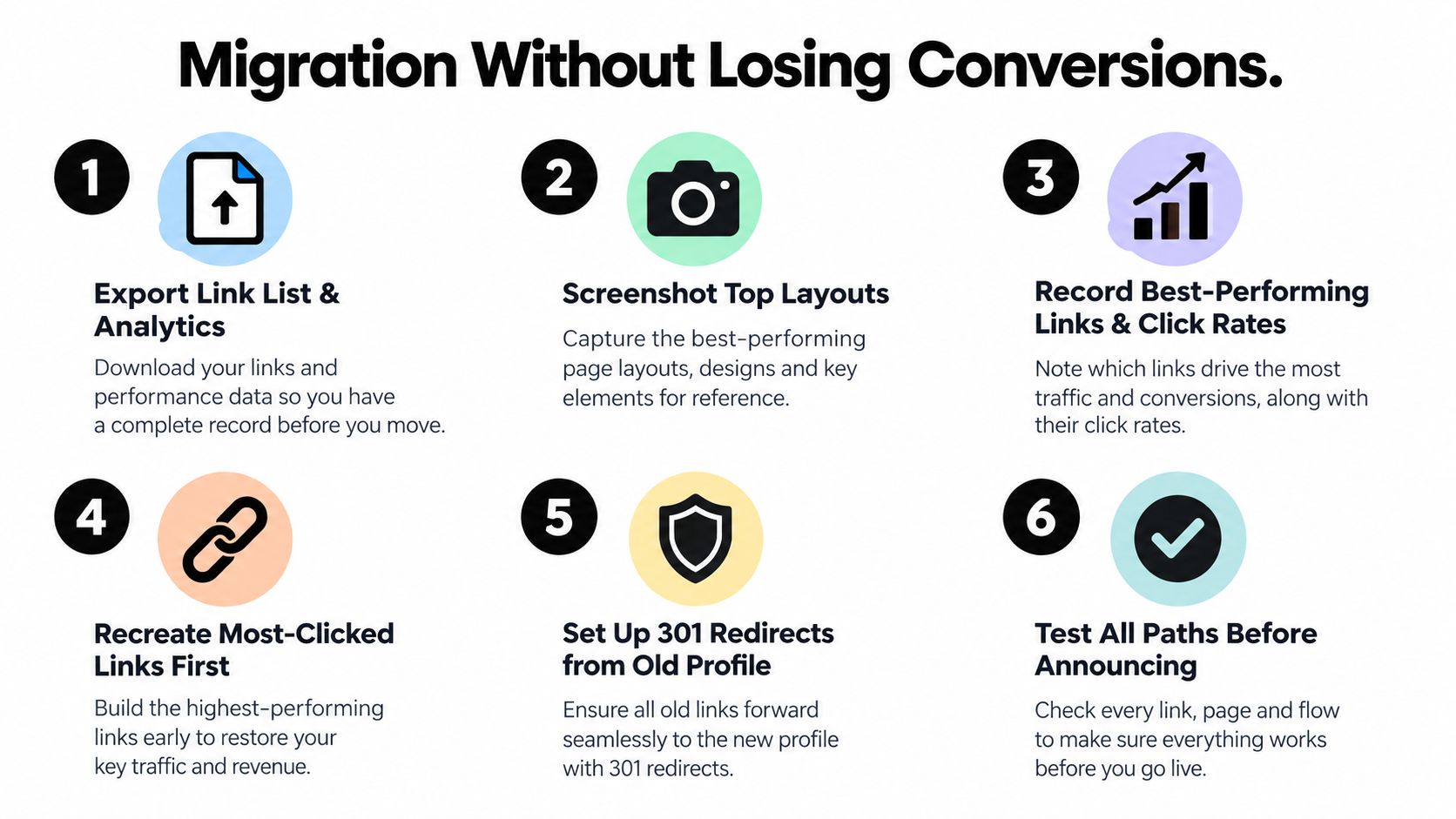
Start with the assets that are hardest to recreate. Your top links, your product copy, your lead capture flow, and your booking logic matter more than visual polish on day one.
Migration checklist that protects revenue
- Export what you can first. Save your link list, subscriber data, product descriptions, thumbnails, and any analytics views you rely on.
- Screenshot your current layout. Don't trust memory. Preserve the order of links and blocks that already get attention.
- Rebuild the highest-intent actions first. Your main offer, your lead magnet, your calendar, and your primary checkout come before secondary links.
- Test payment and booking flows yourself. Run a live test purchase. Make sure confirmation emails, file delivery, and calendar invites all work.
- Delay the public switch until the basics are stable. A migration isn't done when the page looks right. It's done when people can buy and book without friction.
- Tell your audience only after the page is proven. Don't announce a “new bio link” and use your followers as QA.
A lot of creators also want to preserve their subscriber list cleanly during the move. If that's part of your switch, this guide on exporting contacts to CSV is practical.
Sequence matters more than design
Run both pages in parallel briefly if you can. Keep the old page live while you verify the new one. Recreate the most-clicked links first, then bring over lower-priority content.
This quick walkthrough is useful if you want a visual migration checklist before changing anything:
Switch after testing, not after styling.
A clean seven-day rollout
Day one is exports and screenshots. Days two and three are rebuild days. Day four is testing. Day five is soft launch with limited traffic. Day six is final edits. Day seven is the public cutover.
That pacing is boring, which is exactly why it works. Fast migrations break monetization flows. Careful ones preserve them.
When a Consolidated Creator Store Beats Both
Here's my opinionated take. Once a creator is actively selling, the Linktree vs Beacons debate starts becoming the wrong debate.
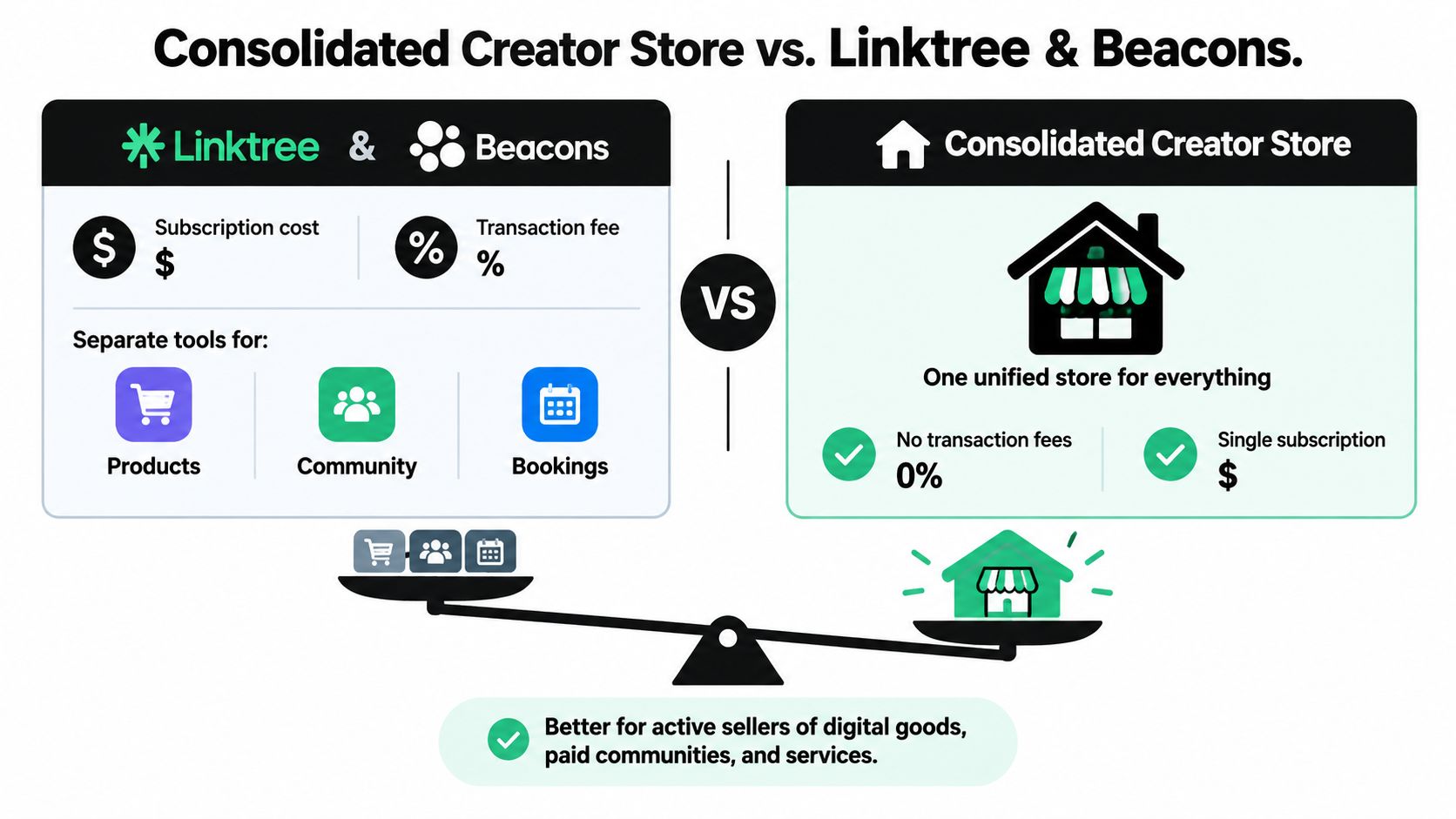
The reason is simple. You stop needing “a better link page” and start needing one place that handles links, checkout, bookings, email capture, and analytics without taking a percentage of every sale.
The stack tax gets old fast
Creators tolerate fragmented stacks longer than they should. A link page points to a store. A scheduler handles calls. An email tool collects leads. Analytics live somewhere else. Then you reconcile all of it manually.
That's wasted motion. It also makes every conversion path easier to break.
Who should stop comparing these two
If you're a revenue-first creator, not just a traffic-first creator, a consolidated setup usually makes more sense. That includes people selling digital downloads, paid sessions, memberships, or affiliate-heavy offers from the same page.
I'd look at taap.bio as a separate category choice. It offers a link-in-bio creator store with built-in checkout, paid bookings, email capture, analytics, optional custom domains, and 0% platform fees, on a flat $19 per month after a trial, according to the taap.bio product site. That's not the same product philosophy as Linktree or Beacons. It's a consolidation play.
Who doesn't need consolidation
Not everyone should switch to a store-first setup.
- Pick Linktree if you mainly need a clean, recognizable profile hub.
- Pick Beacons if you want more creator-business features and are comfortable with a denser tool.
- Skip full consolidation if you rarely sell and mostly need a bio directory.
But if you're already stitching together a page, a checkout tool, a scheduler, and an email list builder, then paying subscriptions plus platform fees is usually the expensive way to stay “flexible.”
Final Recommendation and Decision Summary
If you're comparing Linktree vs Beacons in 2026, don't ask which one has more features. Ask which one fits the way you earn.
Pick Your Link-in-Bio by Priority
| If your priority is | Pick | Why |
|---|---|---|
| A familiar, simple page that mainly routes traffic | Linktree | It's cleaner, easier to explain, and better suited to creators who want a straightforward public hub |
| A creator business page with more built-in monetization tools | Beacons | It bundles more of the business stack into one place and makes more sense for coaches, educators, and creators selling offers |
| Protecting margin once sales become a routine part of your business | A consolidated creator store | Flat pricing and no platform commission are easier to justify when your bio page functions like a storefront |
Here's the blunt version.
Pick Linktree when your bio page is still mostly a directory.
Pick Beacons when you want a fuller creator toolkit and can live with a busier setup.
Stop choosing between both when the page has clearly become a commerce surface and the stack around it is eating margin and time.
That's the part most comparison posts dodge. Once a solo creator starts monetizing actively, a link list plus extra tools becomes an awkward business stack. It works, but it doesn't age well.
So yes, start with the Linktree vs Beacons question. Just don't stop there if your real problem is revenue operations, not link management.
If you're selling through your bio link instead of just collecting clicks, taap.bio gives you one page for products, paid bookings, email capture, and analytics without stacking separate tools. It's the more sensible setup for creators who are done paying both subscriptions and platform cuts just to run a small online business.