Most advice about selling Notion templates starts with the wrong obsession. It tells you to polish the layout, tweak the icons, and make the cover prettier, as if design alone sells the file. It doesn't. Niche selection, positioning, and support decide whether a template becomes a product or sits in your drafts forever.
The market is big enough to fool people into thinking volume equals opportunity. Notion's own template marketplace shows 30,000+ templates, and one sales category alone lists 2,946 templates on the official marketplace, which tells you the supply side is crowded and professionalized, not casual Notion templates marketplace. Independent market reporting also projects the Notion templates market at about $0.9 billion in 2025, growing to $1.8 billion by 2033 with a 12.3% CAGR, so this isn't a dead niche, it's a competitive one Notion templates market report.
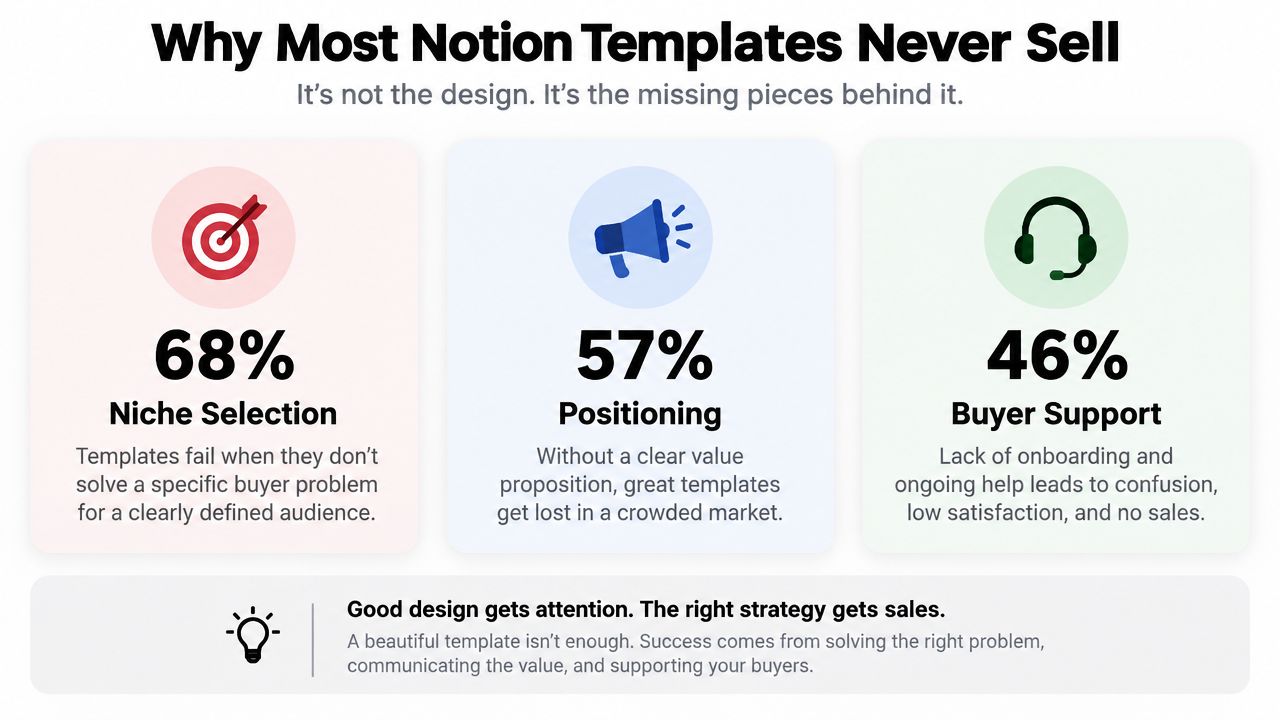
Table of contents
Why Most Notion Templates Never Sell
The mistake I see over and over is simple. Creators build for “productivity,” “second brain,” or “life OS,” then wonder why buyers pass. Those are categories, not buyer problems. If you cannot name the person, the situation, and the job the template solves, you are adding another file to the pile.
Design is not the bottleneck
A clean interface helps, but it will not save a vague offer. The official marketplace is already crowded, and market coverage says a few categories account for roughly two-thirds of paid sales volume, which means broad templates are fighting in the most saturated lanes Best-selling Notion template categories. The money sits in niche, job-shaped builds that solve a specific workflow instead of promising a vague life upgrade.
Practical rule: if you cannot describe the buyer in one sentence, the market will not understand the template in one glance.
Pricing fails just as often. Sellers expect a cold visitor to land on a sales page and buy immediately. That is fantasy. Pricing benchmarks show free templates are often used as lead magnets with about 5-10% email-capture conversion, while paid templates typically convert around 3-5% at $5-$15, 2-4% at $15-$30, 1-3% at $30-$50, and roughly 0.5-2% above $50 Notion templates statistics 2026. If your page has no email capture path, you are skipping the part of the sale that gives you a second chance.
Support is the third weak point. Buyers do not just purchase a file, they buy clarity. Notion's own marketplace workflow lets creators track views, duplicates, and revenue for direct marketplace sales, and it allows creators to register a URL for transaction data when templates are sold or refunded, which makes the business measurable instead of guesswork Notion templates marketplace. If the buyer gets stuck after checkout and there is no setup help, the sale turns into silence, refunds, or bad reviews.
The harsh math is straightforward. A polished template on a third-party marketplace often lands in the 2-4% conversion range from visitor to buyer, so traffic source matters more than pixel perfection. Stop thinking like a designer first. Think like a seller, who is the buyer, where do they discover it, and what happens after checkout.
Designing a Template Worth Paying For
Good templates feel obvious once you open them. The structure matches one job, the labels make sense, and you don't need a tutorial to find the first action. That doesn't happen by accident. It comes from choosing one user, one workflow, and one outcome, then refusing to cram in every idea you've ever had.
Build for one buyer and one job
Start with a person, not a feature list. A freelancer managing invoices needs a different system than a student tracking assignments, and both need something narrower than a “general productivity dashboard.” If the template tries to solve three unrelated problems, it feels like a demo, not a product.
Design the database schema around the workflow itself. That means choosing the fields and views that support the daily motion, then cutting everything else. A premium feel usually comes from restraint, not decoration. Clear toggles, sensible formulas, and view logic that surfaces the next step do more for perceived quality than a crowded cover ever will.
Buyers trust a template when the first minute feels like progress, not setup.
You also need a clean duplication path. Ship a public Notion link plus a duplicate button so the buyer lands inside their own workspace immediately, not in a maze of instructions. The preview assets matter too. Use a cover image, a few interior screenshots, a short walkthrough, and a one-page usage guide so the buyer knows what they're getting before they buy.
A good reference for user clarity is the UX writing and layout discipline discussed in user experience design basics. Keep the language inside the template just as sharp. Replace placeholder text, remove empty pages, and embed the instructions where the buyer will look, not in a separate file they'll forget to open.
Package it so support questions shrink
The best packaging answer is usually the simplest one. A short video, a quick-start page, and labels that explain themselves will cut down on support requests before they start. A template that needs three follow-up emails is not finished.
Before launch, check three things. The home page should say exactly what the system does, the duplicate flow should be obvious, and the start-here page should make the first action unmissable. If any of those fail, you don't have a product yet, you have a draft.
Choosing Where to Sell Your Templates
Where you sell shapes everything after the first click. Some channels bring discovery, some bring control, and some only bring checkout. The right move is not to pick one forever. It's to start where buyers already browse, then move toward the place where you own the relationship.
The channels play different games
Notion's official marketplace gives you built-in discovery, trust, and direct access to people already looking for templates. The tradeoff is tighter pricing and branding control. Third-party platforms like Gumroad and Lemon Squeezy handle checkout and delivery cleanly, but they won't send you organic traffic on their own. A creator store on a page builder gives you the most control over margins, email capture, and bundles.
A simple way to compare them is below.
| Channel | Commission | Audience Access | Instant Delivery |
|---|---|---|---|
| Notion Marketplace | Platform-dependent, based on marketplace rules | Built-in discovery from active Notion shoppers | Yes, through marketplace workflow |
| Third-party checkout platforms | Platform-dependent | Low unless you bring traffic | Yes |
| Creator store on a single page | Platform-dependent | Depends on your own traffic | Yes |
If you want a deeper look at storefront choices, the platform comparison in online selling platform is worth studying. The practical pattern is staged. Get initial traction and reviews on one marketplace, then use a personal store as your main revenue channel once you have proof and email subscribers.
Pick the channel that matches your stage
If you're new, don't overbuild a storefront before you've made a sale. Marketplace discovery gives you the fastest learning loop because the buyer is already shopping. That's where you learn whether the offer lands, whether the screenshots match the product, and whether your copy is doing its job.
Once buyers start arriving, shift the business toward owned traffic. That's where a creator page or dedicated storefront wins, because you can capture emails, upsell bundles, and stop depending on someone else's marketplace rules. One option is taap.bio, which combines a creator store, checkout, and email capture on a single page. Use it if you want the store and the audience capture to live together instead of across separate tools.
The expensive mistake is trying to scale too early on a platform you don't control. If you don't own the list, the relationship resets with every visit. If you do own the list, every new template gets easier to launch than the last one.
Pricing, Licensing, and the Free-to-Paid Funnel
Price the job, not the page count. A 20-page template that saves a buyer one hour every week can be worth more than a dense system nobody understands. Buyers pay for certainty, speed, and confidence that the template won't turn into another half-finished workspace.
Use tiers to match trust
The cleanest structure is a free sample, a core paid template, and a premium bundle. The free version should solve a small slice of the problem and point to the paid version from inside the file. It's there to build trust and capture email, not to become a dead-end giveaway.
The paid core is the main offer. Keep it focused and easy to understand. The premium bundle should add the walkthrough, setup help, and ongoing updates so buyers who want less friction can pay for it. That's the only reason to charge more, not because you spent longer designing the buttons.
| Template type | Free sample | Core paid | Premium bundle |
|---|---|---|---|
| Solo system | Small starter workflow | Main dashboard and databases | Setup help, walkthrough, updates |
| Team dashboard | One shared view or checklist | Full operating system | Onboarding support and customization |
| Finance tracker | Basic tracker | Full budgeting workflow | Guided setup and update access |
| CRM style build | Lead list preview | Sales pipeline and follow-up system | Extended support and onboarding |
A plain-English license matters just as much. Say personal use, single commercial use per company, no resale of the source file, and no redistribution on freebie sites. Buyers understand that. They don't need a wall of legal text, they need to know what they can and can't do.
If you want a reference point for product pricing logic, the breakdown in digital product pricing strategy is useful. And if you're researching adjacent creator costs, budget for LinkedIn content automation gives a feel for how digital tools are commonly priced in the creator economy.
Don't overprice before trust exists
Complex templates can command more, but only after the audience trusts you. A cold page with a high ticket and no proof usually underperforms a simple offer with a clear use case. If your free sample doesn't convert into emails, your paid version won't convert much better.
The job of pricing is to move strangers into buyers without making them think too hard. The freer the top of the funnel, the easier the first click. The clearer the premium tier, the easier the upgrade.
Marketing Channels That Bring Real Buyers
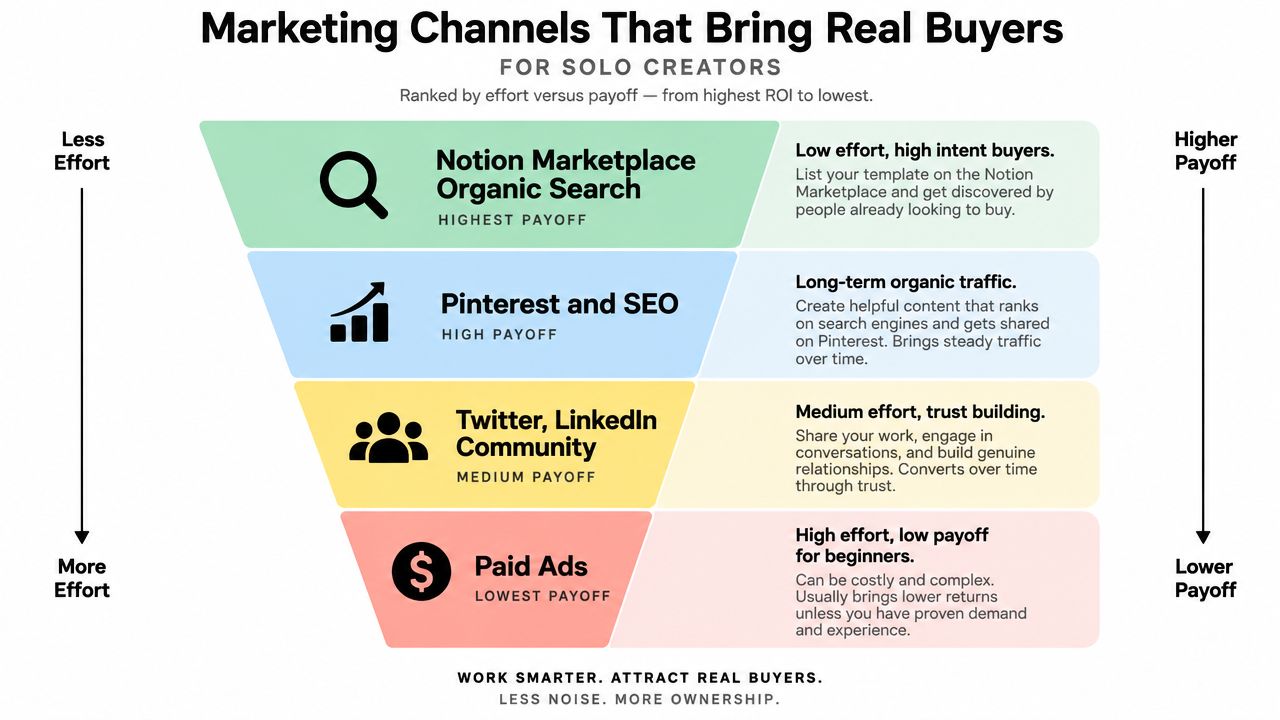
The first buyers come from places where intent already exists. Generic posting looks active and still gets you nowhere. Pick the channels that match buyer intent and let people see the template fast.
Start with the channels that self-qualify buyers
Search inside Notion marketplaces and directories is the cleanest first move because the buyer is already looking for a template. After that, social posts on Twitter and LinkedIn can bring the next wave if you show the build in use, not just the cover art. Short clips, before-and-after shots, and real workflow screenshots beat launch hype every time.
YouTube is slower to produce, but it compounds. Walkthroughs rank for buyer-intent searches and keep sending traffic long after the launch post fades. Pinterest also deserves attention because aesthetic dashboards travel well there, especially when the screenshot itself is the hook.
For practical social selling tactics beyond the template niche, the guide on selling on Reddit in 2026 is useful context. The same rule applies here, show up with something helpful, not a link drop. Communities reward usefulness and punish obvious promotion.
Rule of thumb: if a channel can't show the template in one glance, it's probably not your first channel.
Use content as the bridge, not the main event
SEO content on a creator blog or a single-page hub can catch long-tail searches like a specific CRM or workflow template. That is not where most first sales happen, but it keeps the business from depending on constant posting. A content hub also gives you one place to send people for email capture, bundles, and product comparisons.
Treat marketing digital products as the bridge between discovery and purchase. One good article, one comparison page, or one walkthrough can do more than a week of scattered posts if it answers a real buying question.
Paid ads are a bad bet when you are starting. The price point is too low and the creative is usually untested, which makes the spend hard to justify. Save ads for later, after you know which message converts and which offer people want.
The sequence is simple. Directories first for proof and reviews. Social channels for the first hundred buyers. Then SEO and YouTube once revenue can support the production time. If you skip straight to ads, you pay to discover what the free channels would have told you for less.
Delivery, Support, and the Metrics That Matter
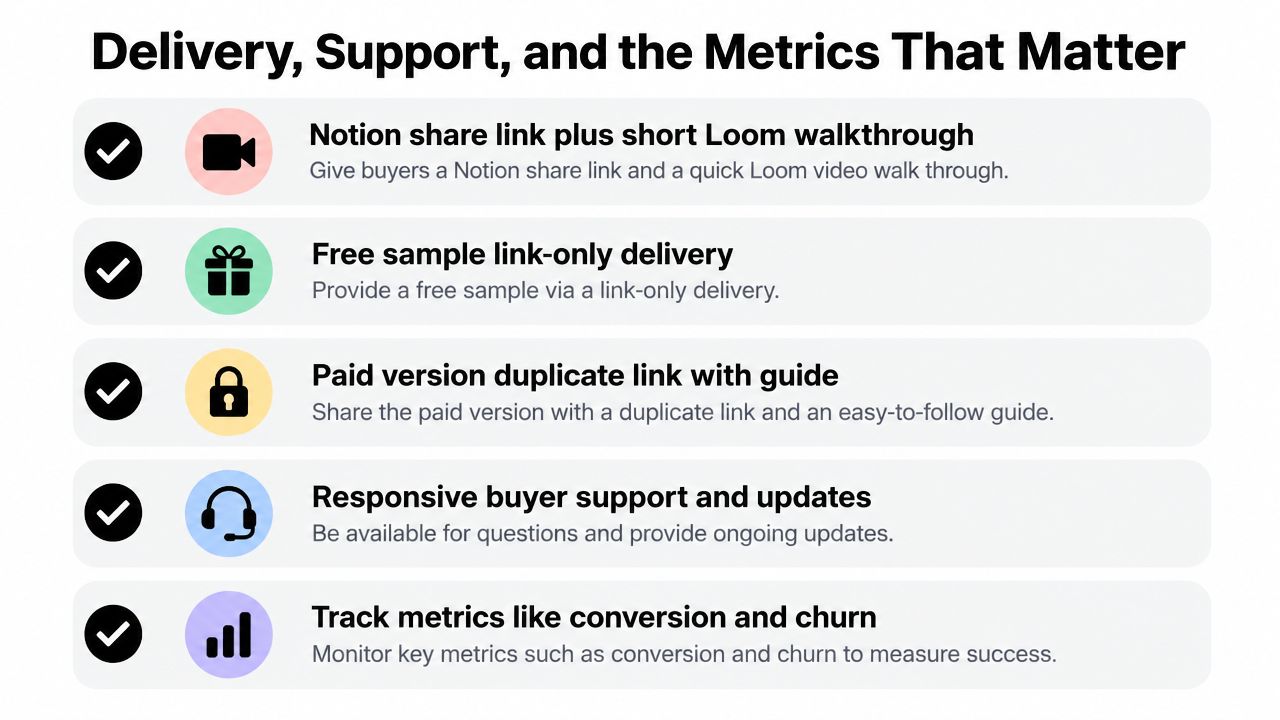
Delivery is part of the product. A buyer who gets a clean handoff feels confident. A buyer who lands in a messy inbox starts second-guessing the purchase before they open the file. The checkout, the email, the link, and the walkthrough should work like one system, and the handoff guide at how to deliver digital products should be part of that setup.
Treat post-purchase as part of the product
The paid version should include a duplicate link and a short walkthrough. The free sample can stay link-only, because its job is to move people into the funnel. If someone paid, they deserve a cleaner handoff than a freebie reader.
Gumroad and Lemon Squeezy can handle checkout, tax, and the automatic email that sends the link and walkthrough. That is the boring part, and boring is fine here. A separate welcome email a day later with three quick-start tips usually clears up confusion and cuts avoidable support messages.
Support should live in one inbox or a private chat channel, not scattered across DMs. During launch week, set a 24-hour response promise and keep it. Buyers notice fast replies, and they notice when the creator disappears after the sale.
If buyers ask the same question more than once, the template or its instructions are unclear.
Track the numbers that tell you the truth
Start with a small set of metrics, and track the ones that change decisions. Watch conversion rate on the sales page, refund rate, email opt-in rate from the free sample, traffic source breakdown, and repeat buyer rate. Those numbers show whether the offer is strong, whether the page is doing its job, and whether people trust you enough to buy again.
Refunds deserve close attention. When they rise, check the gap between the preview assets and the actual template first. Buyers usually do not refund because they dislike the idea. They refund because what they saw and what they got did not match.
Notion's marketplace workflow reflects that reality with views, duplicates, revenue tracking, and transaction data hooks for creators Notion templates marketplace. Measurable sales lead to better decisions. If you are not watching the numbers, you are guessing.
Your 90-Day Launch Plan
The fastest path isn't to build ten templates. It's to launch one solid offer, get feedback, then use what buyers ask for. That keeps you from polishing the wrong product while the market moves on.
Days 1 to 30
Pick one niche and validate it by checking search demand, competitor pages, and buyer complaints in reviews. Build one flagship template for one job, then package it with screenshots, a walkthrough, and a short usage guide. Set up checkout and instant delivery with a storefront or creator page, and draft three lead magnets that each solve a small, specific piece of the problem.
Days 31 to 60
Publish the listing and ask for five organic reviews from early users or testers who used the product. Post every day on one social channel, not five, and keep the content centered on use cases, not features. Run one micro-budget ad test only if the organic message is already resonating, and pitch two newsletter swaps so you can borrow attention instead of buying all of it.
Days 61 to 90
Review your analytics every week. Watch conversion, refund rate, traffic source, and repeat buyer behavior, then kill anything that drags without producing sales. Raise prices on the winner, bundle slow movers only if they fit the same buyer, and use support questions to plan the next template instead of guessing.
The scaling threshold is simple, keep the good channel, cut the weak one, and don't add help until the support queue starts stealing your product time. If a template is getting attention but not converting, fix the offer before spending more. If it's converting cleanly, stack the next product beside it and keep the audience warm.
Expect a modest first month, not a miracle. The upside comes from repeating a system that works, not hoping one launch changes your life overnight. If you want a creator store that can handle checkout, email capture, and digital product delivery from one page, visit taap.bio and build the sales page around the template instead of around the tool stack.