You finish the manuscript, export the file, and then the work starts. Amazon looks simple from the outside, but the difference between a book that sits there and a book that earns royalties usually comes down to setup, pricing, metadata, and what you do after launch. The good news is that how to sell ebooks on Amazon is a repeatable process, not a mystery, and it gets much easier when you stop treating KDP like a standalone storefront and build an owned audience around it at the same time.
Table of contents
Why Selling Ebooks on Amazon Still Works for Independent Authors
Amazon still matters because it gives independent authors direct access to Kindle buyers inside a system built for search, purchase, and reading. When Amazon launched KDP in November 2007, then called Digital Text Platform, on the same day as the first Kindle e-reader, it tied ebook publishing to device adoption and opened a path for authors to publish without a traditional house (Amazon self-publishing overview).
Amazon is a marketplace, not just a bookstore
That difference changes the job. A bookstore gives you shelf space. A performance marketplace gives you data, royalties, rankings, and a feedback loop you can improve.
KDP reporting shows estimated royalties, sales, and Kindle Edition Normalized Pages read. The Sales Dashboard also shows units ordered, KENP read, and royalties earned for the past 90 days (KDP reports and trends help). That makes it easier to see which cover, description, or price point is doing work and which one is wasting traffic.
It also explains why many independent authors publish on Amazon first, then use that visibility to build an audience they own outside the platform. A link-in-bio store can collect emails, test offers, and send readers back to Amazon with more intent than a random social profile can. If you want a practical example of that model, this overview of an online selling platform shows how a single public page can support more than one sales path.
A book on Amazon is not finished the day it goes live. It becomes a business asset when you can trace traffic, clicks, sales, and reader behavior back to the listing.
Royalties and Kindle Unlimited shape the economics
Amazon's royalty system is unusually clear. KDP offers a 35% or 70% royalty option depending on price and territory, and Amazon's help pages show how a $0.99 ebook can earn $0.35 at the 35% rate or about $1.27 on a €1.99 sale in eligible 70% territories after VAT and delivery costs (KDP reports and trends help). That transparency makes pricing easier to test instead of guess.
The subscription side matters too. One industry roundup says Kindle Unlimited had paid a cumulative $2.58 billion to self-publishers from January 2020 through March 2026, and the same source says 31% of Amazon's ebook sales are self-published titles and 85% of Kindle Unlimited books are self-published (ebook statistics roundup). Those figures help explain why Amazon is often the main channel, not the side channel, for digital-first authors.
The practical takeaway is simple. Publish cleanly, price with intent, track the right signals, and connect Amazon to an owned audience so every launch feeds the next one.
Prepare Your Ebook to Publish Without Costly Rework
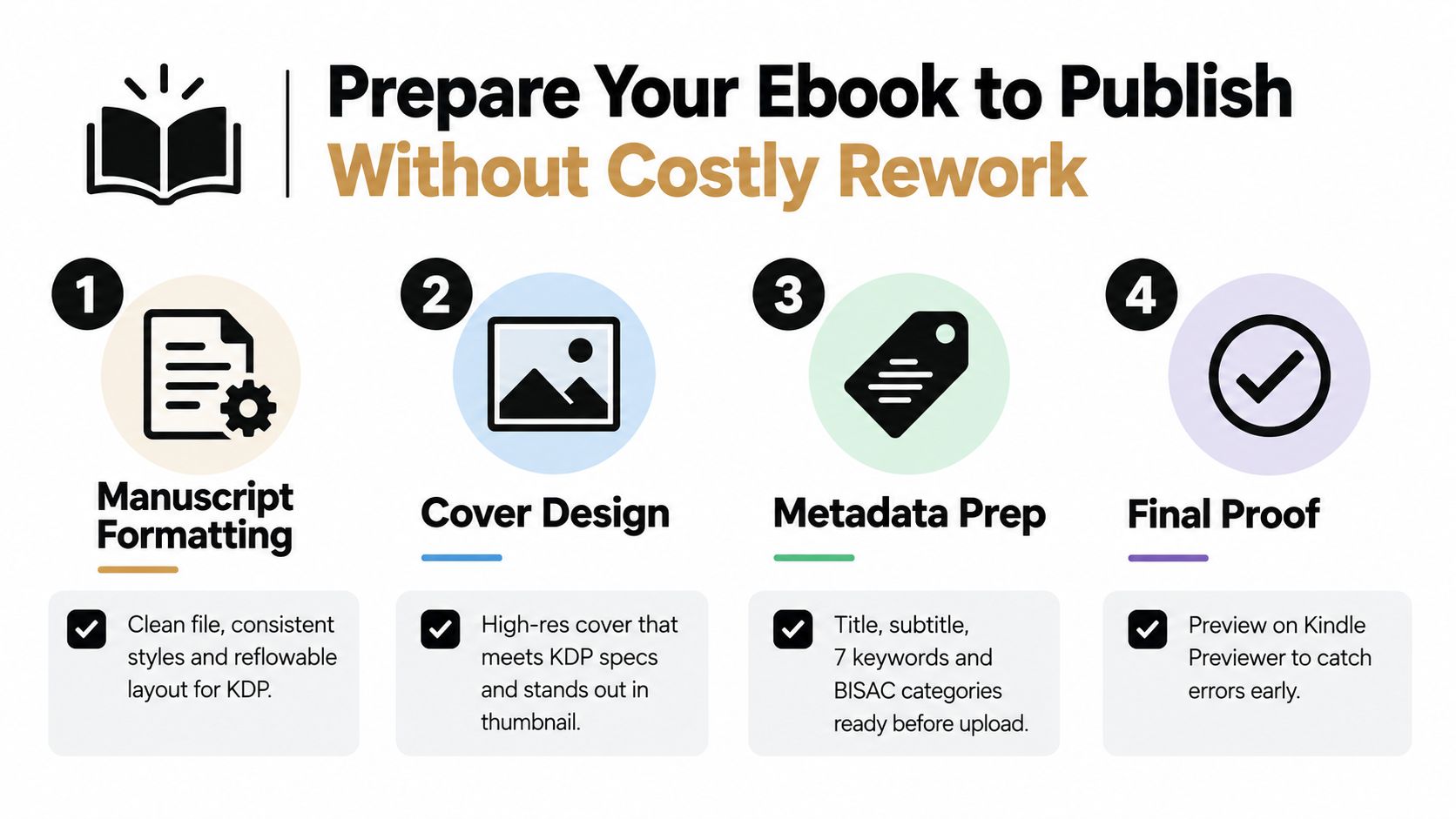
The fastest way to waste a launch is to rush formatting and metadata. A messy file can still get through upload, but it won't convert well, and a weak description will undercut a cover that was otherwise doing the heavy lifting. KDP is forgiving enough to let new authors publish, but readers aren't forgiving when the ebook opens with broken spacing, awkward images, or a title that doesn't match the promise on the page.
Format the manuscript for Kindle first
Reflowable layout is the default assumption for most ebooks. That means the text should adapt cleanly to different screen sizes, with consistent styles, a usable table of contents, and spacing that doesn't depend on fixed-page tricks. If your manuscript is really a workbook or heavily visual document, you need to decide that before upload, because trying to force a print-style PDF into a Kindle-first product usually creates rework later.
A practical rule I use is to open the file on a phone-sized screen before I ever call it done. If chapter headings, bullet points, or callouts look awkward there, readers will notice too. If you're adapting a longer PDF into a cleaner digital file, this guide to drag-and-drop PDF pages is useful when you're restructuring content into a more readable order.
Design for the thumbnail, not the desktop
Your cover has to carry the book in a tiny Amazon search result. That means strong contrast, readable typography, and a visual hierarchy that still works when the image is small. If your concept depends on detailed art or a cluttered title treatment, it can look polished in a mockup and weak on the actual retail page.
That's where many creators look for faster production help. If you need art support, a resource like the top AI art creator for authors can help you explore visual concepts before you brief a designer. The point isn't to outsource judgment. It's to avoid wasting time on a cover that looks clever in your editor but disappears in the Kindle Store.
Practical rule: A good Amazon cover does two things at once, it signals genre instantly and stays legible in thumbnail form.
Lock your metadata before upload
Amazon gives you seven keyword fields and category choices, and those decisions shape discoverability more than many first-time authors expect. Don't write a vague description and hope the algorithm fixes it. Write a description that clearly tells the reader who the book is for, what problem it solves, and why they should click now.
Strong metadata also prevents late-stage rewriting. If the title, subtitle, categories, and back-end keywords are aligned from the start, you can focus on launch traffic instead of rebuilding the page after your first underwhelming week.
Publish on Amazon KDP and Choose Pricing That Protects Royalties
KDP setup is straightforward, but the details matter. You create the account, complete tax and bank information, upload the manuscript and cover, then set rights and pricing inside the dashboard. The mistake most authors make is treating this like a form submission instead of a revenue decision, because the price you choose affects not just sales, but the royalty band you can keep.
Know when KDP is the right path
Amazon's learning pages now separate the journey between selling books in the store and publishing through KDP, and that split matters for ebook creators who are trying to decide whether they need a seller workflow or a publishing workflow (Amazon books learning page). KDP is the right path for digital publishing. Seller Central is the conversation for physical marketplace selling.
That difference affects everything from the interface to the data you'll watch after launch. KDP is built around order trends and KENP reads, not a classic inventory flow. If you're publishing an ebook, that's the system you want.
Price for the royalty band you actually want
Amazon states that 70% royalties are only available in designated territories and only when ebooks are priced between $2.99 and $9.99, while outside that band the royalty drops to 35% (USRO pricing breakdown). That pricing rule is the core trade-off. Lower prices don't automatically mean better economics, and ultra-cheap ebooks can earn less than creators expect.
| KDP Royalty Choice at a Glance | Price Requirement | Territory and Notes |
|---|---|---|
| 35% royalty | Outside the 70% price band | Applies when the ebook is priced below the eligible range or outside designated territory rules |
| 70% royalty | Between $2.99 and $9.99 | Only available in designated territories, delivery costs and local taxes can affect net earnings |
Use that table as a decision filter, not a slogan. If your book is a lead generator, a low-priced entry product, or a premium niche title with a very specific buyer, the math may justify a different structure. If you're building a catalog, pricing consistency usually beats random experiments.
Decide on KDP Select with intent
KDP Select is useful when you want deeper Amazon-native visibility and you're comfortable with the exclusivity requirement. It can fit a launch strategy built around Kindle Unlimited reads, but it also limits your flexibility if you want to sell the ebook elsewhere or use it as a front-end offer in your own store.
A practical way to think about it is this. If Amazon is your only channel for a title, Select can make sense. If the ebook is part of an owned-audience funnel, or you want direct sales plus email capture, staying wider often gives you more control. A pricing framework for that kind of direct-sales thinking is laid out in this digital product pricing strategy, and the logic maps well to ebooks too.
Optimize Your Listing After Publishing for Discoverability
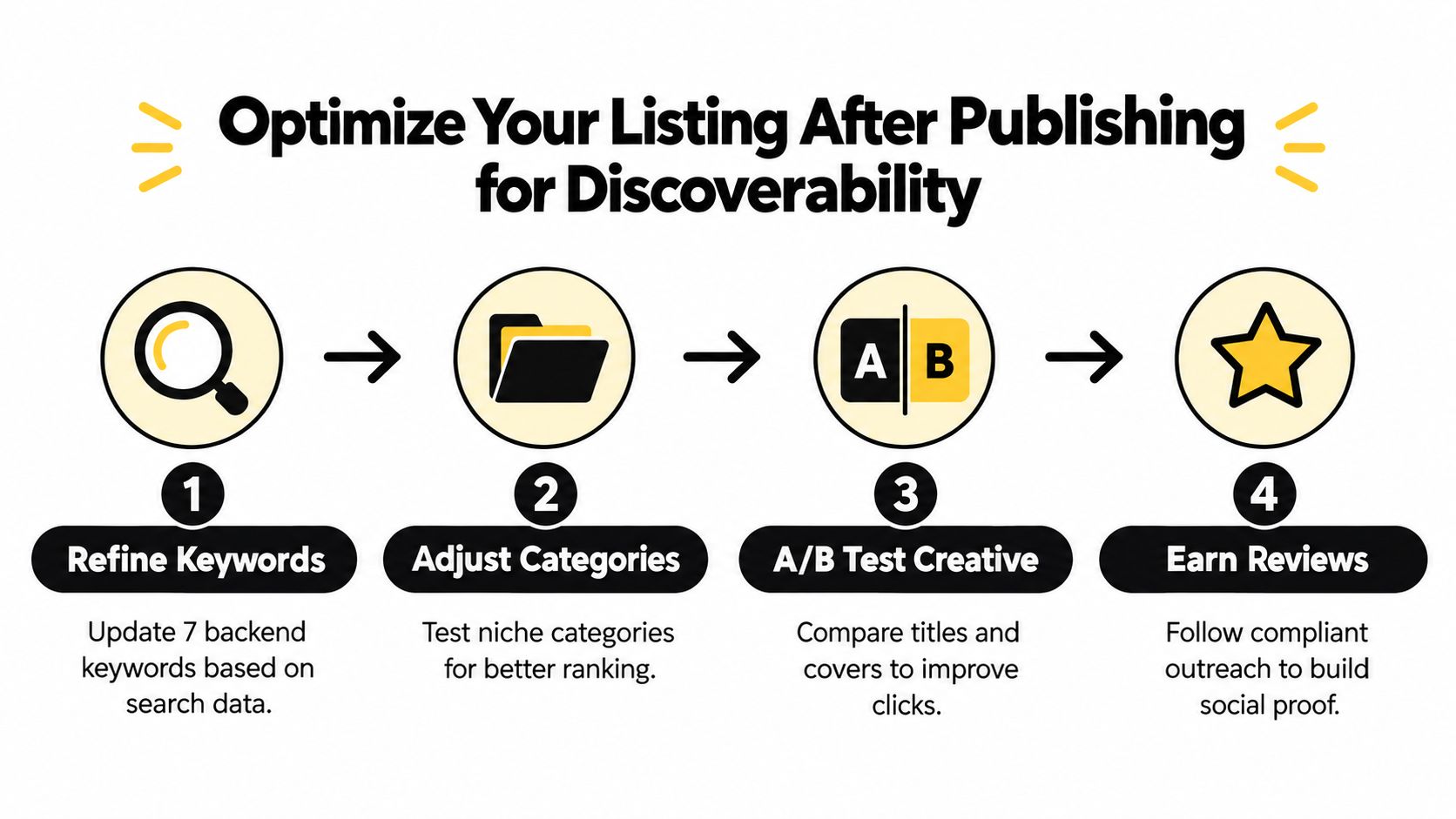
Most ebooks miss because the author stops at publish. The listing needs work after launch, once real clicks, reads, and sales start showing where buyers hesitate.
Read the dashboard the right way
KDP reports show estimated royalties, sales, and KENP read, while the Sales Dashboard gives units ordered, KENP read, and royalties earned for the past 90 days (KDP reports and trends help). Use those views to separate paid unit sales, page-read volume, and royalty yield instead of treating them as one blended result.
Book Trends needs a tighter reading. Amazon says it is not a sales report and reflects aggregate customer engagement over the most recent 30 days, so it should not be used to estimate revenue or conversion. It also combines purchases, Kindle reading, and Audible listening in one engagement view, which makes it useful for broad pattern spotting and weak for clean ebook decisions.
Practical rule: If royalties move but page reads do not, buyers are doing the buying. If page reads move but royalties do not, the format mix or price may be doing the work.
Tweak keywords, categories, and creative with discipline
Post-launch gains usually come from small corrections. Refine backend keywords when the book gets impressions but not clicks. Revisit categories when the title is getting buried inside broader competition. Test title and cover changes only when the current creative is clearly underperforming, because random swaps make it harder to see what changed.
Use this guide to search visibility, this guide to search visibility, to map the fixes before you touch the listing. That matters more once you are sending traffic from a creator store or email list, because you want the Amazon page to convert the people you already brought in.
For ad-driven testing, use the Amazon book advertising data-driven playbook. Ads help only when you know what signal you are trying to move. Otherwise you are paying to gather confusion faster.
Build a simple review cadence
Check the dashboard daily during launch, then compare title-level sales to country-level performance so you can see whether the problem is discoverability, price, or geographic mismatch. Review the snapshot weekly, export historical data, and look for patterns across sessions instead of reacting to one good or bad day.
If the book starts slowly, do not rewrite everything. Change one variable, then measure again. A compliant review strategy still matters, but it should stay patient. You want honest social proof from real readers, not shortcuts that risk the account or the title's credibility.
Drive Traffic and Build Your Email List Beyond Amazon
Amazon is excellent at discovery, but it does not give you ownership. If a title starts selling, the next step should not be to hope the momentum lasts forever. The next step is to capture attention you can use again, because an owned list lets you launch faster, test offers, and send readers back to Amazon when it makes sense.
Use a creator store as the bridge
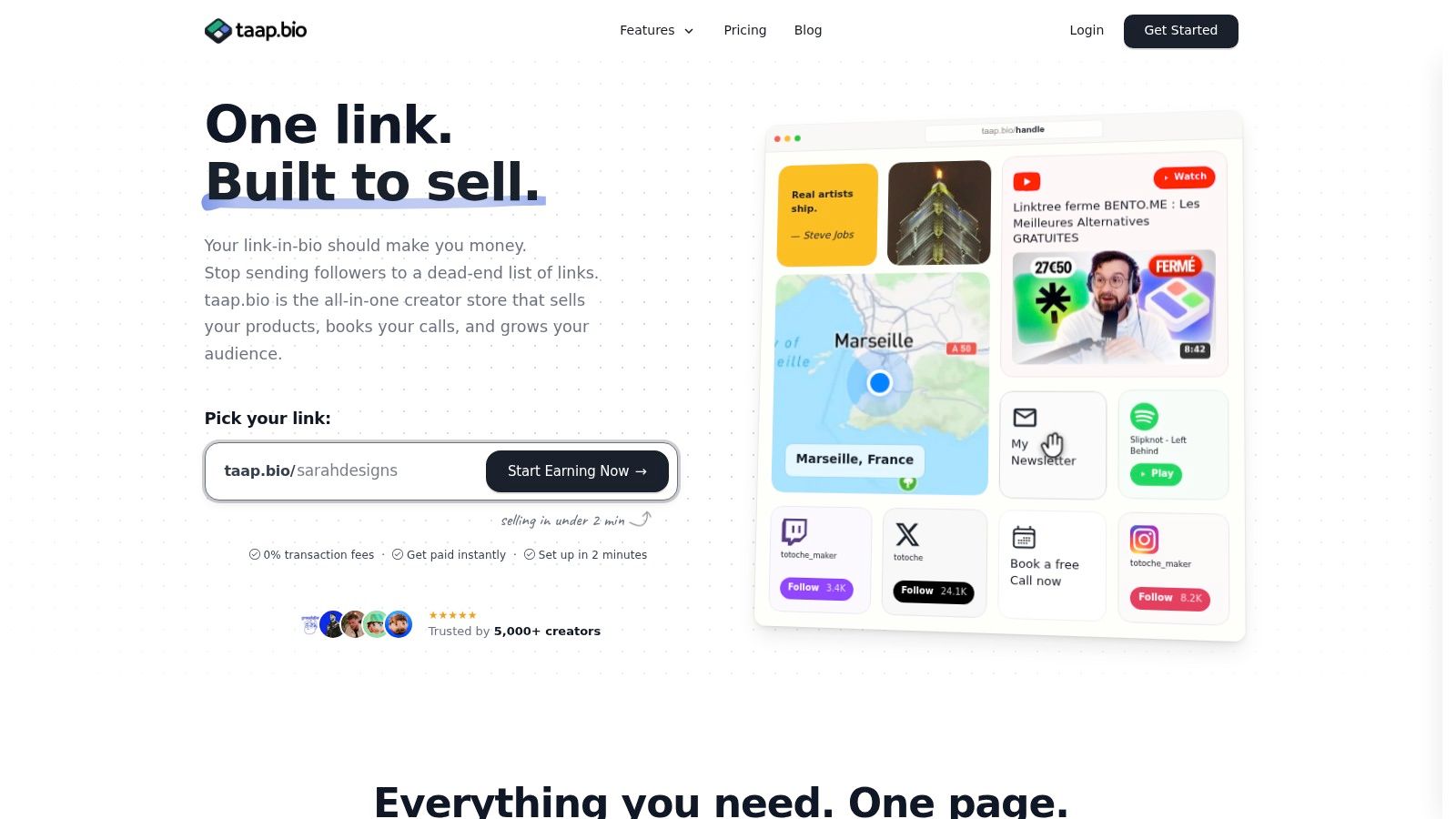
A link-in-bio creator store can turn social traffic into something measurable. In taap.bio's case, the page supports a drag-and-drop bento layout, email signup widget with CSV export, built-in checkout with instant digital delivery, and real-time analytics per widget, so one page can route people to the Amazon listing, a direct ebook purchase, or an email opt-in without sending them through a maze of tabs.
That matters for ebook sellers because social clicks are fragile. Every extra redirect loses buyers. A single page with the book link, a signup prompt, and a direct offer keeps the path short and lets you see which call to action gets attention. The platform also offers 0% platform fees, which can matter when your ebook is priced low and every margin point counts.
Let Amazon and owned traffic work together
Amazon Ads can support visibility, but social and email can do the heavier relationship work. If someone finds the title on Instagram, YouTube, TikTok, or a podcast mention, a creator store gives you a place to capture the lead before the reader disappears. Then you can follow up with launch notes, bonus content, or a preorder reminder instead of trying to reacquire that person from scratch later.
The mechanics matter. A digital product storefront with instant delivery lets you sell the ebook directly while Amazon handles the marketplace version, and the email widget turns casual traffic into a portable list. If you want a deeper breakdown of list growth tactics, this page on email list building strategies fits the same workflow.
Use the right media mix for the funnel
A strong creator page doesn't need to look busy. It needs to look clear. Use the social proof you already have, a clean book mockup, and one obvious next step. If you're showing readers what the workflow feels like, this short demo can help you visualize the handoff from social click to owned page.
Email portability matters here too. If your audience is stored in a system you can export, you're not rebuilding from zero every time one platform changes its rules. That's the part many ebook authors underestimate until they need it.
Launch Smart and Keep Your Ebook Selling Over Time
A clean launch beats a noisy one. Start with the ebook file, the cover, and the metadata, then price inside the royalty band that matches your goal. After that, watch the KDP dashboard daily for the first stretch, because the early signals tell you more about listing quality than any gut feeling does.
When something stalls, diagnose the bottleneck. Low impressions usually point to discoverability. Clicks without sales usually point to the cover, title, description, or price. Sales without the royalty you expected usually mean you stepped outside the 70% pricing band or territory rules, so the fix is usually structural, not mysterious.
Keep the loop simple.
- Launch cleanly: Upload the file, confirm the cover, and verify the description before you submit.
- Measure the right signal: Track sales, KENP, and royalties separately.
- Adjust one lever: Change price, keywords, category, or creative, then give the data time to settle.
- Feed the owned audience: Send traffic from your creator page and email list back to the book when the timing fits.
The long-term advantage comes from pairing Amazon reach with assets you own. Amazon can keep opening doors, but an email list and a direct storefront make the business less dependent on any one marketplace. That combination is what turns a single ebook into a repeatable publishing system.
If you want a simple way to sell ebooks, capture emails, and keep control of your traffic, set up your page on taap.bio and use it as the hub between your social content and your Amazon listing. It gives you one place to sell, collect leads, and send readers where you want them to go next. Start there, publish the ebook, and let the next launch come from a list you own.