
Figuring out how to link a website on Instagram is pretty straightforward. You've got a few key places to work with: the clickable URL in your profile bio, the super-useful Link Sticker in your Stories, and of course, a dedicated link-in-bio tool. These are your go-to channels for getting followers off the app and onto your products, content, or services.
Table of contents
Your Instagram Link Is More Than Just a URL
Think of your Instagram profile as your digital storefront. That one little link in your bio? It's the front door, the most important bridge connecting your social media vibe to your actual business goals.
For the longest time, creators and brands were stuck with just one URL. This meant making a tough choice every single day: do I link to my new blog post, the latest product drop, or my portfolio? This restriction single-handedly turned the "link in bio" phrase into the most valuable piece of real estate on the entire platform.
A smart strategy turns this space from a simple redirect into a powerful conversion machine. It's not just about slapping a link in there; it's about building a hub that turns casual scrollers into loyal customers, clients, or subscribers. If you want to dive deeper, we break down the importance of your bio link in our full guide.
The Evolution of Instagram Links
Instagram has definitely loosened the reins over the years. In April 2023, they officially rolled out the ability to add up to five links directly to your profile. Game changer, right? Well, sort of.
Even with this update, dedicated tools like Taap.bio haven't gone anywhere. The reason is all about workflow. Adding links the native way means you're constantly jumping between your website, a UTM builder to track clicks, and your content scheduler, then manually pasting each link into your profile. It’s clunky. In contrast, specialized link-in-bio platforms are built to fit right into your content process, saving you a ton of time. This friction is exactly why so many savvy marketers still lean on a dedicated solution, a trend you can learn more about through modern Instagram link strategies.
A well-crafted bio link is your chance to tell a story. Instead of just pointing someone to a single page, you can guide them through your entire online world—from your latest YouTube video to your professional portfolio.
From a List to a Destination
Here's the secret: your goal isn't to create a directory of links. It's to build a destination. A visually appealing, interactive landing page encourages people to stick around and explore, keeping them hooked.
Instead of a boring list of URLs, a thoughtfully designed link page can:
- Showcase Multiple Projects: Put your latest articles, products, and other social profiles all in one clean, cohesive space.
- Enhance Brand Identity: Use your own custom layouts, colors, and fonts to make it feel like an extension of your brand.
- Improve User Experience: Make it dead simple for followers to find exactly what they’re looking for without getting frustrated and clicking away.
When you treat your link page like a mini-website, you get the most out of every single click and deliver real value to your audience.
Before you even think about fancy third-party tools, you need to absolutely nail the linking options Instagram gives you right out of the box. These native features are the foundation of any solid linking strategy. Get these right, and you're already ahead of the game.
The most valuable piece of digital real estate you own on Instagram is the link in your bio. It’s your permanent, always-on call to action. Adding a link is straightforward: head to your profile, tap ‘Edit Profile,’ go into ‘Links,’ and then ‘Add external link.’ The best part? You can now add up to five URLs, turning your bio into a mini-hub for your most important destinations.
The Game-Changing Story Link Sticker
For time-sensitive promotions or in-the-moment shares, the Link Sticker in Instagram Stories is your best friend. Gone are the days when you needed 10,000 followers to use this. Since late 2021, everyone has access. It lets you slap a clickable sticker right onto your Story, driving traffic when it matters most.
Just create a Story, tap the sticker icon from the top menu, and find the "Link" sticker. You can then paste in any URL and—this is key—customize the sticker’s text. Don't just leave a raw URL. Something like "Shop the Drop" or "Read the Full Post" is far more compelling. To really make your Stories pop, check out our guide on the ideal Instagram Story specifications and creative best practices.
Not sure which link to use and when? This simple decision tree breaks it down based on whether you're trying to make a sale or just share great content.
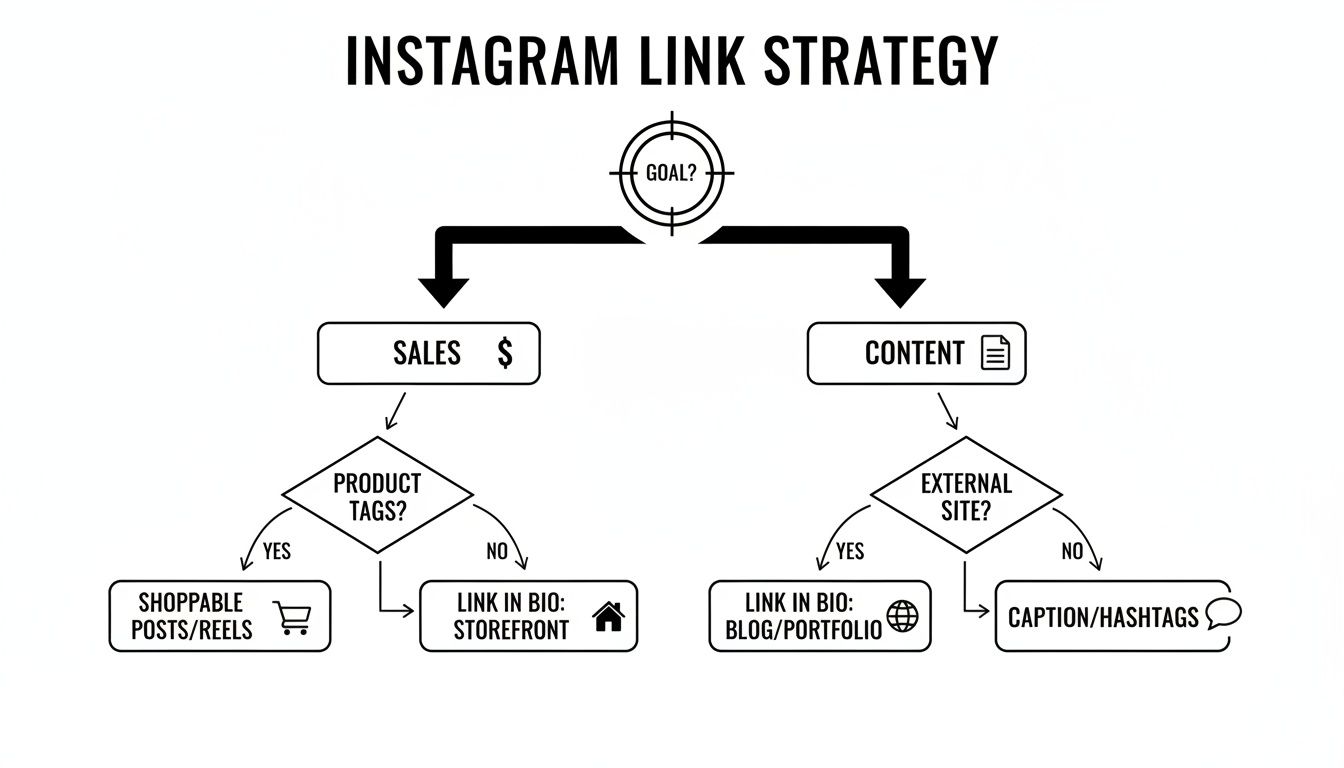
As you can see, choosing the right placement—like a Story link for a flash sale versus a bio link for your main website—is what separates a scattered approach from a strategic one.
Instagram Linking Methods at a Glance
With a few core options available, it's helpful to see how they stack up. This table gives you a quick overview of where each method shines.
| Method | Best For | Who Can Use It | Key Benefit |
|---|---|---|---|
| Bio Link | Your primary website, blog, or link-in-bio page | All Users | Always-on, permanent link that’s easy to find |
| Story Link Sticker | Flash sales, new content, limited-time offers | All Users | High-urgency, contextual placement for timely traffic |
| Profile Action Buttons | Service-based bookings, reservations, ordering | Business Accounts | Seamless, one-tap actions for high-intent customers |
| Direct Messages (DMs) | Personalized recommendations and customer service | All Users | High-touch, direct communication that builds trust |
Ultimately, a smart Instagram strategy uses a mix of these methods, matching the right link to the right context for the best results.
Digging for Hidden Linking Opportunities
Beyond the bio and Stories, there are a couple of other powerful, and often overlooked, ways to drive traffic and make life easier for your followers.
Action Buttons: If you have an Instagram Business account, you can add powerful CTA buttons right to your profile. Think 'Book Now,' 'Order Food,' or 'Reserve.' These integrate directly with services like OpenTable or StyleSeat, creating a frictionless path for customers to convert without ever leaving the app.
Direct Messages (DMs): Never, ever underestimate the power of a one-on-one conversation. When someone slides into your DMs with a question, sending them a direct link to the exact product or blog post they need is a seriously high-conversion move.
Remember, the goal is always to reduce friction. Every single link you share should be about making it dead simple for followers to get from "ooh, that's interesting" to your website.
By really leaning into these native tools, you're building a strong foundation. You'll learn what your audience clicks on, which calls to action resonate, and how different placements serve different purposes. Once you’ve squeezed every drop of value out of what Instagram gives you, you'll be perfectly positioned to supercharge your efforts with a dedicated link-in-bio tool.
Why a Link-in-Bio Tool Is a Game Changer
Let's be honest, the built-in linking options on Instagram are a decent start, but they hit a wall pretty fast for anyone serious about growing their brand or business. Tossing five plain URLs into your bio isn't a strategy; it's just a list of exits. This is exactly where dedicated link-in-bio platforms come in and completely change the game.
These tools aren't just about cramming more links into one spot. Their real magic is in transforming that single, precious bio URL into a branded, interactive mini-website. You stop scattering your audience to the four winds and instead bring all your important content into one cohesive, compelling destination that you control.
Beyond a Simple List of Links
Think about it from your follower's perspective. They tap your bio link. What do they see? A boring, text-heavy list? Or do they land on a dynamic page that feels like a natural extension of your brand—complete with your colors, fonts, and a layout that tells a story? That's the difference maker.
A platform like Taap.bio was built to solve this "scattered presence" problem. It lets you create a page that's far more than a menu of links. With its unique grid layout and smart widgets, your bio link becomes an actual experience, encouraging people to stick around and explore instead of just clicking the first link and leaving.
The goal shifts from just sending traffic somewhere else to creating a central hub where your audience can truly connect with everything you do, all from that one single click.
For example, a musician can embed their latest track right from Spotify for people to play on the spot. A designer could showcase an interactive Figma prototype. This kind of functionality turns passive visitors into active participants because you're bringing the content directly to them, not making them hunt for it.
Creating an Interactive Hub
The best link pages feel alive. They act as a central hub that reflects everything you're doing in real-time, thanks to smart integrations that pull in live content, not just static links.
Just imagine what you could do:
- For Musicians: Embed your new single or a full podcast episode from Spotify that visitors can play right then and there. No redirects, no opening new apps—just instant engagement.
- For YouTubers: Display your latest videos with eye-catching thumbnails and even your subscriber count, giving visitors a real taste of your channel's content.
- For Visual Artists: Showcase a grid of your latest Instagram posts or your Dribbble portfolio that updates automatically, keeping your page fresh without you lifting a finger.
This approach is all about respecting your audience's time and attention. When you present your content in a clean, organized, and visually engaging way, you're not just giving them links—you're crafting a better user experience. If you want to see what’s out there, check out this breakdown of the best link-in-bio tools for creators to see how they stack up.
Ultimately, a well-designed page doesn't just point to your content; it becomes a destination in itself.
Building Your Ultimate Link Page with Taap.bio
Alright, let's get our hands dirty and build something that actually converts. We're going to create a powerful, professional-looking link-in-bio page from scratch using Taap.bio. This isn't just about dumping a few URLs into a list; it's about crafting a branded micro-site that grabs your audience's attention.
What I love about this platform is its modular grid system. Stop thinking of your bio link as a boring list and start thinking of it as a dynamic bento box for all your best content. Every piece of your online world—a YouTube video, a blog post, a Spotify track—gets its own customizable block that you can arrange on a canvas.
This visual approach is a game-changer. It immediately sets you apart from the crowd and creates an engaging experience that actually encourages people to explore. Instead of a single, monotonous list, you get to create a visual hierarchy that makes your most important links impossible to miss.
Crafting Your Page with Smart Widgets
The real magic happens with what they call "smart widgets." These aren't just static links; they're deep integrations that display live, interactive content right on your page. This turns your page from a simple directory into a dashboard that's always fresh and up-to-date.
Let's look at a few real-world scenarios for different creators:
- Musicians: You can drag a Spotify widget right onto your grid. Embed a playable track, a full album, or even your artist profile showing your latest releases. Your followers can listen directly on your page, which is a massive win for engagement.
- Designers: Forget sending people off-site. Use the Figma widget to showcase an interactive prototype or a design template from your portfolio. Potential clients can see your work in action without ever leaving your bio link.
- Developers: The GitHub widget is a fantastic touch. It can display your contribution graph, showing off your coding activity and proving your commitment to your craft.
These widgets are what transform a simple collection of links into a living, breathing portfolio.
This screenshot shows just how clean and effective the modular layout can be, mixing different content blocks for a visually dynamic feel.
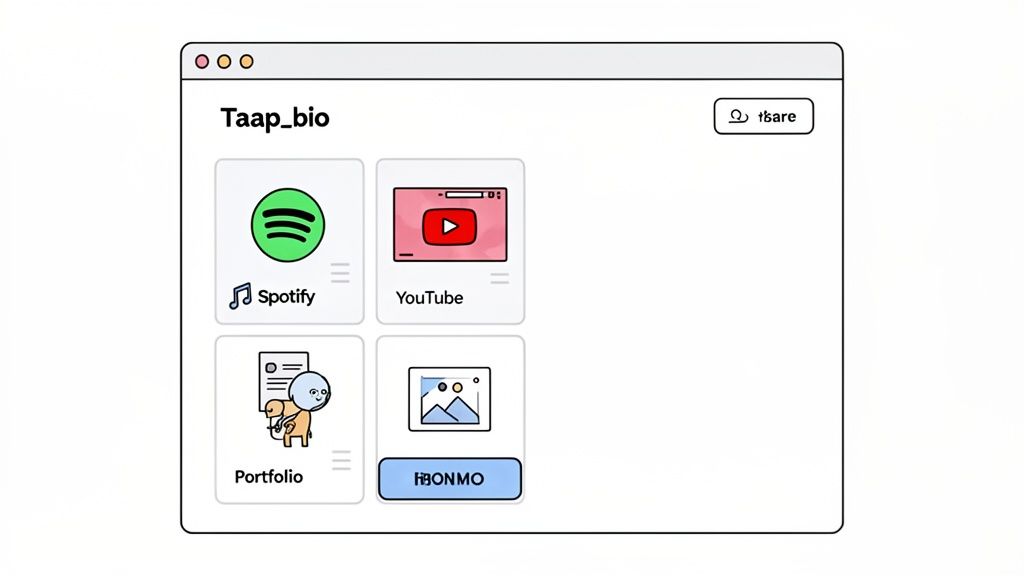
See how the different block sizes and types—like the embedded Spotify player and the image gallery—create a far more interesting and organized layout than a typical vertical list?
A Step-by-Step Build
Getting your page set up is incredibly straightforward. After you sign up, it’s all about dragging elements from the menu onto your canvas.
- Lay Down Your Core Links: Start with the basics. Grab a "Link" block and drop it onto your grid for your main website, blog, or online store. Taap.bio will automatically pull a preview image, but you can easily swap it out or tweak the title to fit your brand.
- Bring in Your Content: Now, connect your social profiles. Add the YouTube widget to show off your latest videos or the Instagram widget to display your most recent posts. Each one pulls data in real-time, so it’s always current.
- Design Your Layout: This is the fun part. Drag and resize each block to create a layout that’s uniquely yours. You could make your newest blog post a large, eye-catching feature and keep your social links smaller and more compact. The platform even lets you edit the mobile and desktop layouts separately, which is a huge plus.
- Nail Your Branding: Finally, dial in the colors, fonts, and background to perfectly match your brand identity. You can even use a photo, video, or an animated GIF for your profile avatar to add some personality.
My biggest tip is to think visually. Place your most important call-to-action in a prime spot, and use text blocks to add headings or short descriptions that guide your visitors exactly where you want them to go.
If you're ready to see what's possible, you can check out all the features and start building your own page over at https://taap.bio/. It’s a tool built for creators who know that presentation matters just as much as the content itself.
Driving Clicks and Measuring Your Success
Alright, you've built a beautiful link page. That's a huge first step, but it’s only half the battle. Now comes the fun part: turning that page into a real conversion machine by sending people there and figuring out what actually works. This is where we stop guessing and start knowing.
It all starts with a rock-solid call-to-action (CTA) in your Instagram bio. Don't just paste your URL and hope for the best—you have to tell your followers exactly what to do. If you're new to this, it's worth spending some time understanding what is a call to action and why it's so critical.
Think about the difference. A lazy bio might just say, "Check out my links." A powerful, action-oriented bio says something like, "👇 Shop the new collection & read my latest post!" It's specific, creates a little urgency, and that emoji literally points people in the right direction.
Making Every Click Count with UTMs
If you really want to understand where your traffic is coming from, you need to get comfortable with UTM parameters. They sound technical, but they're just little bits of code you tack onto the end of your URL. Their job is to tell your analytics tools precisely where each click originated.
It’s the difference between seeing "traffic from Instagram" in your reports versus seeing traffic specifically from your bio link, a certain Story sticker, or that special promo you're running. That level of detail is gold.
Here’s what a simple UTM tag for your bio link looks like:
yourwebsite.com?utm_source=instagram&utm_medium=social&utm_campaign=bio-link
This tells a tool like Google Analytics that the visitor came from Instagram (the source), through a social channel (the medium), by clicking the link in your bio (the campaign). Suddenly, you can show the real, data-backed value of your Instagram marketing.
Interpreting Your Click-Through Rate
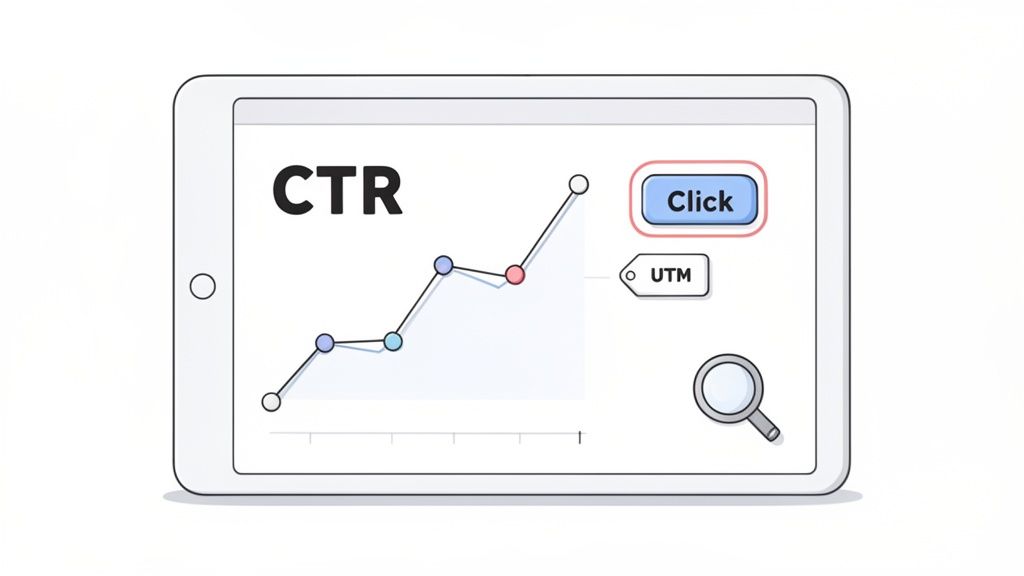
Your click-through rate (CTR) is the key metric for figuring out how well your bio is actually converting eyeballs into visitors. On average, most accounts will see a 2-4% CTR from their bio link. The top players? They can push that as high as 8-10%.
When you consider that Instagram has over 2.5 billion users, you can see why optimizing this one link is so important. A well-crafted bio doesn't just send traffic; it can also boost your profile-to-follower conversion rate by up to 40%.
By tracking which links get the most attention on your link page, you're getting direct, unfiltered feedback from your audience. If your "Latest YouTube Video" link is outperforming your "Shop Now" link by a 3-to-1 margin, that's a massive signal about what your followers want from you right now.
This is the data that lets you fine-tune your entire approach. You can reorder the links on your Taap.bio page to put the most popular ones on top or tweak your bio's CTA to match what's clearly resonating. For more on this, check out our guide on improving conversion rates on landing pages.
Still Have Questions About Instagram Links? Let's Clear Them Up.
Even with all the options we've covered, I see the same questions pop up over and over again. It makes sense—Instagram's rules can feel a bit arbitrary sometimes. Let's tackle the most common points of confusion so you can get your links working for you.
One of the biggest head-scratchers for new users is why you can't just paste a clickable link into a post caption. The simple answer? Instagram wants to keep the main feed clean and visually focused. They intentionally disable hyperlinks in captions to stop the feed from turning into a messy wall of spammy URLs.
It’s a deliberate design choice that forces us to be more strategic. By funneling traffic through specific, dedicated spots—like your bio or Stories—they maintain a better user experience for everyone and make sure the links you do share are genuinely important.
Can I Really Put More Than One Link in My Bio?
Yes, you can! In a fantastic update, Instagram now lets everyone add up to five clickable links right in their bio. This was a game-changer, moving us beyond the old one-link-only rule.
But just because you can add five links doesn't always mean you should. A list of raw URLs can look a bit cluttered and overwhelming. This is where a dedicated link-in-bio tool still shines. It allows you to transform that list into a single, beautifully branded landing page that's far more engaging for your visitors.
The real question isn't just "how many links can I add?" but "what's the best way to present my links?" A messy bio can be just as ineffective as having a single, unhelpful link.
Is the Story Link Sticker Available to Everyone?
Great news on this front: Absolutely. The days of needing 10,000 followers to unlock the "swipe up" feature are officially over. Back in 2021, Instagram rolled out the "Link" sticker to every single user on the platform.
This was a huge win for small businesses, creators, and anyone just starting out. It means you can drive traffic directly from a Story, no matter your audience size. Announcing a flash sale, dropping a new blog post, or sharing a petition? Just create your Story, tap the sticker icon, and paste your URL. It's that simple.
Ready to go beyond a basic list and build a link-in-bio page that truly represents your brand? Taap.bio gives you a drag-and-drop grid and smart widgets to create a beautiful, interactive hub for your followers. Start building your page for free today!


