

You can feel it the moment a product is ready. The PDF is exported, the beat pack is zipped, the mini-course is filmed, the template bundle looks polished, and now the question hits, where does this thing live so it sells? If your current setup is a link page, a PayPal button, and a few disconnected tools, you're not running a storefront, you're running a leak.
The best platform to sell digital products in 2026 is the one that matches your workflow, not the one with the flashiest homepage or the cheapest sticker price. The market is big and still expanding, with the global digital goods market estimated at USD 124.32 billion in 2025, rising to USD 157.39 billion in 2026 and reaching USD 511.43 billion by 2031 in one recent report, which implies a 26.6% CAGR over 2026 to 2031 (Mordor Intelligence digital goods market report). That kind of growth rewards sellers who reduce friction and keep more of every sale.
| Platform archetype | Best for | Main advantage | Main trade-off |
|---|---|---|---|
| Marketplace | Built-in discovery | Traffic you don't have to create | Higher fees and weaker branding |
| Stack of tools | Maximum flexibility | You can bolt on anything | More redirects, more setup, more breakage |
| Commerce suite | Bigger catalogs and site depth | Strong infrastructure | Feels heavier than most creator workflows |
| Bento store | Fast creator workflow | Checkout, email capture, and bookings in one place | Less discovery than a marketplace |
Most creators don't lose money because their product is bad. They lose it because a buyer has to click too many times, wait too long, or leave before the email capture, upsell, or booking handoff happens. If you want the cleanest read on where this topic starts, the framing in this explainer on link-in-bio pages is a useful baseline.
Table of contents
Why Selling Digital Products in 2026 Is Not Just a Link List
You can launch a digital product in an afternoon and still lose the sale in under ten seconds. That happens when the buyer lands on a bio page, taps a link, gets sent somewhere else, then has to reorient before they can buy. A link list is useful for direction, but it is not a storefront, and treating it like one is the most expensive mistake in creator commerce.
The three leaks that kill revenue
The first leak is no email capture. If someone buys once and disappears, you've paid for acquisition but collected almost nothing durable in return. The second leak is no upsell or cross-sell path, which means you force every order to stay tiny even when the buyer is already warm.
The third leak is no booking handoff. Coaches, consultants, and freelancers often send interested people off to a separate calendar tool, then lose momentum before the call is booked. That's a conversion problem, not an aesthetic problem.
Practical rule: if a buyer has to bounce between a bio page, checkout page, form tool, and calendar tool, you're making them do your platform's job.
The shift in 2026 is that buyers expect a short path from discovery to payment. The audience is already used to paying for digital content, and that's one reason platforms that combine checkout, delivery, and capture keep outperforming tool stacks built from separate parts. The broader behavior data backs that up, with 68% of internet users aged 16+ paying for some form of digital content each month in one 2025 industry compilation, while global spending on digital media exceeded USD 560 billion in 2024 and digital product transactions surged 70% between 2022 and 2024 (Whop digital product statistics).
A link list can start the journey. A storefront finishes it. My view is blunt, if your page doesn't collect the email, close the sale, and preserve the next step, it's leaving money on the table.
The Ten Criteria That Actually Decide a Digital Product Platform
Start with revenue, not aesthetics
A platform only looks cheap until you price in the cut it takes from every sale, the tools you need to bolt on, and the conversions you lose to friction. Fee structure matters because it compounds. A marketplace or revenue-share model can look harmless on day one and become the most expensive choice once sales start moving.
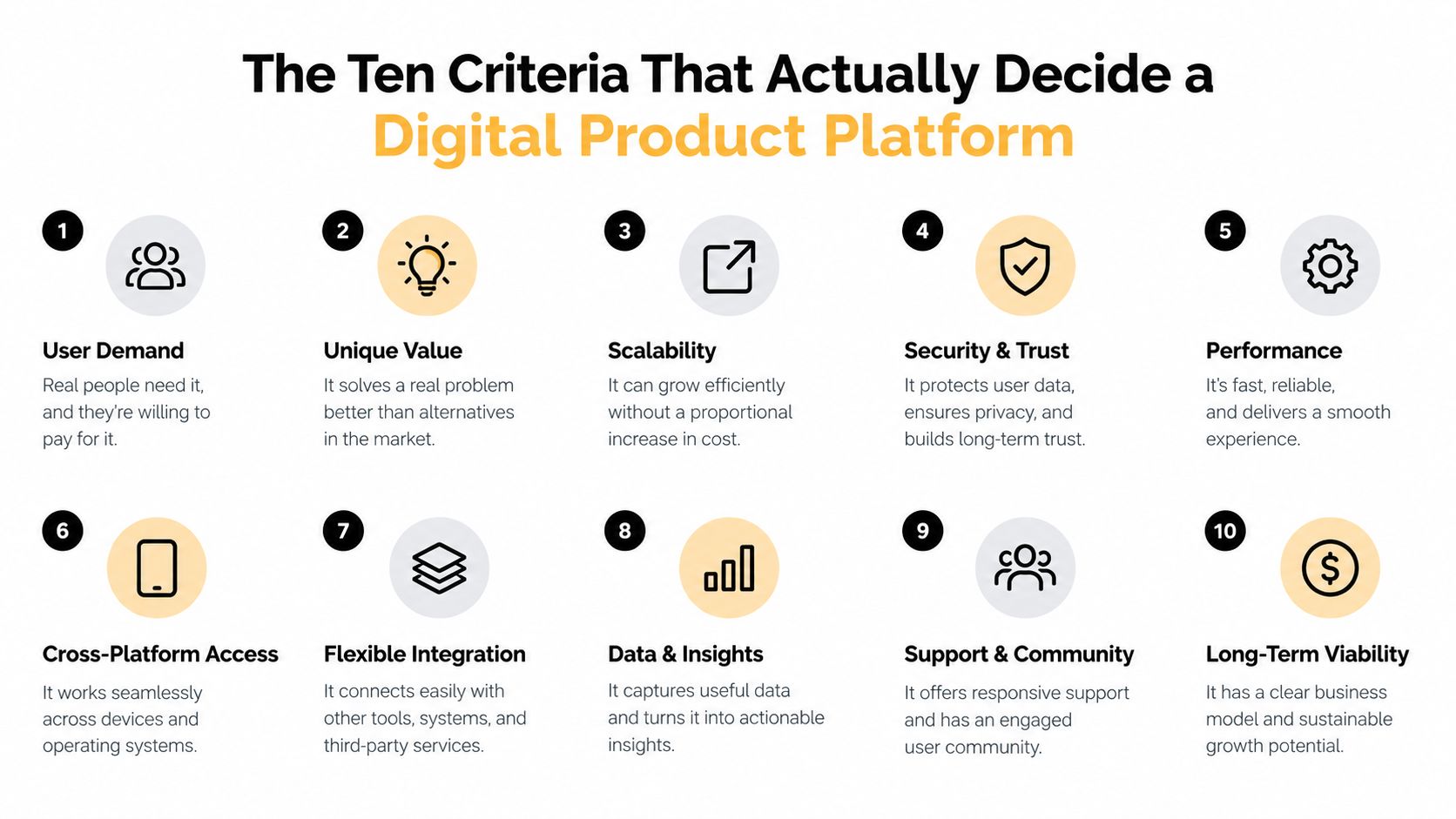
The first four criteria deserve the most weight because they affect revenue immediately, pricing, checkout, bookings, and email capture. The rest matter too, but if the front end leaks, the back end never gets a chance.
- Pricing and transaction fees: A percentage cut scales with every sale, so even a small fee difference can outrun a subscription fast. The comparison benchmark in the brief shows how different fee architectures affect net revenue on low-ticket products (digital product marketplaces comparison).
- Checkout and delivery experience: If the buyer hesitates or the file delivery feels clumsy, conversions drop. Good checkout is boring on purpose.
- Paid bookings support: Coaches and consultants need a path from interest to deposit without a separate scheduling maze.
- Email capture and list ownership: Email turns a one-time buyer into a repeat customer, and it gives you a channel you own.
- Analytics and attribution: You can't improve what you can't see. The winning platform should show where clicks and purchases happen.
- Data residency and security: For cross-border selling, trust signals and compliance are part of the buying decision, not an afterthought.
- Custom domain support: Your brand feels more credible when the URL is yours.
- Ease of setup: The simpler the setup, the faster you launch and learn.
- Payout speed and methods: Cash flow matters when you're running product launches or ad tests.
- Ecosystem integrations: Your platform should connect cleanly to the rest of your stack without turning into a patchwork.
A platform that scores well on the first four criteria beats a cheaper one that fails them. The platform fee is only one line item, friction is the bigger tax.
The strongest choice is the one that matches how you sell, not how a comparison chart looks in isolation. If you care most about margin, retention, and speed, the top of the scorecard matters more than the monthly plan price. For a useful starting point on how all-in-one selling is framed, the overview in this all-in-one platform guide lines up with that logic.
Comparing the Four Platform Archetypes Side by Side
The trade-offs are real, and they're not equal
A creator marketplace, a stack of tools, a commerce suite, and a bento store each solve a different problem. The mistake is assuming one of them is universally “best.” They're not.
| Criterion | Marketplace | Stack of Tools | Commerce Suite | Bento Store |
|---|---|---|---|---|
| Fees | Usually the least favorable for margin | Can add up across multiple tools | Often better than marketplaces, but still layered | Typically cleanest if you sell often |
| Checkout | Simple, but not yours | Depends on how well the tools connect | Strong and mature | Compact and creator-friendly |
| Bookings | Weak or absent | Possible, but split across apps | Possible, but not always native | Native scheduling is a core fit |
| Email capture | Limited ownership | Strong if configured well | Strong | Built in, near the sale |
| Analytics | Basic marketplace reporting | Fragmented across platforms | Solid | Unified in one dashboard |
| Custom domain | Usually limited | Yes, if you own the site | Yes | Yes |
| Ease of setup | Easy | Slowest to assemble | Moderate | Fast |
| Discoverability | Strongest | Weak unless you already have traffic | Depends on your traffic | Depends on your traffic |
Marketplaces win on discovery because buyers are already there searching. They lose on brand control and often on fee structure. Stacks win on flexibility, but every extra tool introduces more redirect points, more logins, and more chances for the buyer to drop off.
Commerce suites are strong infrastructure. They're built for broader ecommerce needs, larger catalogs, and more traditional site architecture. They can absolutely sell digital products, but they're often heavier than a creator really needs.
The bento-store model is the cleanest fit for creators who sell from social traffic, live on direct response, and need purchases, email capture, and paid bookings on one screen. That's why the all-in-one argument in this consolidation-focused platform guide matters. The right archetype depends on whether you need discovery, flexibility, infrastructure, or consolidation.
My view is simple. If your business is built around fast social traffic and direct conversion, a bento store is usually the sharpest operational choice.
Matching the Right Platform to Your Creator Scenario
Pick the workflow that matches the offer
A coach selling one-to-one calls doesn't need marketplace discovery first. They need a clean booking path, a deposit at confirmation, and an easy way to capture leads before or after the call. That's why a consolidated page or a tightly connected tool stack beats a simple download marketplace for consultative offers.
The rule: if the sale ends in a calendar event, don't force the buyer through a marketplace meant for instant downloads.
Musicians are different. Beat packs, stems, and sample libraries benefit from browsing behavior and search-driven discovery, so a marketplace can still earn its keep even if the fee structure stings. For an artist who wants reach more than ownership at first, that trade-off makes sense.
Course creators sit in the middle. They need structured lessons, student access, and often affiliate or community features, so a dedicated course platform or a more complex stack can be the better home. If the product is really a learning experience, don't cram it into a storefront that was built for files alone.
Freelancers selling templates, presets, Notion kits, or short digital downloads have the cleanest fit with a fast checkout, instant delivery, and low operational overhead. That's where a simple storefront, a creator marketplace, or a consolidated page can all work, but the right answer depends on whether they already have traffic.
- Coaches and consultants: choose native scheduling and deposit collection first.
- Musicians and producers: choose discovery if you're still building reach.
- Course creators: choose the platform that supports student progression, not just file delivery.
- Freelancers and template sellers: choose the path that gets the product live fastest with the fewest fees.
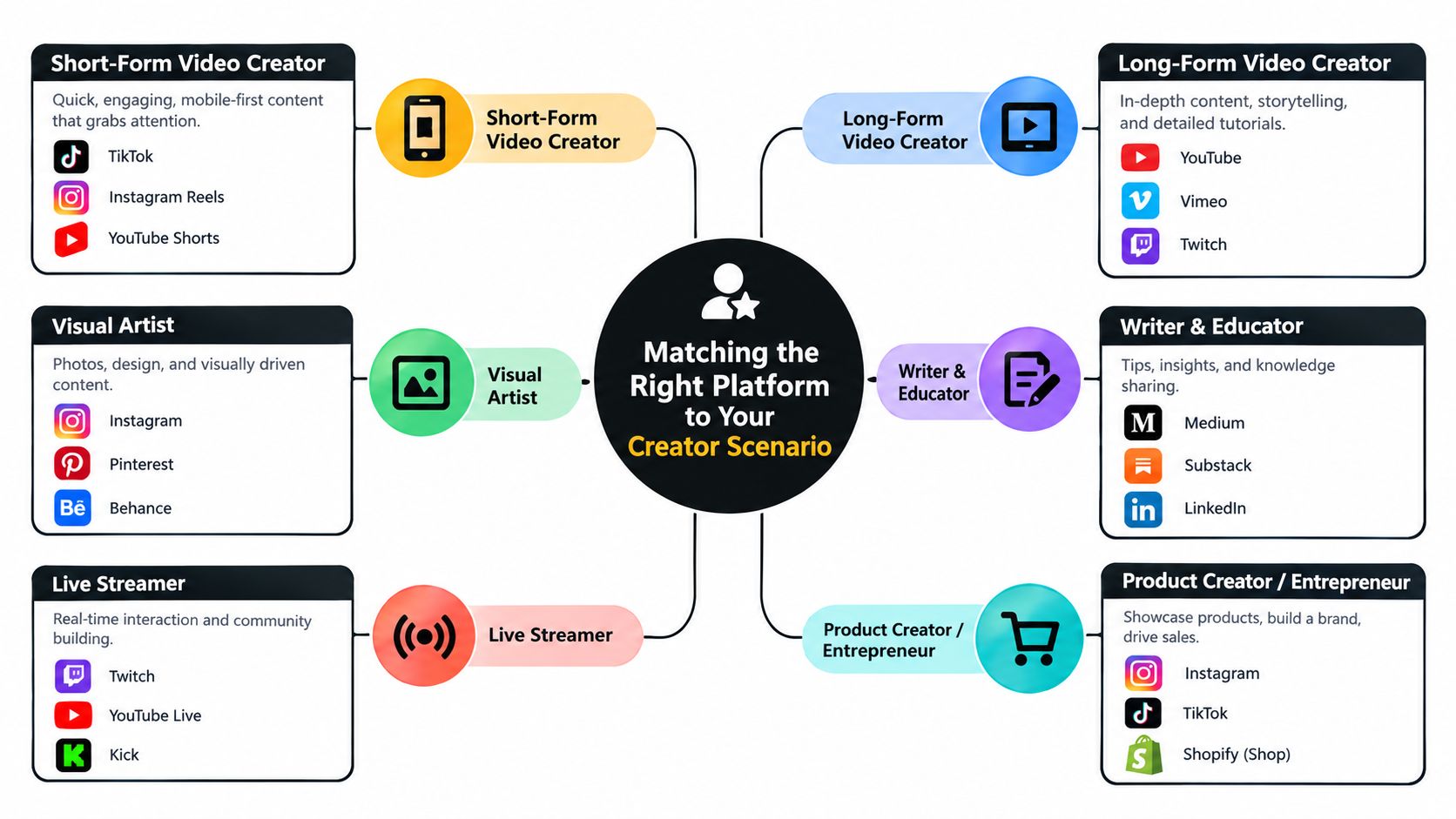
My view is that the product shape decides the platform shape. If your offer ends in a booking, a course portal, or a high-frequency repeat sale, don't let a generic marketplace dictate the workflow.
How taap.bio Fits the Criteria as a Consolidated Bento Store
The appeal is consolidation, not discovery
A creator with one storefront, one email list, and one booking flow has less friction than someone juggling five separate tools. That is the case for taap.bio, which combines a link-in-bio page with product blocks, scheduling, email capture, and analytics. It is a consolidated bento store, not a marketplace, and that distinction matters.
For a closer look at the format, see how a digital product store consolidates checkout and delivery.
| Criterion | taap.bio Result | Notes |
|---|---|---|
| Pricing and transaction fees | Strong | The brief specifies 0% platform fees on sales and a $19/month price after trial |
| Checkout and delivery experience | Strong | Native checkout with instant digital delivery after payment |
| Paid bookings support | Strong | Scheduling is built in, with deposits supported |
| Email capture and list ownership | Strong | Email signup sits on-page and contacts export to CSV |
| Analytics and attribution | Strong | Page, product, and block-level views live in one dashboard |
| Data residency and security | Strong | Hosted in France, with EU and US options documented in the brief |
| Custom domain support | Strong | Optional custom domain mapping is supported |
| Ease of setup | Strong | The brief says pages can go live in under two minutes |
| Payout speed and methods | Strong | Instant payouts are described in the brief |
| Ecosystem integrations | Moderate | The model is intentionally consolidated, not app-heavy |
The main advantage is the reduced handoff. A product block sells the file, a booking block takes the deposit, and an email block captures the lead without pushing the buyer into a separate checkout, scheduler, or signup flow. That is the kind of friction that costs creators money.
The trade-off is still clear. A single page does not bring you buyers the way a marketplace can, so you need traffic of your own. For creators who already have an audience, or who sell from Instagram, TikTok, or an email list, that is an acceptable trade because the page keeps the customer path short and the margin cleaner.
Practical rule: use consolidation when your audience already knows you. Use a marketplace when you need strangers to find you.
The security and privacy side also helps. The brief points to hosted security in France and zero-cookie analytics by default, which fits creators who care about trust, data handling, and international buyers. Taap.bio makes sense for sellers who want one page to handle digital products, leads, and bookings without building a heavier stack around it.
My view is simple. If your real problem is workflow friction, a consolidated page wins.
A Realistic Launch Flow From Page View to Paid Booking
One page, one visit, one smooth sequence
A visitor lands on a creator's bento page from Instagram or TikTok. They see a digital product block, a newsletter block, and a booking block stacked in the same layout. They click the product, the native cart opens, and payment runs through Stripe or PayPal without sending them off to another site.
The file is delivered instantly after payment, and if the product includes a license key, that gets delivered in the same flow. At the same time, the embedded email block can capture the visitor as a lead, so the buyer doesn't vanish after checkout. That's the part most scattered stacks fail to do cleanly.
Then the visitor books a consultation through the native scheduler and pays a deposit as part of the confirmation. No separate Calendly tab. No separate invoice workaround. No manual follow-up just to get the call on the calendar.
If you need a quick operational comparison point for taking a deposit and handling a payment outside of a traditional store flow, GetBill's tool for sending estimates and accepting card payments is a useful reference for how creators and freelancers think about the booking-to-payment handoff.
The creator logs into one analytics view and sees page views, product interactions, and booking activity together. That single dashboard matters because it shows where the path broke, or where it worked. Once you've run a flow like that, going back to a five-tool stack feels clumsy.
My view is that the advantage isn't speed alone. It's that one page can behave like a storefront, a lead magnet, and a booking funnel at the same time.
Migrating From Your Current Stack Without Losing Data
Export first, then rebuild in the right order
Start with an inventory, not a redesign. Pull your data before you touch anything else, because migrations fail when creators reconnect tools before they know what's inside them. If you've got old links, subscriber tags, or booking history sitting in separate systems, export them before you switch.
- Linktree: export link URLs and the analytics CSV.
- Gumroad: export customer emails, sales CSVs, and product files.
- Mailchimp: export audience segments, tags, and automations.
- Calendly: export event types, scheduled meetings, and invitee history.
- Squarespace: collect page URLs for redirects, product catalog data, and the image library.
The reconnect order matters. Import email subscribers first so transactional confirmations keep delivering, then recreate product listings with the new checkout links, then redirect old bio and product URLs so old traffic doesn't hit dead ends. After that, test every path that matters, especially the one where a buyer pays, gets delivery, and lands in your list.
Common migration mistakes are predictable. People lose UTM parameters, leave discount codes orphaned, or break webhooks for course platforms because they swap tools too quickly. Those failures don't always show up on day one, they show up when a launch starts and the edge cases matter most.
Don't cut over on launch day. Do it in a quiet window, then verify one test purchase, one test booking, and one test email sequence before you announce anything.
A two-week cutover is enough for most small creator businesses. Week one is export, rebuild, and redirect prep. Week two is live testing, link replacement, and cleanup. If you want a practical reference for moving contacts safely, this guide to exporting contacts to CSV fits neatly into that workflow.
My view is direct. Migrations should feel boring. If they feel dramatic, you're doing too much at once.
Choosing Between Marketplace, Stack, and One-Page Consolidation
Use volume, ownership, and bookings as the filter
There's a clean rule here. If you're under twenty sales a month, a marketplace can be acceptable because discovery matters more than fee structure. Once volume rises, the fee cut and brand limitations start to matter more than convenience.
Audience ownership is the second filter. If you're renting attention on a marketplace, you need a separate list-building tool. If you're on a stack or a consolidated page, you can capture emails from the first click and start building repeat demand immediately.
Bookings are the third filter, and a marketplace can fall apart for coaches and consultants here. If your business depends on calls, deposits, or recurring appointments, skip the marketplace-first mindset and choose a flow that handles booking natively.
| Criterion | Marketplace (Gumroad, Etsy) | Stack (Linktree + Calendly + Mailchimp) | Consolidated (taap.bio) |
|---|---|---|---|
| Total monthly cost | Low at launch, but fees scale with sales | Often the highest once tools stack up | Predictable single-platform pricing |
| Time to launch | Fast | Slowest | Fast |
| Revenue ceiling | Limited by fees and control | High, but operationally messy | High for direct creators with owned traffic |
| Booking support | Weak | Strong, but split across tools | Strong, native |
| Email ownership | Limited | Strong | Strong |
| Best fit | Discovery-first sellers | Creators who need maximum flexibility | Direct-response creators who want consolidation |
If you sell simple downloads and don't have traffic yet, a marketplace is fine. If you run a service business and need custom workflows, a stack gives you room to bend the system. If you sell from social and want fewer moving parts, a consolidated page is the cleaner long-term choice.
My view is that most creators should not start with more tools than they can maintain. Choose the platform that matches your traffic source and the way buyers naturally move, then upgrade only when the friction becomes obvious.
If you want a creator store that keeps digital products, paid bookings, and email capture in one place, take a look at taap.bio. It's built for the exact workflow this article is about, fewer redirects, fewer tools, and a cleaner path from page view to payment. If your current stack feels like too many tabs and too many handoffs, that's the place to simplify first.


