
You've probably seen this version of the story already because you might be living it.
The course is finished. The lessons are clean. The thumbnails look sharp. You've posted for weeks, maybe months, and people keep replying, “Can't wait.” Then launch day comes, traffic shows up, and sales barely move.
That usually isn't a content problem. It's a systems problem.
Knowing how to sell online courses has less to do with making a prettier curriculum and more to do with removing friction between interest and payment. The creators who keep selling aren't treating the course like a one-time launch. They're treating it like an operating system that connects packaging, checkout, delivery, email capture, scheduling, and analytics into one path.
Table of contents
Why Most Course Creators Struggle to Make Sales
Maya is the kind of creator one might assume should win.
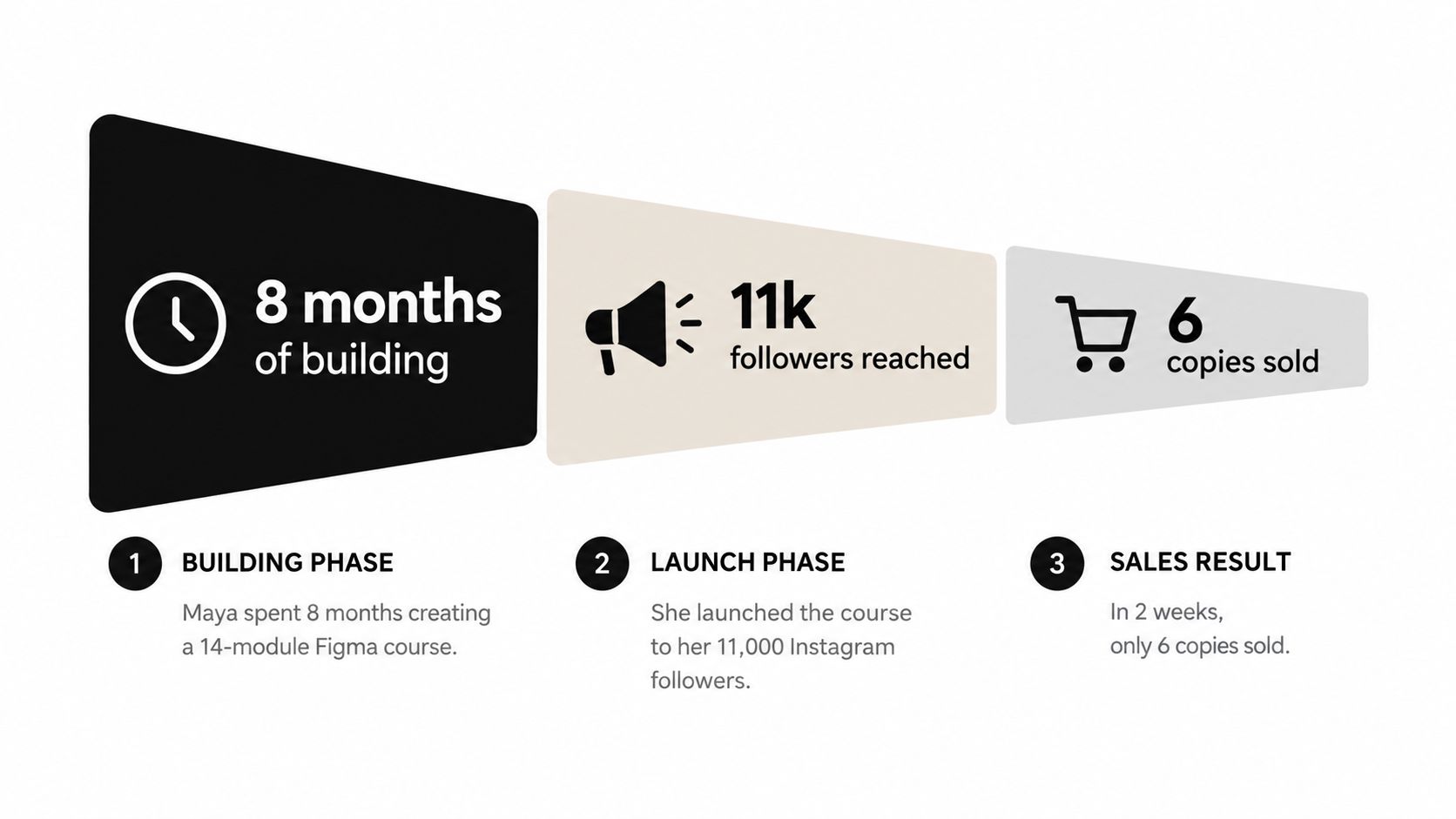
She's a freelance designer. She spent eight months building a 14-module Figma course. She launched it to 11,000 Instagram followers and sold six copies in two weeks. The usual postmortem would blame pricing, the algorithm, or audience quality. Sometimes those are real issues. More often, the product is wrapped in a fragmented funnel that leaks intent at every step.
The hidden cost of handoffs
A typical course setup looks manageable until you trace the buyer journey:
- Discovery happens on one platform. Someone taps your Instagram bio or a LinkedIn post.
- Sales copy lives somewhere else. They land on a page builder or course platform.
- Checkout opens in another environment. Now they need to trust a new screen.
- Delivery sits in a course host. They get redirected again after payment.
- Office hours use a separate scheduler. If they want support, that's another tool.
- Email capture runs through another app. Leads who aren't ready to buy go somewhere else.
- Analytics are split across dashboards. You can't easily tell where the drop happened.
Each handoff creates doubt. Each new tab asks the buyer to make a fresh decision.
That matters because course funnels already operate on thin margins for attention. Sales pages for online courses typically convert at about 1 to 3%, with top-performing offers reaching 5 to 10%. Opt-in pages commonly convert at 3 to 5%, with stronger examples landing at 8 to 15%. Checkout completion often sits at 55 to 65%, with top performers reaching 75 to 85%, according to online course conversion benchmarks from Acceleroi. When those benchmark ranges are already tight, adding extra redirects and disconnected tools makes a weak funnel weaker.
Practical rule: If buyers have to keep re-orienting themselves, conversion usually drops before checkout optimization can save you.
Launch thinking is the wrong frame
Most creators still treat course sales as a campaign problem. They ask how to write better launch posts, build hype, or send more emails. That can help, but it misses the actual bottleneck.
A course sells best when the path is consolidated. One page. One flow. One place to understand the offer, pay, get the product, book support, and join your list if they're not ready today.
That shift changes the whole build. You stop asking, “How do I launch this?” and start asking, “Where does the buyer hesitate, and why?”
Package Your Course Into Something People Buy
A course isn't a product just because you recorded it.
Buyers don't purchase modules. They purchase a result they can picture. If your sales page reads like “Module 1, Module 2, Module 3,” you're still describing content, not packaging an offer.
Start with the outcome, not the lesson count
Take every module in your course and rewrite it as a result:
- “By the end of this module, you'll be able to…”
- “After this lesson, you'll know how to…”
- “Once you finish this section, you can…”
Then cut anything that doesn't support the headline promise.
If your course says it helps junior designers build a client-ready Figma workflow, every lesson should move that outcome forward. A bonus lecture that's interesting but unrelated doesn't increase value. It muddies the promise. Buyers trust focused products more than bloated ones.
Many creators first understand the difference between teaching and selling. Teaching rewards completeness. Selling rewards clarity.
If you're still working out how to turn content into income, that distinction matters. Content can explore. A paid course has to solve.
Use three tiers without rebuilding the curriculum
The cleanest packaging move is to sell the same intellectual property at different support levels.
| Three-Tier Course Packaging Framework | |||
|---|---|---|---|
| Tier | Deliverables | Best For | Funnel Role |
| Core | Course lessons and essential materials | First-time buyers who want the main result | Entry offer |
| Applied | Core course plus templates, worksheets, swipe files, or implementation assets | Buyers who want speed and structure | Most practical mid-tier |
| Mastery | Applied tier plus feedback, calls, cohort support, or community | Buyers who want accountability and access | Premium tier |
This does two useful things.
First, it lets a cautious buyer say yes without forcing them into your highest-touch version. Second, it gives serious buyers a reason to pay for implementation, not just information. That's often where the margin sits.
If a stranger reads your module list and can't restate the transformation in one sentence, the packaging isn't done.
A quick packaging test
Run this test before you touch checkout, branding, or page design:
- Read your headline only. Is the promise specific?
- Read your module list next. Does it reinforce the same promise?
- Hide your name and credentials. Would the offer still make sense to a cold visitor?
- Match assets to friction. Templates reduce effort. Feedback reduces uncertainty. Community reduces drop-off.
For creators building bundles or laddered offers, this is also where structure starts affecting price. A strong mid-tier can carry most of your sales. A premium tier can absorb your higher-touch support. If you want examples of how bundling changes perceived value, this guide on bundle pricing strategy is useful because it forces you to think in outcomes instead of isolated files.
Choose a Pricing Model That Fits Your Audience
Pricing isn't just a number. It's a delivery model with consequences.
The wrong model can create support headaches, refund tension, and messy cash flow even if the sticker price looks fine. The right model fits the buyer's goal, your audience size, and how much involvement the result needs.
Four models most creators should consider
One-time purchase works when the buyer wants a defined skill. They pay once, consume on their own timeline, and expect straightforward delivery. This is the easiest model to operate and the easiest to explain.
Tiered pricing is usually the strongest default for smaller creators because it gives buyers choice without making the offer complicated. You're not creating different courses. You're packaging different levels of help around the same core result.
Cohort-based enrollment works when the promise is more transformational than informational. If the buyer needs deadlines, feedback, or peer momentum, a fixed start date can increase commitment. The trade-off is operational load. You now have delivery dates, live support, and seat management to handle.
Subscription drip only makes sense when your material updates regularly or when the value compounds through ongoing access. If you're not publishing consistently, a membership model becomes a retention problem fast.
Match the model to the buyer
| Pricing Model Decision Table | |||
|---|---|---|---|
| Audience Size | Outcome Type | Recommended Model | Watch Out For |
| Small audience | Clear skill acquisition | Tiered one-time | Underpricing the support layer |
| Small to mid-size audience | Transformation with accountability needs | Cohort-based | Calendar and support demands |
| Any audience with broad entry-level intent | Narrow, self-serve skill | One-time purchase | Weak follow-up after purchase |
| Audience that expects recurring updates | Ongoing learning or resource access | Subscription drip | Churn if updates slow down |
A lot of newer creators overcomplicate this. If you're under a modest audience threshold and you're still validating demand, a tiered one-time model is usually cleaner than trying to run a community, live calls, and monthly content all at once.
The bigger market trend supports that practical view. A recent industry review describes online education as a major commercial category, with the U.S. market projected at $99.84 billion in 2026 and broader global estimates varying by scope, while the core pattern remains the same: online learning has become mainstream and structured offers with clear outcomes outperform loose lesson libraries, according to Ruzuku's state of online courses review.
If you need a clearer framework for setting price around buyer intent and offer shape, this piece on digital product pricing strategy is a better starting point than random creator screenshots on social media.
Set Up Checkout and Instant Delivery on One Page
Once the offer is packaged and priced, the operational work starts. A surprising number of launches still break.
Not because the course is weak. Because payment, delivery, and page structure weren't built for momentum.
Build the page in buyer order
A good course page doesn't show everything at once. It answers questions in the order a buyer has them.
Use this sequence:
- Hero block with the main promise and who it's for.
- Modules or outcomes block that shows what they'll be able to do.
- Price block with the tier or purchase option.
- Checkout block without unnecessary detours.
- FAQ block that handles delivery, refunds, access, and fit.
That order matters because people don't want to hunt for the price, then scroll back up to remember what they're buying.
For digital delivery, keep product titles literal and useful. “Freelance Figma Systems Course” is better than “Design Freedom Academy” if the second title needs explanation. Use cover thumbnails that look consistent across the page. Keep file names clean so the buyer's download feels intentional, not like a random export from your desktop.
Delivery should happen immediately
If you're selling a self-paced product, instant access isn't a luxury. It's part of the promise.
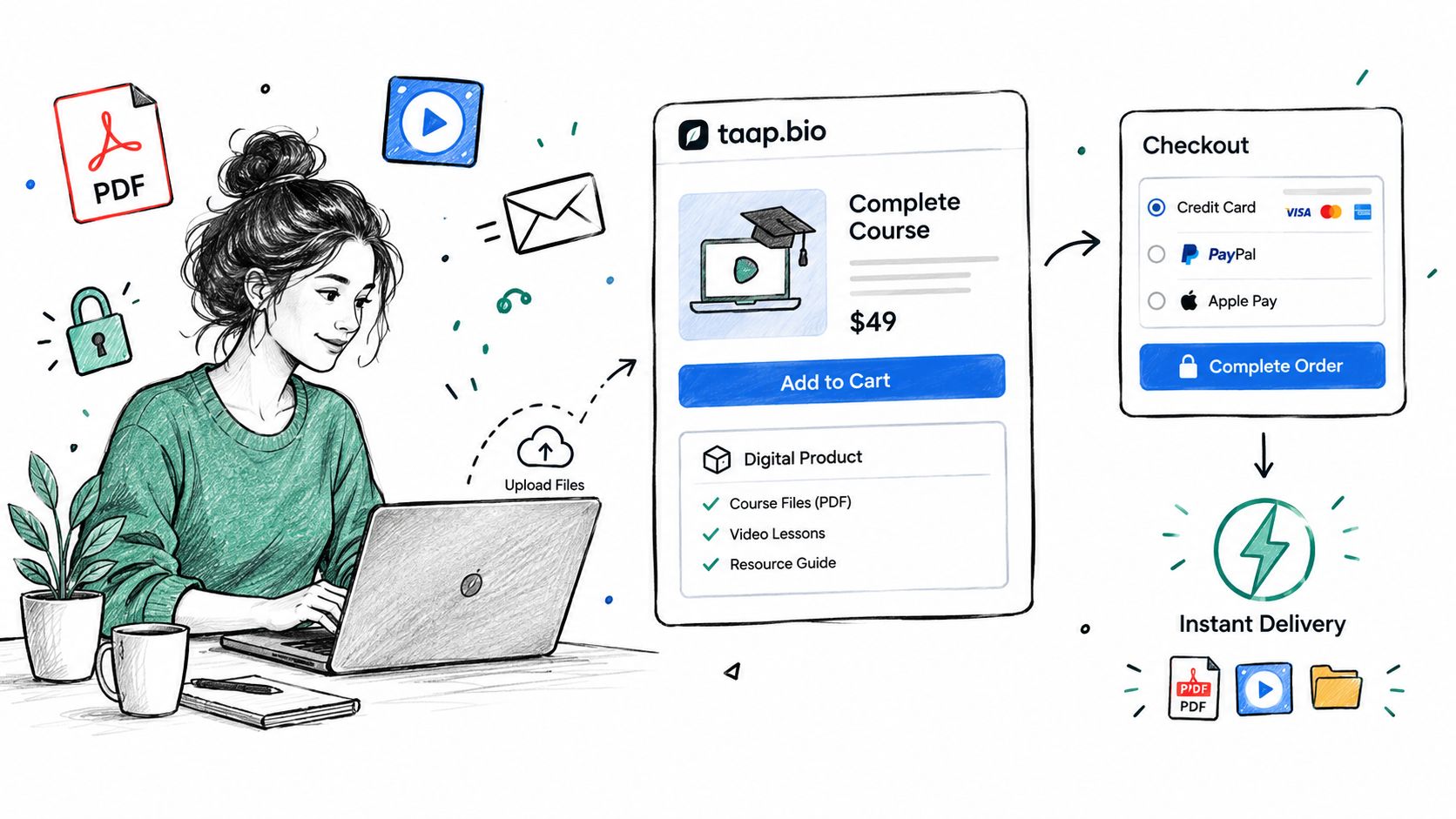
A creator store can handle this by attaching course files or access materials to a digital product block and triggering delivery after payment confirmation. That removes the awkward “check your inbox, create a password, wait for another email, click again” chain that causes support tickets on day one. One option is taap.bio, which supports digital products, built-in checkout, and instant file delivery on a single page with 0% platform fees and hosted checkout, based on the platform details provided by the company.
For a walkthrough of the delivery logic itself, this guide on instant digital delivery is the part most creators should study before they send any traffic.
A buyer who's ready to pay should never have to decode your tool stack.
Later, once the page is live, watch where people hesitate. If visitors reach the price and stop, the offer may be unclear. If they start checkout and disappear, the payment flow may feel clunky. If they buy but immediately email questions, the delivery instructions weren't strong enough.
A simple way to gather that feedback is to send a short post-purchase survey. This customer checkout satisfaction survey template is useful because it keeps the questions focused on the flow itself rather than general praise.
Here's a visual walkthrough if you want to see how a one-page product setup can look in practice.
Handle the exceptions before they happen
Most course creators only think about edge cases after launch. That's backwards.
Add clear answers for:
- Access questions such as how files arrive and when.
- Refund conditions so buyers know the rules before paying.
- Support contact for failed downloads or duplicate purchases.
- Booking boundaries if calls or office hours are included in upper tiers.
Those details don't reduce sales. They reduce uncertainty.
Add Paid Bookings and Email Capture to Boost Revenue
A standalone course can sell. A course with the right surrounding layers sells better and keeps working after the launch burst fades.
The two layers that usually matter most are paid bookings and email capture.
Paid bookings belong beside the course
A buyer who finishes a course often wants one of two things next. Personalized help or accountability.
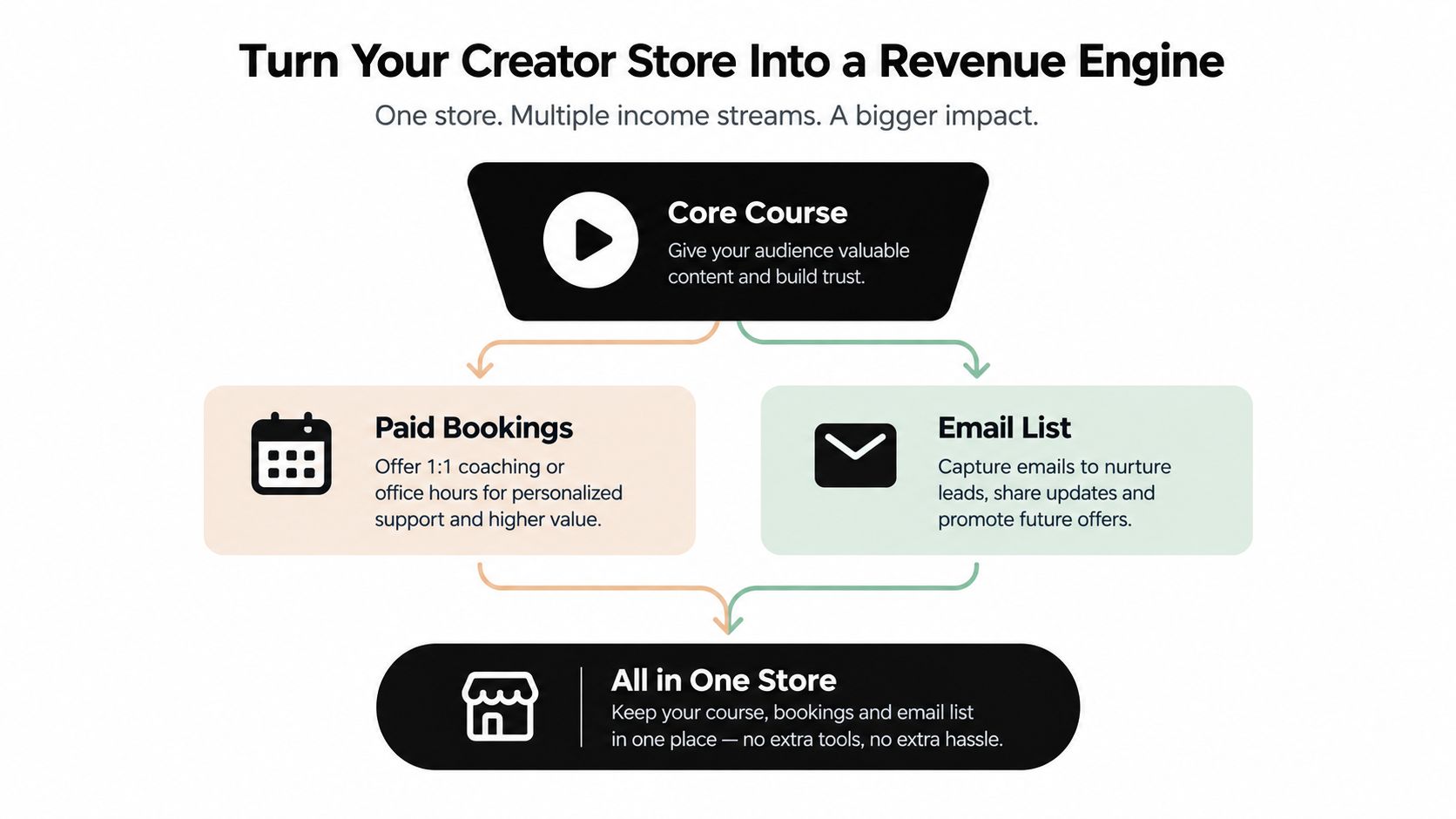
That's where paid office hours, audits, or coaching calls fit. They shouldn't live in a totally separate ecosystem if you can avoid it. When the booking option sits on the same page as the course, the upsell feels natural. The student already understands the context. They don't need a second funnel.
Set the booking up as its own paid offer, not as an informal “message me if you want help” invitation. Charging upfront filters casual requests and reduces calendar clutter. If you want to use payment to confirm commitment before the slot is held, this walkthrough on pay-now bookings shows the operational logic.
Email capture is your retention layer
Those who view your course page won't buy on the first visit. That's normal.
What matters is whether you lose them completely or turn that visit into an owned contact. Offer a useful mini-module, checklist, or sample lesson in exchange for an email address. Keep it tightly related to the paid course. A generic freebie creates a generic list.
The market backdrop makes that worth doing patiently. One market summary projects the global online courses market at USD 347.65 billion in 2026 and USD 1.27 trillion by 2034, with a projected 17.58% CAGR across 2025 to 2034, while another estimate in the same summary says the online course app sector generated $2.16 billion in 2025 and that 86 million people used online courses in 2024, according to Business Research Insights on the online courses market. Big demand doesn't mean every page converts immediately. It means there's room to build a niche audience if you keep the contact instead of wasting the click.
Watch the page, not just the launch
Once bookings and email capture are live, look at behavior in context:
- Traffic source quality tells you which channel sends buyers, not just visitors.
- Module or section drop-off shows where page interest fades.
- Booking preference shows which support offer people choose.
- Lead capture performance tells you whether the free offer matches the paid one.
The course is the product. The email list is the memory. The bookings are the margin.
Treat those three as one system, not three separate businesses.
Replace Five Tools With One Creator Store
Most course creators don't notice how expensive fragmentation is until they've been paying for it for months.
You start with a course platform. Then you add checkout software because the native checkout feels weak. Then an email tool because you need lead capture. Then a booking app because students want calls. Then analytics because none of the other tools tell the whole story.
Now you've got five subscriptions, five dashboards, and five versions of the buyer journey.
The usual stack creates operational drag
This setup doesn't just cost money. It scatters responsibility.
When a buyer says they clicked from Instagram, joined your list, tried to book, and got stuck before purchase, where do you investigate first? The scheduler? The email tool? The product host? The analytics layer? Everyone who has run this stack knows the answer is annoying: all of them.
Recent creator guidance also keeps circling the same issue. Marketing, validation, pricing, and fear are common blockers for course creators, and much of that pain is really go-to-market confusion rather than content weakness, as reflected in Ruzuku's creator guidance archive.
Consolidation is a margin decision
| 5-Tool Stack vs. One Creator Store | ||
|---|---|---|
| Factor | Typical 5-tool stack | taap.bio creator store |
| Checkout | Separate payment layer | Built in on page |
| Digital delivery | Often routed through another app | Included with product flow |
| Bookings | External scheduler | On-page paid bookings |
| Email capture | Separate ESP or form tool | Built-in signup with CSV export |
| Analytics | Split across platforms | Unified page and widget analytics |
| Privacy operations | Multiple vendors and policies | One hosted environment |
There's also a compliance angle that gets ignored until someone sells to EU buyers. More tools usually means more vendors handling personal data, more overlapping privacy terms, and more implementation work to understand who stores what. A single hosted environment simplifies that. If your audience includes EU students, confirm where customer data is hosted before launch, whether you need cookie consent, and how your privacy notice maps to the vendors involved.
If you're currently piecing together attribution across a course stack and a platform like Kajabi, a tool-specific reference like attribution for Kajabi users can help you understand what's usually required when analytics live outside the selling experience. That's exactly the complexity many smaller creators don't need.
A consolidated setup like an all-in-one business platform isn't just about convenience. It protects margin, shortens setup time, and makes troubleshooting possible without turning launch week into tech support.
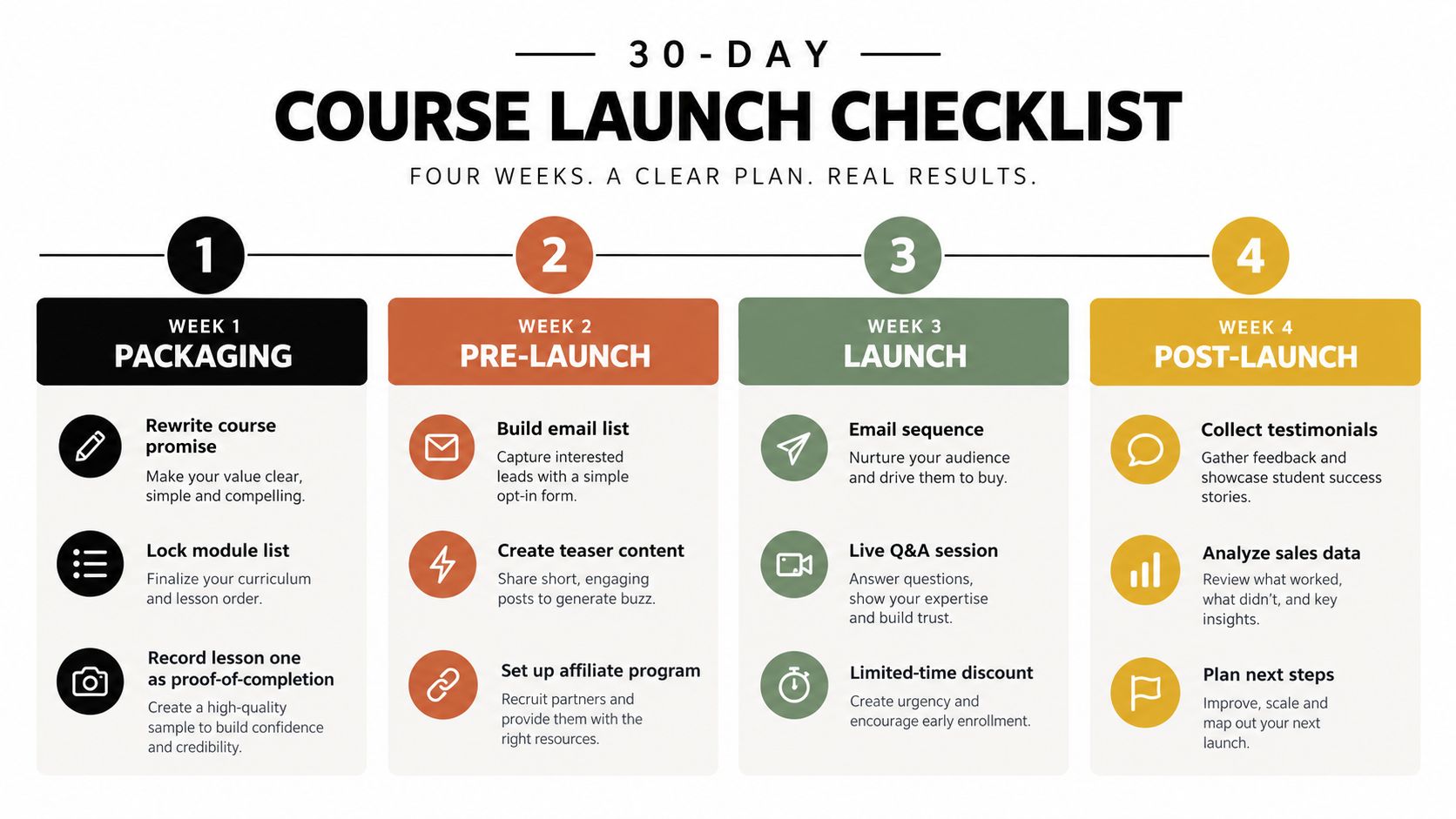
Your 30-Day Course Launch Checklist
A launch works better when each week has one job.
Not ten jobs. One.
Week 1
- Rewrite the promise. Use the packaging method from “Package Your Course Into Something People Buy.”
- Lock the module list. Cut anything that doesn't support the main result.
- Record lesson one. Make it strong enough to signal completion quality, not just information density.
Week 2
- Choose the pricing model. Use the decision logic from “Choose a Pricing Model That Fits Your Audience.”
- Build the page. Arrange the hero, outcomes, price, checkout, and FAQ in buyer order.
- Wire delivery and email capture. Make sure buyers get access immediately and non-buyers have a reason to subscribe.
Week 3
- Open a waitlist. Use a lead magnet or sample lesson tied directly to the paid course.
- Publish consistent content. Share objections, outcomes, mistakes, and behind-the-scenes proof tied to the course promise.
- Collect proof. Early testimonials, peer reviews, or beta feedback make the sales page easier to trust.
Week 4
- Open cart. Send the announcement, post the direct offer, and reply to warm leads personally.
- Message past buyers or clients. They're often your cleanest first customers if the topic fits.
- Activate the upsell. Turn on paid bookings for people who want help applying the material.
- Check behavior daily. Watch page drop-off, completed purchases, and lead capture so you can fix friction while the launch is live.
Selling a course is operations. The system gets stronger when the offer, page, payment, delivery, and follow-up all live in one flow instead of five disconnected tools.
If you want that flow without stitching together a course host, checkout app, booking tool, email form, and analytics dashboard, taap.bio gives you a single page to sell digital products, take paid bookings, and capture email leads in one place. It fits the way modern course sales work: less launch theater, fewer handoffs, and a cleaner path from interest to payment.


